[Help] Understanding the UPS Dialog TOS 7.0
Posted: 08 Aug 2026, 19:23
I have plugged my APC UPS into the USB Port.
I want to wait 10 minutes after power loss before shutting down to be safe.
The UPS should run on battery for at least 30 minutes,
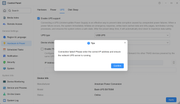
The UPS is recognised and correctly identified as can be seen in the image below.
The estimated use time remaining reads "Use time predictions unavailable"; Is this normal?
I have checked Enable USB Support
I have selected USB UPS as the device type
I have selected 10 minutes as the runtime.
I do not want to set up a server, so I have not checked Enable TNAS UPS Server , and so the IP entry is not usable.
When I click apply, I see a connection failed message asking for an IP address; I have not and should not need to enter an IP address.
I don't know if this is a fault, or if I am misunderstanding the instructions.
I want to wait 10 minutes after power loss before shutting down to be safe.
The UPS should run on battery for at least 30 minutes,
The UPS is recognised and correctly identified as can be seen in the image below.
The estimated use time remaining reads "Use time predictions unavailable"; Is this normal?
I have checked Enable USB Support
I have selected USB UPS as the device type
I have selected 10 minutes as the runtime.
I do not want to set up a server, so I have not checked Enable TNAS UPS Server , and so the IP entry is not usable.
When I click apply, I see a connection failed message asking for an IP address; I have not and should not need to enter an IP address.
I don't know if this is a fault, or if I am misunderstanding the instructions.