Page 1 of 1
[Help] Cannot mount HDDs from my D8 Hybrid to my F6-425 Pro at all
Posted: 08 Aug 2026, 13:36
by hasmith
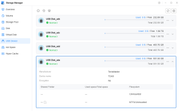
So I'm transferring some files for a media server to my F6-425 and I thought I could connect my DAS to the NAS directly to make it go faster, but when I connected them via usb-c cable, the drives were detected, but they weren't able to be mounted. In the disk section of control panel it only gave an option to create a new storage pool. All options in the USB section are greyed out. I do have raid 0 on the first two drives (disk sde in my image)
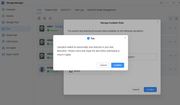
I also tried to take a drive from the DAS and putting in a slot on the NAS, this time it let me attempt to mount, but it would always fail and give me the error message "Operation failed! An abnormality was detected in your disk filesystem. Please check and repair the disk before attempting to mount it again." I even repaired it on windows and tried again but it gave the same message.
How do I fix this?
Re: [Help] Cannot mount HDDs from my D8 Hybrid to my F6-425 Pro at all [SOLVED]
Posted: 08 Aug 2026, 15:10
by TMzethar
Just to confirm — you have two HDDs in Slot 1 and Slot 2 of the D8 Hybrid, and you created a RAID 0 using the D8 Hybrid's hardware RAID, is that correct?
Could you please let us know which TOS 7 version you are currently using, as well as the Storage Manager app version? (You can find this in the App Center.)
If your Storage Manager version is lower than 1.0.062, please update it to fix an issue in older versions where NTFS USB drives could not be mounted.
If your situation does not match the above, and the suggested steps do not resolve the problem, please contact us online to schedule a remote session with an engineer:
https://salesiq.zohopublic.com/signatur ... 97d0be8892
If you are short on time at the moment, you may also consider collecting a system report via TOS > Support and Help > Report Issues and sending it to our technical support email for analysis.
Re: [Help] Cannot mount HDDs from my D8 Hybrid to my F6-425 Pro at all
Posted: 08 Aug 2026, 16:00
by hasmith
TMzethar wrote: ↑08 Aug 2026, 15:10
Just to confirm — you have two HDDs in Slot 1 and Slot 2 of the D8 Hybrid, and you created a RAID 0 using the D8 Hybrid's hardware RAID, is that correct?
Could you please let us know which TOS 7 version you are currently using, as well as the Storage Manager app version? (You can find this in the App Center.)
If your Storage Manager version is lower than 1.0.062, please update it to fix an issue in older versions where NTFS USB drives could not be mounted.
If your situation does not match the above, and the suggested steps do not resolve the problem, please contact us online to schedule a remote session with an engineer:
https://salesiq.zohopublic.com/signatur ... 97d0be8892
If you are short on time at the moment, you may also consider collecting a system report via TOS > Support and Help > Report Issues and sending it to our technical support email for analysis.
Yes that is correct, and updating TOS to the latest version fixed it, thank you! However it would've been nice if it upgraded automatically instead of having to manually download a file, I didn't even know I wasn't on the latest version until now