Page 1 of 1

TOS7 VMS App - Resize (Shrink)

Posted: 05 Aug 2026, 15:42
by sianderson
Hi,

is there a guide on how to resize a VM (shrink) at all or doesnt it support it?

i have provisioned 100gb drive, but realise i can actually get away with 50gb so wish to resize it down to reclaim 50gb and make maintenance easier

is it just a case of reducing the partition size in the windows VM so its spare) and this will then see it? or am i looking at creating a new VM at the correct size and setting it back up again?

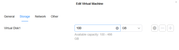
i can see the resize option to make it bigger but obviously at the moment it wont let me drop below the 100gb
Image

Re: TOS7 VMS App - Resize (Shrink)

Posted: 05 Aug 2026, 17:55
by EriChan
Regarding your report about the inability to shrink a VM's virtual disk size, here is a detailed explanation:

Currently, the VMS App only supports expanding (increasing) virtual disk size—it does not support shrinking (reducing) disk capacity.

Why shrinking isn't supported:

VMS functions as a hypervisor manager, but it does not have fine-grained visibility into the internal file system or data layout of the guest OS (e.g., Windows). If disk shrinking were allowed directly from the hypervisor level, forcing a reduction in disk size could truncate active partitions—especially if the disk is heavily used or fragmented—leading to OS corruption and permanent data loss.

Re: TOS7 VMS App - Resize (Shrink)

Posted: 06 Aug 2026, 23:10
by sianderson
thanks for the confirmation, so i guess my only way is to create a whole new VM to sort this out at the reduced size

while i understand why VMS App doesn’t support it, all the other bigger named hypervisors can shrink the virtual disks and i do believe this was something that virtual box could also do (albeit a manual way)

it half just feels like you have pushed customers into having an inferior hypervisor?

Re: TOS7 VMS App - Resize (Shrink)

Posted: 07 Aug 2026, 10:31
by TMroy
sianderson wrote: 06 Aug 2026, 23:10
We fully understand your desire to reduce the maximum capacity of the virtual disk as seen by the VMs. I'd like to share a few key points with you on this matter.

In reality, mainstream virtualization platforms are all very cautious about shrinking the maximum disk size:
VMware vSphere​ does not offer a shrink button in its Web Client at all. It can only be done indirectly via the vmkfstoolscommand line, and it throws an error if snapshots exist.
Hyper-V​ allows you to reduce the maximum size via Set-VHD -MaximumSize, but Microsoft's official documentation warns that setting a value smaller than what the guest file system expects can directly corrupt the file system and render the entire system unbootable.
Even in the KVM ecosystem​ (which TOS VMs are built on), qemu-img resize --shrinkrequires that you first shrink the partition and file system inside the guest, leaving enough unallocated space at the end of the disk. Otherwise, "resizing will indiscriminately delete data from the end of the disk, destroying the partition table and making the VM unbootable."
In short, supporting shrink ≠ safe and easy to use. Most platforms either don't expose it in the UI or treat it as a high-risk command reserved for professionals.

Why we haven't enabled UI-based shrinking yet:
The biggest risk is alignment — if the size shrunk inside the guest doesn't match what the virtualization layer expects, it can easily corrupt disk data and leave the VM unbootable. TOS VMs serve a broad NAS user base. Allowing a one-click UI operation that could trigger data loss would be irresponsible. As a storage vendor, choosing not to enable this switch in the UI is a decision made to protect user data.

If you do need to reduce the maximum capacity, here's the recommended safe approach:
Create a new, smaller virtual disk → migrate the data via rsync→ replace the original disk. This method completely avoids the alignment risks of in-place shrinking, and is also the officially recommended production practice for platforms like VMware.