Page 1 of 2
[Help] System Disk Configuration with 1 System Disk
Posted: 04 Aug 2026, 01:53
by wormshoe
Hello TM Community,
I have a question around my RAID/System Disk configuration that I'm hoping to solve before I get too deep into my NAS journey. I recently purchased a F4-425 Plus running TOS7 and have it fully configured with 4 HDD's. After configuring and testing everything over the past few weeks I came across a potential issue I was hoping to get some guidance on.
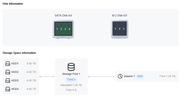
When I initially setup TOS7 before creating my Storage Pool/Volume TOS7 was installed to HDD1 (I've attached pictures below to reference my setup) and then proceeded to create a TRAID+ configuration.
What I'm trying to understand is what occurs during a drive failure and specifically the drive containing the System Disk failing. I know for the other drives I can lose up to 2 drives and still rebuild my TRAID+ array BUT if the system disk drive fails I'm unsure exactly how that scenario plays out. When I replace the drive TOS7 would not be installed so I would need to re-go through the initial setup. At this state would I even be able to rebuild my array or would I lose that ability due to the system disk being lost?
I realized late that during setup I believe I could install the system disk to multiple drives to handle this case. Before I continue on my journey should I completely reinstall TOS7 and have the system disk across all the drives or is there a simple method for whenever the system disk fails, being able to recover.
Thank you for the help!

Re: [Help] System Disk Configuration with
Posted: 04 Aug 2026, 05:46
by Gremlin
The system partitions (drive/disk if you like) can reside on max of 2 drives. You could migrate your 1 system drive to another HDD which would provide a raid-1 mirror of the o/s and mitigate single disk failure. This will not disturb your data since TOS already allocates the space needed.
You also have the opportunity to utilise the nvme m.2 slots. They might be used in the same way providing a somewhat 'faster' operating system response and allowing all the hdd to sleep (as much as a server can sleep) while the diskless nvme do the heavy lifting.
If a single disk based o/s fails it will lead to issues needing a system re-install. I know there is more of a trade-off between practicality and cost today, but I still prefer the nvme solution (including having my home directories and apps on an nvme volume) even if I only use a relatively small ssd pair with less than ideal performance.) My nas capable of nvme only run pcie3x1 for each nvme slot so I don't need anything exotic. Not certain of your 425+ capabilities.
Hope that helps. Maybe soomeone from @TM will chip in with your best options for proceeding.
Re: [Help] System Disk Configuration with 1 System Disk
Posted: 04 Aug 2026, 06:11
by wormshoe
Thanks for the reply Gremlin! If migrating my system drive to one of my other HDDs which is basically in a RAID6 configuration with TRAID+ would work that would definitely be the ideal way to go at least in terms of simplicity although not sure on the exact steps to accomplish this.
If I were to go the NVME route, I would still want to install 2 correct? And then in the setup process select both as system disks to prevent this concern going forward.
Again appreciate the response, will see if I can get a bit more information before proceeding.
Re: [Help] System Disk Configuration with 1 System Disk
Posted: 04 Aug 2026, 08:11
by Gremlin
For migration:
Storage Manager > Disk > System Disk > Migrate (middle Button ->| )
You should see the disk(s) available to accept migration.
Re: [Help] System Disk Configuration with 1 System Disk
Posted: 04 Aug 2026, 08:52
by CursaYang
wormshoe wrote: ↑04 Aug 2026, 06:11
Thanks for the reply Gremlin! If migrating my system drive to one of my other HDDs which is basically in a RAID6 configuration with TRAID+ would work that would definitely be the ideal way to go at least in terms of simplicity although not sure on the exact steps to accomplish this.
If I were to go the NVME route, I would still want to install 2 correct? And then in the setup process select both as system disks to prevent this concern going forward.
Again appreciate the response, will see if I can get a bit more information before proceeding.
If you are planning to migrate your system from an HDD to an NVMe SSD, you can choose to install the system on a single SSD, or set up a RAID 1 array with two SSDs to provide redundancy.
Re: [Help] System Disk Configuration with 1 System Disk
Posted: 04 Aug 2026, 09:43
by wormshoe
Thank you Gremlin and Cursa!
If I choose to not add the additional m.2 SSDs and go the migration route to another HDD am I understanding correctly based on Gremlin's comment that it would also solve the redundancy problem by having the system disk be across 2 HDDs?
Re: [Help] System Disk Configuration with 1 System Disk
Posted: 04 Aug 2026, 11:44
by TMzethar
Hi,
Although TOS 7 supports system installation on two drives in RAID 1 configuration, please be aware that, for stability considerations, you can't mix an SSD and an HDD for this — both must be either SSDs or HDDs
Re: [Help] System Disk Configuration with 1 System Disk
Posted: 05 Aug 2026, 05:17
by wormshoe
Working on picking up 2 smaller NVME drives currently so I go the RAID 1 configuration and then migrate the system disk over to them. Thank you again for all the help!
Re: [Help] System Disk Configuration with 1 System Disk
Posted: 05 Aug 2026, 06:48
by Gremlin
If you plan to follow the idea of migrating one system drive to a pair, there may be an issue. I have been checking it out on my test devices and I cannot get it to work (424 & 425+, TOS7 latest and previous.) It only allows selection of 1 drive to be assigned as the destination.
@TM support: can you confirm?
Re: [Help] System Disk Configuration with 1 System Disk
Posted: 05 Aug 2026, 09:04
by CursaYang
Migrations from multiple source hard drives are supported, but only one destination drive can be selected for the migration, which involves rebuilding the md9 array.
For the use case covered in this thread, you can migrate the system from two HDDs to a single SSD, then add a second SSD to serve as the system drive.