Page 1 of 1

F4-425 plus Network card discovery issue

Posted: 16 Jul 2026, 12:25
by qidi4feet
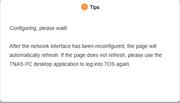
i get this

Image

when trying to access the network interfaces in settings

the cards works fine as i am using them and they show up in the dashboard
but i cant configere them at all , its super annoying
so please fix it ASAP

Re: F4-425 plus Network card discovery issue

Posted: 17 Jul 2026, 13:56
by Felix
According to your description, the network adapters are still physically present and working, but TOS cannot display them in the Control Panel.

This may be related to the network service, driver loading, or system detection issue.

Please open the Terminal application from the TOS desktop and run the following commands:

Code: Select all

ip addr

Code: Select all

lspci | grep -i ethernet
If you are using a USB network adapter, please also provide:

Code: Select all

lsusb
Please send us the output. We will check whether the system can still detect the network adapters and whether there are any driver-related errors.

Re: F4-425 plus Network card discovery issue

Posted: 19 Jul 2026, 13:44
by qidi4feet
1: lo: <LOOPBACK,UP,LOWER_UP> mtu 65536 qdisc noqueue state UNKNOWN group default qlen 1000
link/loopback 00:00:00:00:00:00 brd 00:00:00:00:00:00
inet 127.0.0.1/8 scope host lo
valid_lft forever preferred_lft forever
inet6 ::1/128 scope host
valid_lft forever preferred_lft forever
2: eth0: <BROADCAST,MULTICAST,UP,LOWER_UP> mtu 1500 qdisc fq_codel state UP group default qlen 1000
link/ether 6c:bf:b5:04:ee:0a brd ff:ff:ff:ff:ff:ff
inet 192.168.0.10/24 brd 192.168.0.255 scope global eth0
valid_lft forever preferred_lft forever
3: eth1: <BROADCAST,MULTICAST,UP,LOWER_UP> mtu 1500 qdisc fq_codel state UP group default qlen 1000
link/ether 6c:bf:b5:04:ee:0b brd ff:ff:ff:ff:ff:ff
4: br-28b8ee8657f7: <NO-CARRIER,BROADCAST,MULTICAST,UP> mtu 1500 qdisc noqueue state DOWN group default
link/ether b6:0f:b9:ad:6b:ef brd ff:ff:ff:ff:ff:ff
inet 172.18.0.1/16 brd 172.18.255.255 scope global br-28b8ee8657f7
valid_lft forever preferred_lft forever
5: docker0: <NO-CARRIER,BROADCAST,MULTICAST,UP> mtu 1500 qdisc noqueue state DOWN group default
link/ether b2:21:67:fb:a1:7a brd ff:ff:ff:ff:ff:ff
inet 172.17.0.1/16 brd 172.17.255.255 scope global docker0
valid_lft forever preferred_lft forever
6: br-57574f91aeb4: <BROADCAST,MULTICAST,UP,LOWER_UP> mtu 1500 qdisc noqueue state UP group default
link/ether 12:4a:a9:22:62:78 brd ff:ff:ff:ff:ff:ff
inet 172.19.0.1/16 brd 172.19.255.255 scope global br-57574f91aeb4
valid_lft forever preferred_lft forever
inet6 fe80::104a:a9ff:fe22:6278/64 scope link
valid_lft forever preferred_lft forever
7: eth1.20@eth1: <BROADCAST,MULTICAST,UP,LOWER_UP> mtu 1500 qdisc noqueue state UP group default
link/ether 6c:bf:b5:04:ee:0b brd ff:ff:ff:ff:ff:ff
inet 192.168.20.176/24 metric 1024 brd 192.168.20.255 scope global dynamic eth1.20
valid_lft 26302sec preferred_lft 26302sec
8: eth1.30@eth1: <BROADCAST,MULTICAST,UP,LOWER_UP> mtu 1500 qdisc noqueue state UP group default
link/ether 6c:bf:b5:04:ee:0b brd ff:ff:ff:ff:ff:ff
inet 192.168.30.176/24 metric 1024 brd 192.168.30.255 scope global dynamic eth1.30
valid_lft 22756sec preferred_lft 22756sec
9: vethbebfaa1@if2: <BROADCAST,MULTICAST,UP,LOWER_UP> mtu 1500 qdisc noqueue master br-57574f91aeb4 state UP group default
link/ether 26:23:c7:fb:b1:d5 brd ff:ff:ff:ff:ff:ff link-netnsid 0
inet6 fe80::2423:c7ff:fefb:b1d5/64 scope link
valid_lft forever preferred_lft forever


02:00.0 Ethernet controller: Realtek Semiconductor Co., Ltd. Device 8126 (rev 01)
03:00.0 Ethernet controller: Realtek Semiconductor Co., Ltd. Device 8126 (rev 01)


no issues as what i can see
Re: F4-425 plus Network card discovery issue

Posted: 19 Jul 2026, 20:06
by MikeZhang
qidi4feet wrote: 19 Jul 2026, 13:44
Based on the `ip addr` output you provided, the network configuration itself is functional but complex. This explains why the network interface works while the TOS settings interface displays "Network is being configured"—the TOS network management service is likely "confused" by the complex Docker and VLAN configurations and cannot accurately parse the current network topology, causing the interface to hang.
Your network configuration has several characteristics that are the root cause of the interface issues:

Physical Network Interfaces:
eth0: Has a valid IP (192.168.0.10/24) and is functioning correctly.
eth1: Has no IP directly assigned, but its sub-interfaces (VLANs) are in use.

VLAN Sub-interfaces: eth1.20 and eth1.30 are VLANs created based on eth1, each obtaining an independent IP (192.168.20.176 and 192.168.30.176). This configuration indicates that VLANs have been defined on your network switch.

Docker Bridges: Three bridges—br-28b8ee8657f7, docker0, and br-57574f91aeb4—are present, indicating that you are running multiple Docker containers that have created independent virtual networks.

The TOS network management module is typically designed to handle simple physical network interface configurations (such as IP, gateway, and DNS). When it detects a large number of virtual interfaces and VLANs created by Docker or manual commands, it may fail to load the status correctly, causing the interface to remain stuck on "Configuring..." or become unresponsive to actions.

Option 1: Restart the TOS network management service (Lowest risk)
Connect to the NAS via SSH and restart the background network management service to see if the interface returns to normal.
systemctl restart systemd-networkd
Then, refresh the TOS web interface to check if the "Network Interface" page has returned to normal.

Option 2: Check if Docker containers are the cause (Common reason)
Networks created by Docker containers (such as br-* bridges) often conflict with TOS network management. You can try the following:
Pause or stop all running containers within the TOS Docker management interface. Check the web interface to see if the network settings have been restored. If they have, it confirms that the conflict was indeed caused by the Docker network.
You can then start the containers one by one to identify exactly which container's network settings (such as the use of macvlan or host mode) triggered the issue.

Re: F4-425 plus Network card discovery issue

Posted: 22 Jul 2026, 17:26
by qidi4feet
hmm well
i do not completly agree on that
as it has been working but some firmware update or docker manager update destroyed it

but i cant quite recall what version did it , but the setup as i have now has been working fine

did a test,
disconected the lan cable , and disabled docker ,
but it is stille the same
even though that i only have one aktive Lan connection in it , nothing else , but it is the same , so
there must be something in your firmware that stops it from showing up in the network settings menu
and no
i will not reset my setup as it is working like it should ,


it is fixed now, turns out it didnt have a ip adress on the netcard that was out of the scope , so changed it to a completly diffrent ip adress and that fixed the issue . so problem solved

Re: F4-425 plus Network card discovery issue

Posted: 24 Jul 2026, 00:33
by qidi4feet
Well the issue is back ,
so there is something going on that does so it does not show the network cards in settings
all is setup like it should , nothing is out of the ordinary , so there must be some issue in your firmware somewhere

i might suspect that it has to do when we create vlans in docker ipvlan , and it cant show them in settings therefor it just does nothing,
but yes.. there is a issue with that
all is working but not that gui part

Re: F4-425 plus Network card discovery issue

Posted: 24 Jul 2026, 10:41
by TMzethar
Hi, we appreciate your ongoing monitoring of this matter.
Could you grab related screenshots of your network settings in Control Panel and the Docker virtual network config, and share them here? We'll forward them to the project team for discussion on the cause and possible solutions.

Re: F4-425 plus Network card discovery issue

Posted: 25 Jul 2026, 11:31
by qidi4feet
TMzethar wrote: 24 Jul 2026, 10:41 Hi, we appreciate your ongoing monitoring of this matter.
Could you grab related screenshots of your network settings in Control Panel and the Docker virtual network config, and share them here? We'll forward them to the project team for discussion on the cause and possible solutions.
LOL
Cant grap screenshot of that , duo to that is the issue, its not showing uo
network config well pretty simple

Docker.
Docker is setup as stock with IPVLAN on some containers
NAS.
Network setup with static IP on eth0
network setup with static on eth1 ( with ip adress that is out of my scope ) eth1 just forward vlan to docker just like it have worked always

Re: F4-425 plus Network card discovery issue

Posted: 27 Jul 2026, 18:42
by TMzethar
You could grab a system report and email it to our support team for analysis — just remember to include a link to this thread and your forum name in the message.
Or you can book a remote session with our engineer via the link below. Again, please mention this post's URL and your username when you do.
https://salesiq.zohopublic.com/signatur ... 97d0be8892