[Discussion] F6-424MAX failed to boot correctly after update to TOS7
Posted: 26 Jun 2026, 02:29
Today I saw some posts that said that TOS7 was no longer beta, so I decided to upgrade my F6-424MAX.
I didn't see any special steps for upgrading the BIOS like on some other 424 models.
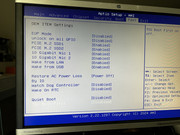
I upgraded to the beta 7.0.0601 as directed in another POST, and when the system rebooted, it was no longer on the network in the same location. When I discovered the new IP, the web gui prompted me to do an initial setup. This did not seem safe so I powered the NAS off, and connected a keyboard and monitor to it and went to the BIOS setup.
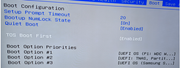
There were 3 options for boot devices, a USB, a single SATA HDD, and a single NVMe SSD. The USB was default, so I changed it to the SATA HDD, since I know my "system" is on a couple of those. I saved settings and rebooted, and it booted up just fine with TOS7 and all of my settings and data were still there. I was then able to online download and upgrade to the non-beta version 7.0.0746.
Is this expected behavior for this model of NAS? If so, can you update the articles to say that you might need to change boot device during upgrade?
If this is not expected behavior, did I do something wrong? Or do I need to make some other update so that doesn't happen in the future?
Thank you!
I didn't see any special steps for upgrading the BIOS like on some other 424 models.
I upgraded to the beta 7.0.0601 as directed in another POST, and when the system rebooted, it was no longer on the network in the same location. When I discovered the new IP, the web gui prompted me to do an initial setup. This did not seem safe so I powered the NAS off, and connected a keyboard and monitor to it and went to the BIOS setup.
There were 3 options for boot devices, a USB, a single SATA HDD, and a single NVMe SSD. The USB was default, so I changed it to the SATA HDD, since I know my "system" is on a couple of those. I saved settings and rebooted, and it booted up just fine with TOS7 and all of my settings and data were still there. I was then able to online download and upgrade to the non-beta version 7.0.0746.
Is this expected behavior for this model of NAS? If so, can you update the articles to say that you might need to change boot device during upgrade?
If this is not expected behavior, did I do something wrong? Or do I need to make some other update so that doesn't happen in the future?
Thank you!