Page 1 of 1
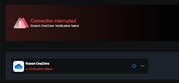
[Help] Verification failed
Posted: 19 Jun 2026, 02:58
by rfbjr
How do you fix this, I mean there isn't a edit option for the connection credentials.
This was working for weeks, not sure when it stopped though. Since I have no clue when it does or the next time, other than my 2hr setting.
Yes the log tells me when it ran and did something.
Re: [Help] Verification failed [SOLVED]
Posted: 19 Jun 2026, 10:15
by EriChan
Regarding the verification issue you encountered when using OneDrive in CloudSync: This is because the corresponding developer account has expired. We are urgently fixing this problem, and thank you for your patience.
Re: [Help] Verification failed
Posted: 19 Jun 2026, 18:28
by rfbjr
Ah, thanks.
I do feel for the person frantically trying to fix it. Fixing a bug is one thing, but when an app stops completely and the literally the world is waiting is entirely different pressure.
Re: [Help] Verification failed
Posted: 20 Jun 2026, 14:48
by TMroy
rfbjr wrote: ↑19 Jun 2026, 18:28
Thank you for bringing this issue to our attention! We are already aware of it and are actively working on a fix. Once the update is released, the service will no longer be interrupted due to an expired developer account. We sincerely apologize for any inconvenience caused.
Re: [Help] Verification failed
Posted: 20 Jun 2026, 23:33
by crisisacting
TMroy wrote: ↑20 Jun 2026, 14:48…
Once the update is released, the service will no longer be interrupted due to an expired developer account. …
Will this be an update to the CloudSync app or just a back-end update with no change to the app?
Re: [Help] Verification failed
Posted: 22 Jun 2026, 22:53
by rfbjr
I just tried connecting again to OneDrive and it worked!