Page 1 of 1
[Help] What next?
Posted: 31 May 2026, 19:38
by rfbjr
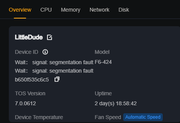
The rebuild from scratch of my F4-424 Pro was complete early this morning (95% of time waiting for RAID). I am running an RSYNC to copy back the 3.5TB of data back from the F6-424 (via D4-320). When I noticed this on the F6-424
**I haven't reboot yet, as the rsync is running fine. Logging off/on changing nothing.
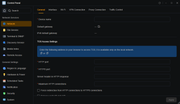
Even the mobile app shows no information (device/network) for the F6-424.
TNAS PC, does see the F6 and displays the correct IP for NIC1.
I'm trying to run a system report but it's still at 0% after 1/2hr.
When the rsync finished, I'll see if the system report finishes as well.
Putty and terminal from the GUI will not connect.
Re: [Help] What next?
Posted: 01 Jun 2026, 01:25
by EriChan
Regarding the issue you encountered, here is a detailed explanation and suggestions:
This is a typical severe failure caused by a crash of the TOS system management daemon, resulting in UI and management function failures. Fortunately, the underlying Linux kernel and network data transmission are still operational.
1. Core Issue: Segmentation Fault
- From the first screenshot (no-device-id.png), it is clear that the system overview interface directly popped up:
Wait: signal: segmentation fault F6-424
- This means that the core background daemon in the TOS system responsible for collecting hardware information, handling network configuration, responding to Web API requests, and managing SSH services crashed during runtime.
2. Why can Rsync still run normally?
- The Linux system architecture is layered. Currently, the crashed service is the user space TOS management service, while the kernel space and underlying network and storage drivers are still functioning properly.
- The rsync process had already established connections and allocated memory before the crash, so it can continue running independently in the background, separate from the TOS desktop.
3. Why is the network information empty, SSH unreachable, and system report stuck at 0%?
- In the second screenshot (empty-nic-info.png), device names, gateways, and ports are all blank because when the frontend Web interface requests this data, the corresponding backend API service has already died and cannot return any data.
- Similarly, SSH and system reports require calling these crashed management components, so naturally, connections fail or freeze.
Important reminder: Do not perform any forced reboot at this time. There is currently 3.5TB of large data being transferred across devices via rsync, and the F4-424 Pro has just undergone a "rebuild." Forcibly shutting down now may cause other serious problems.
Please proceed according to the following two phases:
Phase One: Wait and Monitor the Transfer
1. Do not refresh or frequently operate the F6-424 Web interface to avoid adding extra load to the already unstable system memory.
2. Monitor progress on the receiving end (F4-424 Pro): Since the F6-424 (source) management interface is down, you can log into the F4-424 Pro (destination) Web interface or SSH into F4 to check if the size of the rsync target folder is continuously increasing.
- Alternatively, observe the hard drive indicator lights on the F6-424 and D4-320 panels; if they are still flashing rapidly, it indicates the transfer is ongoing normally.
Phase Two: Recovery and Troubleshooting After Transfer Completion
Once you confirm that the 3.5TB data transfer is complete (both ends’ hard drive lights return to steady or slight blinking, and the F4 side confirms file sizes match):
- Step 1: Try clicking the reboot button on the TOS desktop for a safe soft reboot.
- Step 2: If the system recovers after reboot, please send the system report to our technical support email ([email protected]) for in-depth analysis.
Re: [Help] What next?
Posted: 01 Jun 2026, 02:58
by rfbjr
When the transfer finished I Rebooted from the webgui, well the screen showed please wait, but nothing happened. Still couldn't putty, even the HDMI console didn't work, well it took the name/password but just when back to logon prompt.
I first just touched the power button on the back, same issue, couldn't logon any way.
This time held the power button for the usual 10 seconds, and that reboot worked, everything came back all network related settings were there.
I'm generating a system report. That will be sent via support email.
I did see this before I did the 2nd reboot.
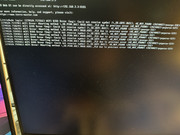
No issues so far since the 2nd reboot.
Update: No rebuild on any of the storage pools. That's good. Well I did wait until the transfer was completed.
Re: [Help] What next?
Posted: 01 Jun 2026, 18:37
by rfbjr
My bad, I think I found what happened. Forgot that at 7am every Sunday morning, the laptop does a windows backup to the storage pool on the D4-320. Well the 3tb copy from the D4 had already been going for a few hours already. I noticed only because in the backup folder on the D4 is a couple hundred core files with a time stamp starting at 7am yesterday. My guess TOS or whatever was overwhelmed.
Re: [Help] What next?
Posted: 02 Jun 2026, 17:10
by CursaYang
You can enable debug mode to continuously monitor the current state of the TOS system. If the TOS system does indeed crash during data transmission or runtime, we can also analyze the cause through the logs.