Page 1 of 2
[Help] TOS 7 : impossible to mount a SMB folder via the file manager
Posted: 30 May 2026, 20:48
by totoguile
Hi,
I've tried to mount a remote SMB folder (from my Freebox CPE) via the file manager -> Remote Folder. without succes
the remote SMB mount is with login and password.
When I try to mount it through the terminal , it works ...
command : mount -t cifs //192.168.1.254/Freebox /home/toto/test -o username=toto
(password is asked bythe prompt, and the folder is mounted)
is there an issue with login / password SMB mount on TOS 7 ?
Re: [Help] TOS 7 : impossible to mount a SMB folder via the file manager
Posted: 30 May 2026, 23:51
by Gremlin
I don't see any issue. I have remote folder mounts between Tos7-Tos7 nas, Tos7-Tos6 nas and Tos7 -Windows11. Compatible SMB versions?
Re: [Help] TOS 7 : impossible to mount a SMB folder via the file manager
Posted: 30 May 2026, 23:54
by EriChan
To accurately identify the issue, please provide the following information to assist with analysis:
- What is the exact version number of the currently running TOS 7?
- Does your remote SMB account password contain any special characters (such as &, $, #, @, single quotes ' or double quotes ")?
- Which SMB protocol version (SMBv1, SMBv2, or SMBv3) is currently configured on your Freebox CPE?
- What is the specific error message displayed by the system when you try to mount in the TOS 7 interface? (For example: credential error, connection timeout, or path does not exist?)
Re: [Help] TOS 7 : impossible to mount a SMB folder via the file manager
Posted: 31 May 2026, 20:10
by totoguile
Hi,
thanks for answering ! Here are the info :
What is the exact version number of the currently running TOS 7? --> 7.0.0612
Does your remote SMB account password contain any special characters (such as &, $, #, @, single quotes ' or double quotes ")? --> No only letters
Which SMB protocol version (SMBv1, SMBv2, or SMBv3) is currently configured on your Freebox CPE? --> SMBv2 and SMBv3
What is the specific error message displayed by the system when you try to mount in the TOS 7 interface? (For example: credential error, connection timeout, or path does not exist?) --> "Connection failed"
Re: [Help] TOS 7 : impossible to mount a SMB folder via the file manager
Posted: 01 Jun 2026, 01:41
by EriChan
Thank you for providing such precise feedback.
Please confirm whether you have mounted the SMB remote folder using the UI path input format shown in the image below:
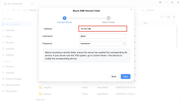
If so, please contact our technical support staff through the following link to schedule a remote technical support session for diagnosis:
https://salesiq.zohopublic.com/signatur ... 97d0be8892
Re: [Help] TOS 7 : impossible to mount a SMB folder via the file manager
Posted: 01 Jun 2026, 03:47
by totoguile
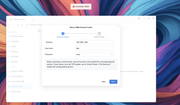
yes that's correct
Re: [Help] TOS 7 : impossible to mount a SMB folder via the file manager
Posted: 01 Jun 2026, 15:24
by CursaYang
We need to check this issue remotely. It might be related to SMB compatibility. Please visit the link and schedule a remote appointment with online customer service:
https://salesiq.zohopublic.com/signatur ... 97d0be8892
Re: [Help] TOS 7 : impossible to mount a SMB folder via the file manager
Posted: 01 Jun 2026, 16:29
by walcaro
Hi,
I can confirm this issue. Same Remote SMB source mounts perfectly on TOS6 (latest). SMB Server is Windows 2019 in my case.
Syslog output:
un 1 10:47:02 TNAS11 filemanager[15976]: [DEBUG /bin/bash -c /etc/tos/scripts/remotefolder mount _89d02f126d0146388dc8fb8207b3ab5b]
Jun 1 10:47:02 TNAS11 filemanager[15976]: ERROR Remove xattr failed: err="no data available"
Jun 1 10:47:02 TNAS11 filemanager[15976]: ERROR DelFileAttr failed path=/Volume1/public/M ok=false
Jun 1 10:47:02 TNAS11 filemanager[15976]: ERROR MOUNT err="source path can not be used: This program is not installed setuid root - \"user\" CIFS mounts not supported.\nThis program is not installed setuid root - \"user\" CIFS mounts not supported.\nThis program is not installed setuid root - \"user\" CIFS mounts not supported.\nThis program is not installed setuid root - \"user\" CIFS mounts not supported.\nThis program is not installed setuid root - \"user\" CIFS mounts not supported.\n: exit status 1\n1. source path can not be used: This program is not installed setuid root - \"user\" CIFS mounts not supported.\nThis program is not installed setuid root - \"user\" CIFS mounts not supported.\nThis program is not installed setuid root - \"user\" CIFS mounts not supported.\nThis program is not installed setuid root - \"user\" CIFS mounts not supported.\nThis program is not installed setuid root - \"user\" CIFS mounts not supported.\n: exit status 1\n 1). gitlab.local/DO-module/new-filemanage-module/src/service/remotefolder.mountRemoter\n \t/buildAgent/work/ab67c8b4601f5cef/src/service/remotefolder/remotefolder_model.go:658\n..
Rest cut: Your message contains 16099 characters.
The maximum number of allowed characters is 10000.
Re: [Help] TOS 7 : impossible to mount a SMB folder via the file manager
Posted: 03 Jun 2026, 16:09
by walcaro
Even with version 1.2 of filemanager the problem persists:
Jun 3 10:04:16 TNAS11 filemanager[2160621]: [DEBUG /bin/bash -c /etc/tos/scripts/remotefolder mount _a403ace3541a4b558a6d6eddd2403206]
Jun 3 10:04:16 TNAS11 filemanager[2160621]: ERROR Remove xattr failed: err="no data available"
Jun 3 10:04:16 TNAS11 filemanager[2160621]: ERROR DelFileAttr failed path=/Volume1/public/M ok=false
Jun 3 10:04:16 TNAS11 filemanager[2160621]: ERROR MOUNT err="source path can not be used: This program is not installed setuid root - \"user\" CIFS mounts not supported.\nThis program is not installed setuid root - \"user\" CIFS mounts not supported.\nThis program is not installed setuid root - \"user\" CIFS mounts not supported.\nThis program is not installed setuid root - \"user\" CIFS mounts not supported.\nThis program is not installed setuid root - \"user\" CIFS mounts not supported.\n: exit status 1\n1. source path can not be used: This program is not installed setuid root - \"user\" CIFS mounts not supported.\nThis program is not installed setuid root - \"user\" CIFS mounts not supported.\nThis program is not installed setuid root - \"user\" CIFS mounts not supported.\nThis program is not installed setuid root - \"user\" CIFS mounts not supported.\nThis program is not installed setuid root - \"user\" CIFS mounts not supported.\n: exit status 1\n 1). gitlab.local/DO-module/new-filemanage-module/src/service/remotefolder.mountRemoter\n \t/buildAgent/work/ab67c8b4601f5cef/src/service/remotefolder/remotefolder_model.go:658\n 2). gitlab.local/DO-module/new-filemanage-module/src/service/remotefolder.(*RemoteFolder).MountRemoter\n \t/buildAgent/work/ab67c8b4601f5cef/src/service/remotefolder/remotefolder_model.go:317\n 3). gitlab.local/DO-module/new-filemanage-module/src/controller/remotefolder.(*RemoteFolderController).mount\n \t/buildAgent/work/ab67c8b4601f5cef/src/controller/remotefolder/RemoteFolderController.go:426\n
etc.
Re: [Help] TOS 7 : impossible to mount a SMB folder via the file manager
Posted: 03 Jun 2026, 22:05
by totoguile
Hi,
I need more time to arrange the remote debug.
In the meantime here are the logs of /var/log/syslog when trying to add a remote SMB connection
Jun 3 16:01:25 TNAS filemanager[2746476]: [GIN] 2026/06/03 - 16:01:25 | 200 | 1.790043ms | | GET "/fileManage/GetDirTrees?path=remotefolder&type=5"
Jun 3 16:01:25 TNAS filemanager[2746476]: ERROR GetAllRemoteFolders ReadRemoteConfig err="open /etc/remotefolder/remotefolder.conf: no such file or directory"
Jun 3 16:01:25 TNAS filemanager[2746476]: [GIN] 2026/06/03 - 16:01:25 | 200 | 995.37µs | | GET "/remotefolder/list"
Jun 3 16:01:25 TNAS filemanager[2746476]: ERROR GetAllRemoteFolders ReadRemoteConfig err="open /etc/remotefolder/remotefolder.conf: no such file or directory"
Jun 3 16:01:25 TNAS filemanager[2746476]: [GIN] 2026/06/03 - 16:01:25 | 200 | 1.005211ms | | GET "/remotefolder/list"
Jun 3 16:01:55 TNAS filemanager[2746476]: ERROR GetSmbDirs failed host=192.168.1.254 err="exec failed: exit status 1, stderr: "
Jun 3 16:01:55 TNAS filemanager[2746476]: [GIN] 2026/06/03 - 16:01:55 | 200 | 122.156197ms | | POST "/remotefolder/smb/dirs"