Page 1 of 1
[Help] F4 424 Pro - Bios update and fan pin order?
Posted: 23 May 2026, 12:29
by jester
Two questions regarding my F4 424 Pro.
Would there happen to be a bios updates available for it? I noticed some random errors while testing Unraid that various forums, etc report as a result of some items in the bios not having been removed from the bios, etc. They appear to be about the usb port(s). I tried turning off the Thunderbolt stuff in the bios as I don’t believe the model actually has thunderbolt connectivity, but that made no difference. Additionally there’s a type-o of “samrt fan control” if memory serves.
The next question would be related to the fan port on the motherboard. As it’s not the typical desktop fan connector, I was wondering what the pin diagram is for it as I was thinking about swapping out the fan with one from Noctua. I think it’s a JST XH 2.54mm 4-pin connector but I’m unsure which pin is which in order to make an adapter. Additionally I noticed in Unraid, that one fan tends to show up as #2. I’m guessing #1 might be the empty location next to it where it appears a fan connector could be mounted (unsure if the connections there are even live). There’s also a fan #3 reported, but I’m unsure where that one might even be. These unused fan locations also made me wonder if there is a bios update available somewhere.
Thanks in advance
Re: [Help] F4 424 Pro - Bios update and fan pin order?
Posted: 24 May 2026, 02:17
by EriChan
Thanks for bringing the "samrt fan control" typo in the BIOS to our attention. We have documented this issue and will submit it to our development team for correction in an posisible future BIOS release.
Regarding the random USB errors you encountered during your Unraid testing, could you please let us know your current BIOS version? Additionally, if you could provide more specific details or the relevant log snippets of these errors, it would greatly assist us in diagnosing the root cause.
Due to the weekend, we currently do not have direct access to the detailed hardware pin diagram. We will retrieve the precise pinout arrangement from our hardware team and provide you with an update this coming Monday.
Re: [Help] F4 424 Pro - Bios update and fan pin order?
Posted: 24 May 2026, 09:45
by jester
This is these are the warnings during boot up from the Stalin.
May 23 21:23:19 catalog kernel: ACPI BIOS Error (bug): Could not resolve symbol [\_SB.PC00.TXHC.RHUB.SS01], AE_NOT_FOUND (20250807/dswload2-162)
May 23 21:23:19 catalog kernel: ACPI Error: AE_NOT_FOUND, During name lookup/catalog (20250807/psobject-220)
May 23 21:23:19 catalog kernel: ACPI: Skipping parse of AML opcode: OpcodeName unavailable (0x0010)
May 23 21:23:19 catalog kernel: ACPI BIOS Error (bug): Could not resolve symbol [\_SB.PC00.TXHC.RHUB.SS02], AE_NOT_FOUND (20250807/dswload2-162)
May 23 21:23:19 catalog kernel: ACPI Error: AE_NOT_FOUND, During name lookup/catalog (20250807/psobject-220)
May 23 21:23:19 catalog kernel: ACPI: Skipping parse of AML opcode: OpcodeName unavailable (0x0010)
May 23 21:23:19 catalog kernel: ACPI: 12 ACPI AML tables successfully acquired and loaded
May 23 21:23:19 catalog kernel: ACPI: Dynamic OEM Table Load:
May 23 21:23:19 catalog kernel: ACPI: SSDT 0xFFFF8881018A8000 000394 (v02 PmRef Cpu0Cst 00003001 INTL 20200717)
May 23 21:23:19 catalog kernel: ACPI: Dynamic OEM Table Load:
May 23 21:23:19 catalog kernel: ACPI: SSDT 0xFFFF8881018A8400 0003F5 (v02 PmRef Cpu0Ist 00003000 INTL 20200717)
May 23 21:23:19 catalog kernel: ACPI: Dynamic OEM Table Load:
May 23 21:23:19 catalog kernel: ACPI: SSDT 0xFFFF8881018D8000 0001AB (v02 PmRef Cpu0Psd 00003000 INTL 20200717)
May 23 21:23:19 catalog kernel: ACPI: Dynamic OEM Table Load:
May 23 21:23:19 catalog kernel: ACPI: SSDT 0xFFFF8881018A1000 0004B5 (v02 PmRef Cpu0Hwp 00003000 INTL 20200717)
May 23 21:23:19 catalog kernel: ACPI: Dynamic OEM Table Load:
May 23 21:23:19 catalog kernel: ACPI: SSDT 0xFFFF8881018B0000 001BAF (v02 PmRef ApIst 00003000 INTL 20200717)
May 23 21:23:19 catalog kernel: ACPI: Dynamic OEM Table Load:
May 23 21:23:19 catalog kernel: ACPI: SSDT 0xFFFF8881018B2000 001038 (v02 PmRef ApHwp 00003000 INTL 20200717)
May 23 21:23:19 catalog kernel: ACPI: Dynamic OEM Table Load:
May 23 21:23:19 catalog kernel: ACPI: SSDT 0xFFFF8881018B4000 001349 (v02 PmRef ApPsd 00003000 INTL 20200717)
May 23 21:23:19 catalog kernel: ACPI: Dynamic OEM Table Load:
May 23 21:23:19 catalog kernel: ACPI: SSDT 0xFFFF8881018B8000 000FBB (v02 PmRef ApCst 00003000 INTL 20200717)
May 23 21:23:19 catalog kernel: ACPI: Interpreter enabled
May 23 21:23:19 catalog kernel: ACPI: PM: (supports S0 S3 S5)
May 23 21:23:19 catalog kernel: ACPI: Using IOAPIC for interrupt routing
May 23 21:23:19 catalog kernel: PCI: Using host bridge windows from ACPI; if necessary, use "pci=nocrs" and report a bug
May 23 21:23:19 catalog kernel: PCI: Ignoring E820 reservations for host bridge windows
May 23 21:23:19 catalog kernel: ACPI: Enabled 7 GPEs in block 00 to 7F
May 23 21:23:19 catalog kernel: ACPI BIOS Error (bug): Could not resolve symbol [\_SB.UBTC.RUCC], AE_NOT_FOUND (20250807/psargs-332)
May 23 21:23:19 catalog kernel: ACPI Error: Aborting method \_SB.PC00.XHCI.RHUB.HS01._PLD due to previous error (AE_NOT_FOUND) (20250807/psparse-529)
May 23 21:23:19 catalog kernel: ACPI BIOS Error (bug): Could not resolve symbol [\_SB.UBTC.RUCC], AE_NOT_FOUND (20250807/psargs-332)
Re: [Help] F4 424 Pro - Bios update and fan pin order?
Posted: 24 May 2026, 17:25
by TMzethar
Thank you for providing additional information.
However, we still need the specific details (as mentioned earlier by EricChan).
Re: [Help] F4 424 Pro - Bios update and fan pin order?
Posted: 25 May 2026, 11:17
by TMzethar
The Thunderbolt options in the BIOS do not affect normal operation.
NAS fan header pinout:
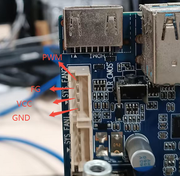
We recommend testing the 12V VCC to determine the pin sequence.
The motherboard has one CPU fan header (not in use due to adequate cooling) and two parallel system fan headers. All are functional.
There are no BIOS updates related to these.
Re: [Help] F4 424 Pro - Bios update and fan pin order?
Posted: 25 May 2026, 12:08
by jester
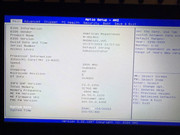
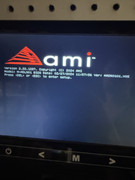
Bios is..
Re: [Help] F4 424 Pro - Bios update and fan pin order?
Posted: 25 May 2026, 15:08
by MikeZhang
Feel sorry there is no BIOS update for now.
As for above ACPI errors in the kernel logs usually indicate a minor issue with the ACPI table in your motherboard BIOS, but generally won't affect normal system operation.
The ACPI table definition in the BIOS is flawed, referencing non-existent devices (possibly certain USB 3.0 ports or Type-C controllers).
Overall, there's no need to worry; the system has already booted normally by skipping the error section.
Does it have other impact for your daily use?