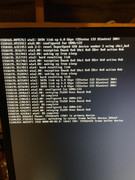
Thank you for providing the screenshot. Regarding the issue you are experiencing, we have carefully reviewed your actual screen logs, and here is the detailed explanation and troubleshooting suggestions:
Your kernel logs show severe SATA Link Exception and Wake-up Failure:
ata3.00: waking up from sleep
ata3: hard resetting link
retrying FLUSH 0xea...
Fault Details:
Your TNAS is encountering a classic HDD Hibernation/Sleep Deadlock.
After several days of uptime, your hard drives (ata2, ata3, ata4) will enter power-saving sleep mode. When the system attempts to wake them up to process a request, the drives or the SATA controller fail to respond in a timely manner. The Linux kernel will then attempt a hard reset on the SATA links and get stuck in an error-handling loop.
Since the storage volume becomes completely unresponsive, all higher-level services (Web management interface, SSH remote access, SMB file sharing) will freeze immediately. However, as the motherboard and network chip remain powered on, the device can still respond to ping requests.
Troubleshooting Steps:
1. Disable HDD Hibernation (Primary First Step)
After force-restarting the NAS and successfully logging into the web management interface, please navigate to:
Control Panel > Hardware & Power > Hard Drive Hibernation > Set the standby timer to "Never".
Keep the drives spinning continuously, then observe whether this specific freezing issue persists.
2. Check Hard Drive Health
Generally, hard drive failures can also easily cause wake-up failures in NAS hardware and software environments. It is recommended to go to the TOS system interface > Control Panel > Storage Management > Disks > S.M.A.R.T. to create a quick detection task to check the health status of your hard drives.
Please try disabling HDD hibernation first, then observe whether the system stabilizes.