Page 1 of 2
[Help] TOS 7 - USB passthrough support
Posted: 07 May 2026, 21:32
by totoguile
Hi,
I've purchased a Nabu Casa Zigbee USB dongle (ZBT-2)
lsusb shows correctly the device, but impossible to pass it through the Home Assitant Virtual Machine.
lsusb
Bus 004 Device 002: ID 0bda:0423 Realtek Semiconductor Corp. 4-Port USB 3.2 Hub
Bus 004 Device 001: ID 1d6b:0003 Linux Foundation 3.0 root hub
Bus 003 Device 005: ID 0463:ffff MGE UPS Systems UPS
Bus 003 Device 004: ID 0bda:5423 Realtek Semiconductor Corp. 4-Port USB 2.0 Hub
Bus 003 Device 003: ID 1908:1320 GEMBIRD PhotoFrame PF-15-1
Bus 003 Device 002: ID 303a:831a Nabu Casa ZBT-2
Bus 003 Device 001: ID 1d6b:0002 Linux Foundation 2.0 root hub
Bus 002 Device 001: ID 1d6b:0003 Linux Foundation 3.0 root hub
Bus 001 Device 001: ID 1d6b:0002 Linux Foundation 2.0 root hub
On the VM config, USB ports are alsways Disable, impossible to select the USB dongle...
This is a real big issue for using the NAS with VM.
What's the plan to support USB passthrough ?
Re: [Help] TOS 7 - USB passthrough support
Posted: 08 May 2026, 18:47
by Felix
Thank you for your feedback. We will submit the relevant requirements to the product team for research and analysis. If supported, it will be added in a future version.
Re: [Help] TOS 7 - USB passthrough support
Posted: 08 May 2026, 19:34
by totoguile
thanks! lots of people from the FR NAS community are waiting for that !

FYI I tried to activate the passthrough via CLI but it does not work either
cat qemu-hostdev-mydevice.xml
<hostdev mode='subsystem' type='usb' managed='no'>
<source>
<vendor id='0x303a'/>
<product id='0x831a'/>
</source>
</hostdev>
virsh attach-device 7096f5e3-2d8a-4ce2-96e1-c551995a0b1a --file qemu-hostdev-mydevice.xml
error: Failed to attach device from /Volume1/homes/glefand/DockerProjects/qemu-hostdev-mydevice.xml
error: internal error: unable to execute QEMU command 'device_add': failed to open host usb device /dev/bus/usb/003/002
Re: [Help] TOS 7 - USB passthrough support
Posted: 08 May 2026, 22:55
by totoguile
OK I figured out the reason why it was not working.
first, the ZBT-2 from nabu casa does require USB3 --> in the VM config, USB-3 must be selected, even if device is disable
then, the ZBT-2 is bind in /dev/ttyACM0 and must be unbind
finally, we can then attach the USB device to the VM.
It could be super great if, in the vm config, we can write the VID:PID of a specifc device to manage automatically this issue.
as a workaround, I've created a script launch at startup :
sleep 60
echo '3-1:1.0' > /sys/bus/usb/drivers/cdc_acm/unbind
sleep 1
/usr/local/sbin/virsh attach-device 7096f5e3-2d8a-4ce2-96e1-c551995a0b1a --file qemu-hostdev-mydevice.xml
the file qemu-hostdev-mydevice.xml do contain :
<hostdev mode='subsystem' type='usb' managed='no'>
<source>
<vendor id='0x303a'/>
<product id='0x831a'/>
</source>
of course , VM ID, USB ID must be adapted based on your config.
Re: [Help] TOS 7 - USB passthrough support
Posted: 09 May 2026, 17:20
by Felix
Thank you for your feedback. We will submit this proposal to the product team for review, and if feasible, it will be added in a future version.
Re: [Help] TOS 7 - USB passthrough support
Posted: 17 Jun 2026, 09:11
by polen
I also would like this. I currently do this with VirtualBox on TOS 6. Can TOS 7 run VirtualBox?
Re: [Help] TOS 7 - USB passthrough support
Posted: 17 Jun 2026, 14:37
by MikeZhang
polen wrote: ↑17 Jun 2026, 09:11
Yes VirtualBox is available in TOS7, you can install from app center
Re: [Help] TOS 7 - USB passthrough support
Posted: 22 Jun 2026, 00:34
by polen
I'm trying to get TOS 7 VMs application to passthrough, and it does not show my USB device, but it does show my USB Storage device.
gregpolen@TNAS:/# lsusb
Bus 002 Device 003: ID 1058:264d
Western Digital Technologies, Inc. easystore 264D
Bus 002 Device 004: ID 2109:0813 VIA Labs, Inc. USB3.0 Hub
Bus 002 Device 001: ID 1d6b:0003 Linux Foundation 3.0 root hub
Bus 001 Device 008: ID 051d:0002 American Power Conversion Uninterruptible Power Supply
Bus 001 Device 009: ID 10c4:8a2a
Cygnal Integrated Products, Inc. HubZ Smart Home Controller
Bus 001 Device 007: ID 2109:2813 VIA Labs, Inc. USB2.0 Hub
Bus 001 Device 002: ID 058f:6387 Alcor Micro Corp. Flash Drive
Bus 001 Device 001: ID 1d6b:0002 Linux Foundation 2.0 root hub
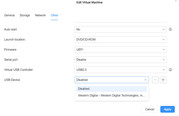
Any help to set this up would be greatly appreciated.
Thanks!
Re: [Help] TOS 7 - USB passthrough support
Posted: 22 Jun 2026, 20:01
by MikeZhang
polen wrote: ↑22 Jun 2026, 00:34
Thank you for your feedback. We are aware of the difficulties you encountered during the USB passthrough configuration process and sincerely apologize for any inconvenience caused.
Regarding your question: Our engineers are currently investigating: Our R&D team has begun preliminary research on this feature, focusing on evaluating USB passthrough implementation schemes under different virtualization platforms, support for device hot-swapping, and compatibility issues to ensure the stability and reliability of the UI solution.
Re: [Help] TOS 7 - USB passthrough support
Posted: 22 Jun 2026, 22:10
by Gremlin
This is a subject about which I know absolutely nothing, so I decided to consult AI ...
The Question:
Code: Select all
Should an os provide usb pass-through support for docker containers and other virtual machines?
An Answer:
Code: Select all
AI Overview
Yes, host operating systems should natively support USB pass-through, as it remains the most reliable way to interact with physical hardware (e.g., smart card readers, security keys, or Zigbee adapters) from virtualized or isolated environments. However, the implementation depends heavily on the platform and virtualization architecture.
Virtual Machines (VMs)
For Type-2 hypervisors and VMs, native OS/hypervisor-level pass-through is absolutely essential.

    The Good: Platforms like VMware natively allow passing individual USB controllers or devices directly into the guest OS.
    The Challenge: Hypervisors tightly tied to host OS kernels (like Microsoft Hyper-V) typically restrict direct USB pass-through for security and architecture reasons, requiring workarounds like USB over IP.

Docker Containers
Containers share the host operating system's kernel, which changes how they handle hardware.
On Native Linux Hosts:
Pass-through is straightforward. The OS doesn't need to do extra emulation; you can map devices directly using the --device flag to bind the host’s /dev/bus/usb node into the container.
On macOS and Windows:
Native Docker doesn't exist. Containers run inside a hidden Linux VM spun up by a hypervisor, so direct USB mapping fails unless the underlying VM or hypervisor supports it.

Workarounds
When native OS or hypervisor support isn't available, the industry standard relies on USB/IP (USB over IP). This forwards USB data as network packets, allowing any container or VM connected to the network to use the hardware.

For Docker Desktop, users can configure this through the Docker Docs
All very fascinating and the words that stand out for me in the answer are "Yes" and "absolutely essential" together with "most reliable way to interact".
Since @TM and Tos7 now fully embrace AI, one would think that AI might be a "first port of call' when contemplating such questions. However @TM are only now conducting "preliminary research" into this matter. Even though, I believe, this subject has been ongoing since Tos5.
Am I stirring things up? Yes, definitely! I think @TM tied their shoelaces together over Tos7 and may well be falling on their faces (if not fallen).
Another notch in the "known defects" cannon.