Page 1 of 1

[Help] F8 SSD Plus missing info on Disk > Overview page after V02 to V07 BIOS update

Posted: 29 Apr 2026, 04:52
by Sihastru
After updating the F8 SSD Plus to the V07 BIOS (from the factory V02), the Disk > Overview page no longer displays the number of drives and the slot occupancy information:
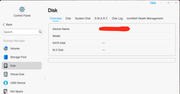
Image

Also, the Disk > Disk page shows my drives mounted as "sdz":
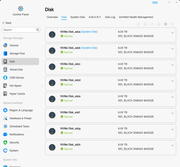
Image

I am using BTRFS, all drives in one storage pool, a single volume, one drive as parity. All data was preserved, I can still access all my files on the volume. Steps I already tried:
  • BIOS - restore optimized defaults > no change
  • BIOS - used "Ctrl+," to expose and toggle CSM on/off > no change
  • TOS - restore to factory defaults > no change
Note that the BIOS update was done following the official procedure, I removed all NVME drives, noting their slots numbers, and the USB boot drive from the unit, I updated with a freshly formatted drive, left the procedure run its course, the NAS restarted, the BIOS was updated successfully. After that I reinstalled all NVME drives in their corresponding slots and the original USB boot drive in the internal port.

Re: [Help] F8 SSD Plus missing info on Disk > Overview page after V02 to V07 BIOS update  [SOLVED]

Posted: 29 Apr 2026, 08:56
by TMzethar
You may have missed or made mistakes in the steps related to writing BIOS parameters. Please try again.

Re: [Help] F8 SSD Plus missing info on Disk > Overview page after V02 to V07 BIOS update

Posted: 29 Apr 2026, 23:00
by Sihastru
Hi TMzethar,

You were correct, I mistakenly assumed that after the BIOS is updated and the system restarts a few times, when presented again with the shell, it would update the BIOS again, so I stopped there. But, in fact, there is another step in the automated shell where a few SMBIOS strings are updated:
  • System SKU number
  • System product
I don't have an image to upload here so others will see, but when you see it, it will be very clear. After these are updated, I was presented with the same over and over again, so that's the time to stop and consider the update process complete.

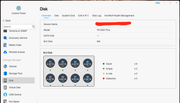
As you can see, all seems well now:
Image
Image

I'm just updating the thread in case someone else will make the same assumptions I did.

As a note, I updated the BIOS as it seems to be a prerequisite for the upcoming full release of TOS 7, which should drop soon. Normally, I would not touch it, unless there are actual issues, a per case situation.

RESOLVED.

Thank you!