Page 10 of 24
Re: TOS 7 Beta Is Available for Testing
Posted: 23 Dec 2025, 01:11
by ChadH42
I have attempted to install TOS7 3 times on my F5-221 NAS. Every time it states that the install was completed but the system never re-boots to complete the install. When I try and manually restart it, the NAS is bricked! I lose the bootloader and have to rebuild the NAS each time.
Any idea what the problem is? I have the right BIOS and TOS6 version as per your Page 1 of this thread.
Re: TOS 7 Beta Is Available for Testing
Posted: 23 Dec 2025, 01:39
by DCCentR
TMEmily wrote: ↑19 Dec 2025, 14:45
Hello, thank you for your detailed description. The Open vSwitch enable operation itself does not change the DHCP or manual configuration mode of the port. The most likely scenario currently is that during the enabling process, the DHCP client process of the first port (LAN 1) encountered an issue, causing it to fail to automatically obtain an IP address as usual. Could you please provide the configuration page information of the first (faulty) port? We need to check its exact status. Thank you for your assistance.
TOS settings:

It seems that the problem was caused by macvlan, which was associated with the first port. I make macvlan this with the following command:
Code: Select all
ip link add host-macvlan link eth0 type macvlan mode bridge
ip addr add 192.168.1.225/27 dev host-macvlan
ip link set host-macvlan up
I bring macvlan up in the running config using these commands, but I don't save it in the config yet.
Re: TOS 7 Beta Is Available for Testing
Posted: 23 Dec 2025, 06:11
by OttO1916
Took me a long time to gather enough courage (on two upgrades I had to Re-Initialize the system), but finally did it.
My F2-221 (my testbox) updated like a charm, quicky and without any issues.
The F2-225 refused to start properly. After login in the web interface just a blank screen. TNASPC said that TNASonline was not running.
Powered down, removed all disks, powered on and off, inserted disks and the system started up OK. Disk conversion went fine.
Happy this time no major issue. Will grab a beer - cheers Terramaster!
Other findings:
- Every time I go to System/Update the update check failed. When I refresh it says current system is the latest version.
- F2-225: Several (not all) shares seem to have disappeared. After recreating them all data within was present again.
Re: TOS 7 Beta Is Available for Testing
Posted: 23 Dec 2025, 08:40
by CursaYang
ChadH42 wrote: ↑23 Dec 2025, 01:11
I have attempted to install TOS7 3 times on my F5-221 NAS. Every time it states that the install was completed but the system never re-boots to complete the install. When I try and manually restart it, the NAS is bricked! I lose the bootloader and have to rebuild the NAS each time.
Any idea what the problem is? I have the right BIOS and TOS6 version as per your Page 1 of this thread.
If the version of the system you are currently running is 6.0.794, installation failures are usually related to the hard disk. Please perform a health check on the hard disk.
Re: TOS 7 Beta Is Available for Testing
Posted: 23 Dec 2025, 22:00
by npclive
abs1ck wrote: ↑22 Dec 2025, 10:47
TMroy wrote: ↑22 Dec 2025, 10:31
I'm seconding the question!
I also ran into the same issue with granting read/write permissions for Docker containers to regular folders, couldn't find a proper solution, and ended up reverting to TOS 6.
Re: TOS 7 Beta Is Available for Testing
Posted: 24 Dec 2025, 01:43
by abs1ck
Dear Support Team, please do not ignore the issue regarding Docker permissions. Thirty containers are unable to start, and the web server is down. We are ready to assist with testing, but such critical bugs must be addressed with hotfixes.
Re: TOS 7 Beta Is Available for Testing
Posted: 24 Dec 2025, 01:47
by ChadH42
CursaYang wrote: ↑23 Dec 2025, 08:40
ChadH42 wrote: ↑23 Dec 2025, 01:11
I have attempted to install TOS7 3 times on my F5-221 NAS. Every time it states that the install was completed but the system never re-boots to complete the install. When I try and manually restart it, the NAS is bricked! I lose the bootloader and have to rebuild the NAS each time.
Any idea what the problem is? I have the right BIOS and TOS6 version as per your Page 1 of this thread.
If the version of the system you are currently running is 6.0.794, installation failures are usually related to the hard disk. Please perform a health check on the hard disk.
Disk health check shows all disks Healthy. I even swapped disk 1 & disk 2 (I have all 5 filled) and the same thing happened.
Re: TOS 7 Beta Is Available for Testing
Posted: 24 Dec 2025, 06:49
by abs1ck
7.0.0309 - not fixed docker permissions problem !!!
Re: TOS 7 Beta Is Available for Testing
Posted: 24 Dec 2025, 12:33
by Joesh
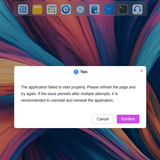
Allready installed TOS 7.0.0299 then upgrade to 7.0.0309, I successfully the update all apps that recommended for update, but everytime I opened an apps from TNAS PC, there is always a delay before opening TOS Desktop and a warning always appears
Re: TOS 7 Beta Is Available for Testing
Posted: 24 Dec 2025, 19:05
by TMEmily
DCCentR wrote: ↑23 Dec 2025, 01:39
TMEmily wrote: ↑19 Dec 2025, 14:45
Hello, thank you for your detailed description. The Open vSwitch enable operation itself does not change the DHCP or manual configuration mode of the port. The most likely scenario currently is that during the enabling process, the DHCP client process of the first port (LAN 1) encountered an issue, causing it to fail to automatically obtain an IP address as usual. Could you please provide the configuration page information of the first (faulty) port? We need to check its exact status. Thank you for your assistance.
TOS settings:
It seems that the problem was caused by macvlan, which was associated with the first port. I make macvlan this with the following command:
Code: Select all
ip link add host-macvlan link eth0 type macvlan mode bridge
ip addr add 192.168.1.225/27 dev host-macvlan
ip link set host-macvlan up
I bring macvlan up in the running config using these commands, but I don't save it in the config yet.
Currently, the TOS system does not have built-in support for macvlan configuration, nor is it adapted for scenarios where macvlan and OVS are used simultaneously. If you need to continue using macvlan, please manually create it after completing all network configurations (including OVS setup), and note that it may need to be reconfigured after each network architecture change.
Thank you for your understanding and support. If you encounter other network issues within the scope of system support, we are always here to provide further assistance.