Page 10 of 31
Re: TOS 6.0.420 Beta Is Available for Testing
Posted: 04 Aug 2024, 19:07
by DCCentR
TMpraj wrote: ↑22 Jul 2024, 21:50
Hello, maybe your NVME was not recognized during the update process. You can try to shut down and reinstall the NVME.
This didn't work
Re: TOS 6.0.420 Beta Is Available for Testing
Posted: 04 Aug 2024, 21:10
by imranalam
After facing many issues should i revert back to TOS5.1 or wait for final release of TOS6(when it will be?)
Re: TOS 6.0.420 Beta Is Available for Testing
Posted: 04 Aug 2024, 21:56
by outkastm
Kanuki wrote: ↑04 Aug 2024, 00:41
Everything almost working fine
but somehow my qBittorrent control panel
in TOS is inaccessible.
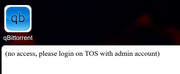
Somehow qBittorrent app is still working fine.
I tried to re-install the app without clearing the config
but it did not solve the issue.
As staded earlier in this topic, all community apps must be fully adapted to be compatible with latest TOS6.
Re: TOS 6.0.420 Beta Is Available for Testing
Posted: 04 Aug 2024, 21:57
by outkastm
imranalam wrote: ↑04 Aug 2024, 09:22
Tailsacle and ZeroTier apps also working asking for open with admin , if already open with admin
All community apps must be apapted to work on latest TOS6
Re: TOS 6.0.420 Beta Is Available for Testing
Posted: 05 Aug 2024, 04:45
by golgoth
From bad to worse: randomly TNAS online stops working, giving me this error
502 Bad Gateway
net/http: timeout awaiting response headers
I have to disable and reenable it locally to make it work again.
Re: TOS 6.0.420 Beta Is Available for Testing
Posted: 05 Aug 2024, 13:19
by TMroy
Thank you for your feedback, the new tnas.online does has some issue to be fixed. we will fix them and release new version soon.
Re: TOS 6.0.420 Beta Is Available for Testing
Posted: 05 Aug 2024, 17:37
by Kanuki
TOS Update 6.0.229 Beta was very stable for my F5-422 but
then TOS Update 6.0.420 Beta gave me a total NAS hung up
while transferring the file to my PC.
Re: TOS 6.0.420 Beta Is Available for Testing
Posted: 05 Aug 2024, 18:33
by TMzethar
Kanuki wrote: ↑05 Aug 2024, 17:37
TOS Update 6.0.229 Beta was very stable for my F5-422 but
then TOS Update 6.0.420 Beta gave me a total NAS hung up
while transferring the file to my PC.
Is this a coincidence or is it reproducible? If it is reproducible, we recommend you to contact the technical support e-mail or the official customer service window to make an appointment with an engineer to assist you remotely.
Re: TOS 6.0.420 Beta Is Available for Testing
Posted: 06 Aug 2024, 08:32
by abs1ck
Hi guys,
After updating the TOS to build 420, I have been unable to deploy a Pi-hole container, and I noticed that port 53 is already occupied by the systemd-resolved service. My router does not support configuring DNS queries to a non-standard port, so I cannot change the port for Pi-hole.
Could you please advise on how to properly set up Pi-hole in this situation? Is it possible to move the systemd-resolved service to another port or configure Pi-hole to work alongside the existing configuration?
I would also appreciate any recommendations for alternative solutions that could help me use Pi-hole without port conflicts.
Thank you for your assistance!

Re: TOS 6.0.420 Beta Is Available for Testing
Posted: 06 Aug 2024, 18:10
by fcs001fcs
This is mostly for other users that may have the same issue with SMB Shares and Passwords.
I did a fresh install of the new TOS 6.0.420 and on trying to use my current "Super User" login/password for the initial setup, it would not accept it with any special characters included. I changed the password to only characters and numbers and continued the process, not noting it too much.
I continued to setup my shares and all the settings for the F4-423 TM NAS.
When I got to the SAMBA (SMB shares) setup I ran into an issue of not connecting to the SMB Shares with any of my prior setup User login/passwords. After hours and hours of going down incorrect avenues of thinking my SMB settings on my windows machines were causing the problem, I realized the Super User login/password worked but the other User's login/password did not.
When I changed the User's passwords to only characters and numbers, then they worked fine.
To confirm the issue, I generated a Test Share on my NAS and generated a Test User assigned to that share with a password with special characters in the password. It would not connect to the SMB Share. I then just removed the special characters from the password and then it worked fine.
I did toggle the "Advance Settings" for the "Users" "Contains special characters" but this still did not allow me to use special characters in the passwords.
Hopefully this helps other TM owners in setting up their NAS.
Question to TM: Is there a setting I can change to allow Special Characters (!@#$% etc...) in my User's passwords?