Page 10 of 10
Re: How to add RAM module to TerraMaster NAS
Posted: 30 Nov 2023, 19:38
by Gremlin
ps: If you go back several pages in this thread, you will see
m471a1k43cb1-ctd 8gb ddr4 2666mhz
mentioned as not working, but that was, I believe, before TM policy change on 3rd party RAM. You may just have to try it and see.
Re: How to add RAM module to TerraMaster NAS
Posted: 08 Dec 2023, 03:39
by candyman
If it is still of any interest here, I can confirm that
Sk hynix 4 GB DDR4-3200 is running without any problems in my F4-423 !
Re: How to add RAM module to TerraMaster NAS
Posted: 07 Jun 2024, 17:26
by SquarePeg
Is it possible to add to an F5-422? Also is there a slot to add an M.2 drive?
Re: How to add RAM module to TerraMaster NAS
Posted: 07 Jun 2024, 18:21
by Gremlin
SquarePeg wrote: ↑07 Jun 2024, 17:26
Is it possible to add to an F5-422? Also is there a slot to add an M.2 drive?
99% certain the memory can be upgraded (within limits). 99% certain there is no M2 slot.
Re: How to add RAM module to TerraMaster NAS
Posted: 25 Nov 2024, 09:44
by 000joshua000
Hello,
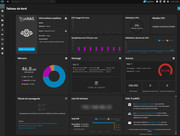
For those who have The TerraMaster F8 SSD Plus, it is indicated in the documentation that this NAS has a maximum memory capacity of 32Gb (1x 32Gb). However, in my MinisForum MS-01, it was specified that the maximum capacity was 64Gb (2x32Gb) and I installed 96Gb (2x48Gb) without problem. So I decided to test a 48Gb stick on the TerraMaster F8, and it works perfectly!!!
Re: How to add RAM module to TerraMaster NAS
Posted: 18 Dec 2024, 10:55
by HarrisBockoven
This is an old topic, but I just purchased a F2-424 Max. Does that have issues with 3rd party ram or is the problem resolved? 3rd party is cheaper.
Thank you.
Re: How to add RAM module to TerraMaster NAS
Posted: 01 Jan 2025, 05:32
by gosciak
000joshua000 wrote: ↑25 Nov 2024, 09:44
Hello,
For those who have The TerraMaster F8 SSD Plus, it is indicated in the documentation that this NAS has a maximum memory capacity of 32Gb (1x 32Gb). However, in my MinisForum MS-01, it was specified that the maximum capacity was 64Gb (2x32Gb) and I installed 96Gb (2x48Gb) without problem. So I decided to test a 48Gb stick on the TerraMaster F8, and it works perfectly!!!
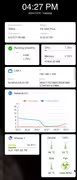
I have a Terramaster F8 SSD Plus and I have successfully upgraded to 48GB RAM with Crucial RAM 48GB DDR5 5600MHz (or 5200MHz or 4800MHz) Laptop Memory CT48G56C46S5
Re: How to add RAM module to TerraMaster NAS
Posted: 13 Jan 2025, 00:41
by adktk
gosciak wrote: ↑01 Jan 2025, 05:32
000joshua000 wrote: ↑25 Nov 2024, 09:44
Hello,
For those who have The TerraMaster F8 SSD Plus, it is indicated in the documentation that this NAS has a maximum memory capacity of 32Gb (1x 32Gb). However, in my MinisForum MS-01, it was specified that the maximum capacity was 64Gb (2x32Gb) and I installed 96Gb (2x48Gb) without problem. So I decided to test a 48Gb stick on the TerraMaster F8, and it works perfectly!!!
I have a Terramaster F8 SSD Plus and I have successfully upgraded to 48GB RAM with Crucial RAM 48GB DDR5 5600MHz (or 5200MHz or 4800MHz) Laptop Memory CT48G56C46S5
Hi gosciak,
Would you check what firmware version of your F8 SSD Plus machine? I have no luck to install 48GB RAM to my F8 SSD Plus.
Tim
Re: How to add RAM module to TerraMaster NAS
Posted: 13 Jan 2025, 00:49
by adktk
gosciak wrote: ↑01 Jan 2025, 05:32
000joshua000 wrote: ↑25 Nov 2024, 09:44
Hello,
For those who have The TerraMaster F8 SSD Plus, it is indicated in the documentation that this NAS has a maximum memory capacity of 32Gb (1x 32Gb). However, in my MinisForum MS-01, it was specified that the maximum capacity was 64Gb (2x32Gb) and I installed 96Gb (2x48Gb) without problem. So I decided to test a 48Gb stick on the TerraMaster F8, and it works perfectly!!!
I have a Terramaster F8 SSD Plus and I have successfully upgraded to 48GB RAM with Crucial RAM 48GB DDR5 5600MHz (or 5200MHz or 4800MHz) Laptop Memory CT48G56C46S5
Hi gosciak,
Would you check what firmware version of your F8 SSD Plus machine? I have no luck to install 48GB RAM to my F8 SSD Plus.
Tim