Page 9 of 12
Re: TOS 6.0.694 (X86) is Released for Update
Posted: 15 Jun 2025, 04:01
by mmick
For now, working fine on my F4-423 but I have a HUGE suggestion:
please add to the FILE MANAGER the ability to copy like a desktop file manager, where it will copy new folders and files and ask if I want to overwrite the already existing ones (NO / ALWAYS / ONCE).
ATM it creates a second folder and doubles what is already there
Re: TOS 6.0.694 (X86) is Released for Update
Posted: 15 Jun 2025, 09:42
by TMeric
mmick wrote: ↑15 Jun 2025, 04:01
Thank you for your suggestion. I have forwarded your request to the relevant product team for evaluation.
Re: TOS 6.0.694 (X86) is Released for Update
Posted: 15 Jun 2025, 16:30
by mmalchuk
jpeckinp wrote: ↑02 Jun 2025, 07:29
3. Network Interface page: Nothing ever populates.
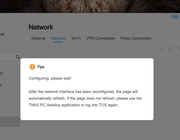
after an upgrade 6.0.648->6.0.694 have the same issue. how to deal with it?
Re: TOS 6.0.694 (X86) is Released for Update
Posted: 15 Jun 2025, 16:36
by mmalchuk
IrisLi wrote: ↑02 Jun 2025, 11:58
Regarding the network and UPS display issues, we recommend performing a system reboot first, then verify if the problems persist.
reboot didn't helps
IrisLi wrote: ↑02 Jun 2025, 11:58
To view log events, please go to the Support & Help page and enable debug mode.
The system will automatically generate relevant diagnostic logs when the issue recurs.
Hope this helps. Wishing you a great day!
debug can't be set. looks like the another one issue for this upgrade.
Re: TOS 6.0.694 (X86) is Released for Update
Posted: 15 Jun 2025, 16:37
by mmalchuk
fordrwd4ever wrote: ↑05 Jun 2025, 15:10
Fixed it myself, turns out that the NetworkManager service was not started anymore.
By using the following command it works again :
systemctl enable NetworkManager.service
Code: Select all
tnas@tnas-f4-423:~# systemctl enable NetworkManager.service
Failed to enable unit: Unit file /etc/systemd/system/NetworkManager.service is masked.
Re: TOS 6.0.694 (X86) is Released for Update
Posted: 15 Jun 2025, 17:39
by TMeric
mmalchuk wrote: ↑15 Jun 2025, 16:30
jpeckinp wrote: ↑02 Jun 2025, 07:29
3. Network Interface page: Nothing ever populates.
after an upgrade 6.0.648->6.0.694 have the same issue. how to deal with it?
Could you please confirm whether this issue occurred after upgrading from version 6.0.648 or 6.0.688 to 6.0.694?
Please note that version 6.0.688 is a test version, and the network modifications in the 688 test version were not merged into the official 6.0.694 release. Upgrading directly from 688 may result in some unforeseen issues.
If the issue occurred after upgrading from 6.0.648 to 6.0.694, we would need to further verify the situation.
Re: TOS 6.0.694 (X86) is Released for Update
Posted: 15 Jun 2025, 17:42
by mmalchuk
TMeric wrote: ↑15 Jun 2025, 17:39
after an upgrade 6.0.648->6.0.694 have the same issue. how to deal with it?
6.0.648->6.0.694
Re: TOS 6.0.694 (X86) is Released for Update
Posted: 15 Jun 2025, 18:15
by TMeric
Thank you for your assistance. We will further verify this issue in our experiment.
Re: TOS 6.0.694 (X86) is Released for Update
Posted: 15 Jun 2025, 18:21
by mmalchuk
TMeric wrote: ↑15 Jun 2025, 18:15
Thank you for your assistance. We will further verify this issue in our experiment.
will help with network configuration after manually set ip via TNAS PC and enter via ssh.
but why it didn't configure network after reboot?
Re: TOS 6.0.694 (X86) is Released for Update
Posted: 15 Jun 2025, 18:25
by mmalchuk
TMeric wrote: ↑15 Jun 2025, 18:15
Thank you for your assistance. We will further verify this issue in our experiment.
another one issue after this upgrade:
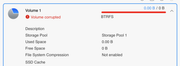
how to dealt with it?