Page 9 of 31
Re: TOS 6.0.420 Beta Is Available for Testing
Posted: 03 Aug 2024, 12:23
by TMroy
Gremlin wrote: ↑03 Aug 2024, 05:19
And there appear to be all sorts of odd issues with installation and enablement of standard apps on a new bare installation of 6.0.420.
Yes, we have known these issues. They will be fixed in the next update.
Re: TOS 6.0.420 Beta Is Available for Testing
Posted: 04 Aug 2024, 00:41
by Kanuki
Everything almost working fine
but somehow my qBittorrent control panel
in TOS is inaccessible.
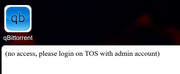
Somehow qBittorrent app is still working fine.
I tried to re-install the app without clearing the config
but it did not solve the issue.
Re: TOS 6.0.420 Beta Is Available for Testing
Posted: 04 Aug 2024, 06:10
by golgoth
Asking for the fourth time how can i choose EU servers for TNAS online.
Re: TOS 6.0.420 Beta Is Available for Testing
Posted: 04 Aug 2024, 09:22
by imranalam
Tailsacle and ZeroTier apps also working asking for open with admin , if already open with admin
Re: TOS 6.0.420 Beta Is Available for Testing
Posted: 04 Aug 2024, 10:40
by TMeric
golgoth wrote: ↑04 Aug 2024, 06:10
Asking for the fourth time how can i choose EU servers for TNAS online.
TNAS.online will automatically select the fastest server based on your location. You cannot manually specify a particular server.
Re: TOS 6.0.420 Beta Is Available for Testing
Posted: 04 Aug 2024, 13:18
by golgoth
TMeric wrote: ↑04 Aug 2024, 10:40
golgoth wrote: ↑04 Aug 2024, 06:10
Asking for the fourth time how can i choose EU servers for TNAS online.
TNAS.online will automatically select the fastest server based on your location. You cannot manually specify a particular server.
Then TNAS online is wrong, because i'm from Italy and it chose US. It's slower, i need to go back to EU.
Re: TOS 6.0.420 Beta Is Available for Testing
Posted: 04 Aug 2024, 14:07
by TMeric
golgoth wrote: ↑04 Aug 2024, 13:18
TMeric wrote: ↑04 Aug 2024, 10:40
golgoth wrote: ↑04 Aug 2024, 06:10
Asking for the fourth time how can i choose EU servers for TNAS online.
TNAS.online will automatically select the fastest server based on your location. You cannot manually specify a particular server.
Then TNAS online is wrong, because i'm from Italy and it chose US. It's slower, i need to go back to EU.
If you are accessing the NAS remotely through a computer's browser, you can first log in to the NAS using TNAS ID on the TNAS PC, which will simultaneously activate a virtual network. At this point, you can access the NAS in the browser by entering the virtual IP address followed by the port (for example: 100.88.0.1:8181). This is a new feature of TNAS.online that significantly boosts speed.
Re: TOS 6.0.420 Beta Is Available for Testing
Posted: 04 Aug 2024, 15:46
by golgoth
And there's no way to revert to EU?
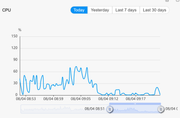
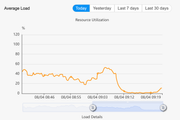
Another issue: i found out that qbittorrent increases overall loading and CPU usage A LOT, making the system slow and unstable (see attached screenshots, the chart reverted when i turned qbittorrent off). With previous TOS 6 version everything was fine.
Re: TOS 6.0.420 Beta Is Available for Testing
Posted: 04 Aug 2024, 18:06
by TMeric
golgoth wrote: ↑04 Aug 2024, 15:46
And there's no way to revert to EU?
Another issue: i found out that qbittorrent increases overall loading and CPU usage A LOT, making the system slow and unstable (see attached screenshots, the chart reverted when i turned qbittorrent off). With previous TOS 6 version everything was fine.
1. Yes, there is no way to manually select a forwarding server. The system will automatically choose the best server. It's dynamic. So, for now, just remember the domain tnas.online/yourtnasid for remote access. Of course, we still recommend using TNAS PC on your fixed computer to log in and activate the TNAS.online virtual network. This way, you can use a virtual IP for remote NAS access.
2. Thank you for your feedback. We will verify the issue you mentioned about qBittorrent consuming a large amount of system resources when running.
Re: TOS 6.0.420 Beta Is Available for Testing
Posted: 04 Aug 2024, 18:56
by DCCentR
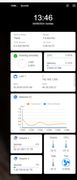
I turned the NAS off to replace the thermal interface, and after turning it back on I noticed the cooler wasn't spinning (auto mode). After turning on full speed, the cooler started spinning.
Does the current version of TOS6 have a lower limit of CPU temperature at which the cooler does not spin up?