Page 8 of 9
Re: Instructions for Adding HDDs to RAID
Posted: 31 Jul 2025, 09:01
by TMjack
If the original TRAID array consists of two 8TB hard drives, any additional drives added to this TRAID must have a capacity equal to or larger than 8TB. For example, a 6TB drive cannot be added to the existing TRAID array.
Re: Instructions for Adding HDDs to RAID
Posted: 08 Sep 2025, 20:03
by Photoroom
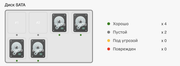
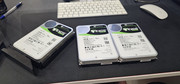
Good afternoon. I installed disks of different sizes and different brands in bays 3-6, everything works, everything is fine. Then I bought 22 TB Seagate disks - 4 pcs. to replace the smaller ones and fill the empty 1-2 slots. The result is that the nas f6-424 max sees them (the indicator is on), but I cannot expand the storage with them. It does not show up in the list of disks, as if it does not exist, but the indicator on the nas itself is on, indicating that the disk is there. Help solve this problem.
Re: Instructions for Adding HDDs to RAID
Posted: 08 Sep 2025, 22:33
by Gremlin
Exactly how did you attempt the expansion? It
sounds as if you simply removed 2 6TB HDD and inserted 4x22TB drives. That, in itself, would be a problem since you can only change one HDD at a time. {short version}.
Re: Instructions for Adding HDDs to RAID
Posted: 08 Sep 2025, 23:02
by Photoroom
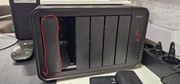
Нет, поставил все верно. 1 диск 22тб в 1 пустой слот для расширения сначала одного диска, следом ставил бы во 2 слот, далее уже по одному менял бы уже 6 и 6 ТБ
Re: Instructions for Adding HDDs to RAID
Posted: 08 Sep 2025, 23:04
by Photoroom
Вопрос состоит в том, что диск в 1 слоте на 22 ТБ стоит, индикатор светится, а в настройках хранилища нет этого диска
Re: Instructions for Adding HDDs to RAID
Posted: 09 Sep 2025, 18:15
by CursaYang
Photoroom wrote: ↑08 Sep 2025, 23:04
Вопрос состоит в том, что диск в 1 слоте на 22 ТБ стоит, индикатор светится, а в настройках хранилища нет этого диска
Can you install the two 6TB hard drives that can normally be recognized into the first and second slots for testing? This can determine if it's a slot issue.
Additionally, you can insert the unrecognizable 22TB hard drive into the third to sixth slots to determine if it's a hard drive issue.
Re: Instructions for Adding HDDs to RAID
Posted: 10 Sep 2025, 13:58
by Photoroom
Good day. I think I found the reason, unfortunately. It turns out that the storage does not read SAS disks, although one of the sites stated this in the specifications, but alas. I wasted money on so many. If I am still wrong, please give me a solution on how to connect it.
CursaYang wrote: ↑09 Sep 2025, 18:15
<font dir="auto" style="vertical-align: inherit;"><font dir="auto" style="vertical-align: inherit;">
Photoroom wrote: ↑08 Sep 2025, 23:04 </font></font>
<font dir="auto" style="vertical-align: inherit;"><font dir="auto" style="vertical-align: inherit;">
</font></font>
<font dir="auto" style="vertical-align: inherit;"><font dir="auto" style="vertical-align: inherit;">Вопрос состоит в том, что диск в 1 слоте на 22 ТБ стоит, индикатор светится, а в запасе нет этого диска </font></font>
<font dir="auto" style="vertical-align: inherit;"><font dir="auto" style="vertical-align: inherit;">
</font></font>
<font dir="auto" style="vertical-align: inherit;"><font dir="auto" style="vertical-align: inherit;">Может вы устанавливаете два жестких диска по 6 ТБ, которые обычно распознаются, в первый и второй слоты для тестирования? Это может определить, является ли это проблемой слота. </font></font>
<font dir="auto" style="vertical-align: inherit;"><font dir="auto" style="vertical-align: inherit;">Кроме того, вы можете вставить неизвестный жесткий диск емкостью 22 ТБ в слоты с третьего по шестой, чтобы определить, проблема ли это с жестким диском.</font></font>
Re: Instructions for Adding HDDs to RAID
Posted: 10 Sep 2025, 14:16
by CursaYang
You are right, our NAS does not support SAS hard drives; it only supports standard SATA hard drives and NVMe SSDs.
Re: Instructions for Adding HDDs to RAID
Posted: 24 Sep 2025, 02:29
by heliav8r
Are these instructions the same for an F8 Plus, all SSD NAS? ...other than hot plugging a drive.
FYI, I'm running TOS 6
Re: Instructions for Adding HDDs to RAID
Posted: 24 Sep 2025, 16:50
by TMzethar
This applies to SATA slots for all NAS models.
Due to the M.2 SSD slot not supporting hot swapping, a step needs to be inserted - connect a new M.2 SSD while it is turned off, start the NAS, and continue with the next steps.