

Hi, we have already contacted you via private message on the forum. Please check your inbox and provide your email address there. We will then send you the relevant firmware package and instructions. Thank you!Amatsumara wrote: ↑13 Jul 2026, 21:23 Unfortunately, I flashed an incorrect BIOS file by mistake. As a result, my F6-424 Max is now completely bricked and will not power on. I need the raw BIOS dump file (.bin or .rom) to restore the chip directly using a hardware EEPROM programmer.
Can you send it to me, please?
How to Properly Install and Use TOS 7 on the 424 Series TNAS
Re: How to Properly Install and Use TOS 7 on the 424 Series TNAS
To contact our team, please send email to following addresses, remember to replace (at) with @:
Support team: support(at)terra-master.com (for technical support only)
Support team: support(at)terra-master.com (for technical support only)


Re: How to Properly Install and Use TOS 7 on the 424 Series TNAS
Finally gave up TOS 7 on my F4-424 with D4-320 (2 Traid volume), too much bug, took me sometime to return to TOS 6 which is more stable (need time to rebuild Plex server and Jellyfin Server with Tailscale.) The bugs I encouter are 1) Trouble updating storage pool and nothing show after you click storage pool 2) Can't access Jellyfin anymore 3) The D4-320 don't sleep and have to restart F4-424 to make it sleep, did not use the Nas all night but D4-320 get hot and loud and keep spinning. 4) Tailscale always need to restart. 5) Some other small bugs. Since I use it mainly as a Plex and Jellyfin Server and second backup files storage. I think I better go back to TOS 6 and I am lucky after installing back TOS 6 to the NVME M.2 SSD, put back the drives and it is all working. Just don't want to be tester, good luck to others who are using TOS 7.
F4-424
Two D4-320
Two D4-320

Re: How to Properly Install and Use TOS 7 on the 424 Series TNAS
It's unfortunate that TOS 7 isn't quite meeting your expectations right now.apvm wrote: ↑23 Jul 2026, 01:14 Finally gave up TOS 7 on my F4-424 with D4-320 (2 Traid volume), too much bug, took me sometime to return to TOS 6 which is more stable (need time to rebuild Plex server and Jellyfin Server with Tailscale.) The bugs I encouter are 1) Trouble updating storage pool and nothing show after you click storage pool 2) Can't access Jellyfin anymore 3) The D4-320 don't sleep and have to restart F4-424 to make it sleep, did not use the Nas all night but D4-320 get hot and loud and keep spinning. 4) Tailscale always need to restart. 5) Some other small bugs. Since I use it mainly as a Plex and Jellyfin Server and second backup files storage. I think I better go back to TOS 6 and I am lucky after installing back TOS 6 to the NVME M.2 SSD, put back the drives and it is all working. Just don't want to be tester, good luck to others who are using TOS 7.
On point 1) — this might be related to:
viewtopic.php?t=10354
On point 2) — since you're dealing with a large amount of data, the permission conversion may not have finished yet, or the app permissions might not be set correctly. If it's taking too long, you can often speed things up by just reapplying the permissions manually. TOS 7 is much faster at handling permissions now.
On point 3) — the new version does support USB DAS drive sleep. If sleep still isn't working, check if any tasks are constantly accessing the drives and keeping them awake.
On point 4) — we'll keep an eye out for anything related. If you have more details, feel free to share them.
To contact our team, please send email to following addresses, remember to replace (at) with @:
Technical team: support(at)terra-master.com (for technical support)
Service team: service(at)terra-master.com (for purchasing, return, replacement, RMA service)
Technical team: support(at)terra-master.com (for technical support)
Service team: service(at)terra-master.com (for purchasing, return, replacement, RMA service)
Re: How to Properly Install and Use TOS 7 on the 424 Series TNAS
Thanks, I will wait for a while before update to TOS 7 since TOS 6 is working fine with Jellyfin and files backup storage. To be honest, Terramaster is still a bit behind Synology and Asustor, the reason I upgraded my Synology and Asustor to Terramaster F4-424 and D4-320 is becaue they are not expensive at all during a special sales and F4-424 cpu is very good for Jellyfin. Joined the team and looking forward Terramaster will improve their software.
F4-424
Two D4-320
Two D4-320
Re: How to Properly Install and Use TOS 7 on the 424 Series TNAS
Thank you for your support. We'll keep working on making our software better.
To contact our team, please send email to following addresses, remember to replace (at) with @:
Technical team: support(at)terra-master.com (for technical support)
Service team: service(at)terra-master.com (for purchasing, return, replacement, RMA service)
Technical team: support(at)terra-master.com (for technical support)
Service team: service(at)terra-master.com (for purchasing, return, replacement, RMA service)


Re: How to Properly Install and Use TOS 7 on the 424 Series TNAS
Hi! I'm a little bit confused about this upgrade.
I'm reading all the threads (and the update documentation) I can find, and all I see is that the only option is a manual update and there are no automatic updates. However, when I go to the System Update section and check for available updates, I see a pop-up notification for the new version 7.0.0747, with buttons to download it or download and install it. Is this possible? Or will clicking any button prompt me to review it or redirect me here?
My hardware, firmware and OS versions:
F4-424 Pro 16Gb
MADN0101.V05
OS 6.0.794-01324
Thank you!
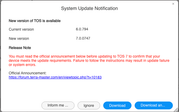
I'm reading all the threads (and the update documentation) I can find, and all I see is that the only option is a manual update and there are no automatic updates. However, when I go to the System Update section and check for available updates, I see a pop-up notification for the new version 7.0.0747, with buttons to download it or download and install it. Is this possible? Or will clicking any button prompt me to review it or redirect me here?
My hardware, firmware and OS versions:
F4-424 Pro 16Gb
MADN0101.V05
OS 6.0.794-01324
Thank you!
F4-424 Pro - TOS 6


Re: How to Properly Install and Use TOS 7 on the 424 Series TNAS
On-line updates are being rolled out by machine versions. Looks like you just hit lucky.
F5-221 TOS7.0.1278 - 4x4TB (Ironwolf) Traid
F2-424 TOS7.0.1278 - 2x500GB nvme (P3) Traid, 2x6TB HDD (HGST) Traid
F2-221 TOS7.0.1278 - 1x3TB Ext4, 1x4TB Btrfs
F2-425+ TOS7.0.1278 - 2x500GB nvme (P3) Traid, 2x6TB HDD (EXOS) Traid
F2-424 TOS7.0.1278 - 2x500GB nvme (P3) Traid, 2x6TB HDD (HGST) Traid
F2-221 TOS7.0.1278 - 1x3TB Ext4, 1x4TB Btrfs
F2-425+ TOS7.0.1278 - 2x500GB nvme (P3) Traid, 2x6TB HDD (EXOS) Traid

Re: How to Properly Install and Use TOS 7 on the 424 Series TNAS
Yes, that's correct. Users running TOS 6 will receive the TOS 7 update push gradually, depending on the model.
To contact our team, please send email to following addresses, remember to replace (at) with @:
Support team: support(at)terra-master.com (for technical support only)
Service team: service(at)terra-master.com (for purchasing, return, replacement, RMA service)
Support team: support(at)terra-master.com (for technical support only)
Service team: service(at)terra-master.com (for purchasing, return, replacement, RMA service)
Re: How to Properly Install and Use TOS 7 on the 424 Series TNAS
Just in case i wanted to upgrade to TOS 7, I have to ask a question, my TOS 6 F4-424 has a nvme 256GB sdd as system drive, volume 1, and 4 drives Traid Volume 2, I also have a D4-320 with 4 drives connected to it, different storage pool and Traid volume 3, how do I upgrade to TOS 7 properly?
I googled and the result told me to turn off D4-320 before the upgrade and turn it back on after the upgrade, is that true?
Apprciate if you can inform me the proper instruction on how to upgrade to TOS 7, thanks in advance.
I googled and the result told me to turn off D4-320 before the upgrade and turn it back on after the upgrade, is that true?
Apprciate if you can inform me the proper instruction on how to upgrade to TOS 7, thanks in advance.
F4-424
Two D4-320
Two D4-320
Re: How to Properly Install and Use TOS 7 on the 424 Series TNAS
Hey @TMroy and @Gremlin, thank you for your comments
Finally I updated from the system notification and it seems that everything worked out. But I have some feedback. After download the update the system show the "Unzipping the software package. Please wait!" and still after a lot of time (almost 45 minutes) and seems totally freezed. After waiting all this time, I opened a new tab and accessed the NAS. I now saw the new login screen for version 7.0. Once logged in, I updated the permissions and upgraded to the latest version. Everything seems to be working.
Perhaps it would be better to improve the status update process.
Regards!
F4-424 Pro - TOS 6