Page 7 of 9
Re: TOS 6.0.650 (X86) is Released for Update
Posted: 11 Apr 2025, 08:28
by TMnick
Lex wrote: ↑09 Apr 2025, 17:52
I apologize for the issue you encountered. I'm not sure if the problem still persists. You can try restarting your device to see if it resolves the media indexing failure. If it still doesn't work, please contact customer service to schedule a remote session with a technical engineer to assist you.
Re: TOS 6.0.650 (X86) is Released for Update
Posted: 11 Apr 2025, 19:00
by jositodc
TNAS F2-221
TOS: 6.0.650
Hello:
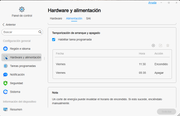
Since TOS version 6, it's been happening to me that the scheduled startup I have always shuts down at the specified time, but never turns on. I have to do it manually.
Excuse my English, it's from Google Translate.
Re: TOS 6.0.650 (X86) is Released for Update
Posted: 11 Apr 2025, 21:11
by GevinKe
jositodc wrote: ↑11 Apr 2025, 19:00
TNAS F2-221
TOS: 6.0.650
Hello:
Since TOS version 6, it's been happening to me that the scheduled startup I have always shuts down at the specified time, but never turns on. I have to do it manually.
Excuse my English, it's from Google Translate.
We sincerely apologize for the inconvenience caused. We are aware that the scheduled power on/off feature may occasionally fail to take effect. This issue is already on our radar and will be addressed in the upcoming version. Thank you for your patience and continued support.
Re: TOS 6.0.650 (X86) is Released for Update
Posted: 11 Apr 2025, 21:58
by OttO1916
Same issue here. I just gave up, and stuck a fingerbot on the power button. Problem solved...
Re: TOS 6.0.650 (X86) is Released for Update
Posted: 11 Apr 2025, 22:03
by GevinKe
We will resolve this issue as soon as possible in the upcoming version. Thank you for your understanding and support.
Re: TOS 6.0.650 (X86) is Released for Update
Posted: 14 Apr 2025, 00:54
by Arendatr
The USB connection to the F2-423 breaks every hour. I have to pull out and plug in the USB cable.
Re: TOS 6.0.650 (X86) is Released for Update
Posted: 14 Apr 2025, 02:41
by Murrayb
I get an error message when I try to download the update from within Control Panel > System >Update that tells me to manually download it, but I cannot find the download. Where is it on the site?
Re: TOS 6.0.650 (X86) is Released for Update
Posted: 14 Apr 2025, 16:01
by crisisacting
Murrayb wrote: ↑14 Apr 2025, 02:41
I get an error message when I try to download the update from within Control Panel > System >Update that tells me to manually download it, but I cannot find the download. Where is it on the site?
Most of the newer TOS 6.× builds are not available for direct download.
Re: TOS 6.0.650 (X86) is Released for Update
Posted: 14 Apr 2025, 19:35
by TMzethar
We suspect that this might be due to the sleep setting on your USB box. You can verify this guess and resolve the issue by creating a custom schedule to run every one and a half hours with the following command (example):
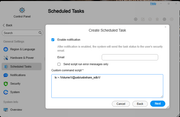
Please use the following instructions to determine the directory of your own USB drive:
Since the system only supports repeating tasks every hour at minimum, you can set two tasks half an hour apart to read the USB drive every half hour.
Re: TOS 6.0.650 (X86) is Released for Update
Posted: 14 Apr 2025, 19:51
by TMzethar
You can download the installation package from the download center. Then, you may find that there are no TOS6 builds available for your specific model. This is to prevent users with older versions, who may not read the instructions, from mistakenly using an incompatible version and encountering issues. If you are certain that your NAS can install TOS6, you can obtain TOS6 builds from the download list of other models.