TOS 6.0.648 (X86) is Released for Update

Official news about TOS, mobile app, PC app updates or beta releases.
User avatar
TheBacons
Posts: 0
Joined: 29 Dec 2024, 03:37
Germany

Re: TOS6.0 Main Web Interface Failure (502 Bad Gateway) - Need Terminal-Based Repair Options

Post by TheBacons »

Subject: TOS 6.0 Main Web Interface Failure (502 Bad Gateway) - Need Terminal-Based Repair Options**

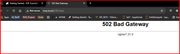
I'm experiencing issues with my TNAS F4-424MAX running TOS 6.0.648. The problem started after I deleted files to free up system space on the limited 8GB system partition. Now I'm getting a persistent "502 Bad Gateway" error when trying to access the main TOS web interface (both via TNAS.local and direct IP address).

Current situation:
- Full SSH/terminal access via Putty works perfectly
- All Docker containers and their web interfaces function normally
- I Can create and manage Docker images/containers via command line
- All data volumes and storage appear intact

Troubleshooting attempted:
- Followed all support team suggestions
- Reinstalled nginx/1.21.0 from /etc.default
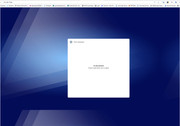
- Attempted reinstall by removing all disks but received "no disk detected - please install disk(s)" error)
-I have downloaded the latest update and reinstall files which are on

I need assistance in the following areas:
1. Is there a way to repair/reinstall just the TOS web interface through SSH terminal?
2. If not, is there a procedure for complete TOS reinstall via a SSH terminal that preserves my data and Docker setup and existing backup data volumes?
3. Instructions for rebuilding/repairing the boot disk too

Critical concern: Will a complete reinstall preserve my volume data? Previous TOS versions warned about disk reformatting during reinstall.

I'd appreciate any guidance on resolving this issue without losing my current configuration to data on the volumes setup.
Has anyone in the community encountered a similar issue or found a way to repair TOS without reformatting disks or losing data? I'd greatly appreciate any insights, tips, or experiences you might be willing to share - especially if you've managed to recover from a similar situation!

Thank you for your help! I'm trying to resolve this without losing my current data and configuration.
Image

Image
User avatar
Lex
Posts: 44
Joined: 13 Mar 2024, 05:07
Russia

Re: TOS 6.0.648 (X86) is Released for Update

Post by Lex »

[2025/03/07 19:18:01] minidlna.c:1287: warn: Starting MEDIA_INDEX version 6.1.58_2024.08.09
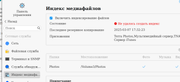
[2025/03/07 19:18:01] minidlna.c:341: fatal: ERROR: Failed to connect postgres database! Exiting...

Try enable media index.

Image
After deleting all files from @* directories, and factory reset, all work normal
F4-423
User avatar
TMzethar
TM Support
Posts: 2819
Joined: 27 Oct 2020, 16:43

Re: TOS6.0 Main Web Interface Failure (502 Bad Gateway) - Need Terminal-Based Repair Options

Post by TMzethar »

TheBacons wrote: 07 Mar 2025, 18:00
It is difficult to determine if you have deleted any relevant files; attempting to recover web page files may not be successful. Reinstalling TOS6 typically does not clear your APP or Docker data (which are all located in volume directories), provided that your HDDs meet partition standards. However, if it prompts about 'lost/deleted/formatted data,' stop immediately and contact technical support via email or the official website's customer service to resolve the issue.
To contact our team, please send email to following addresses, remember to replace (at) with @:
Technical team: support(at)terra-master.com (for technical support)
Service team: service(at)terra-master.com (for purchasing, return, replacement, RMA service)
User avatar
TheBacons
Posts: 0
Joined: 29 Dec 2024, 03:37
Germany

Re: TOS 6.0.648 (X86) is Released for Update

Post by TheBacons »

Thanks TMzethar, I tried to re-install, but after removing all disks, I just got the message "No disk detected - Please insert disks". If you look at the 2nd screenshot, you'll see the TOS webpage I got.

Do you have instructions on how to rebuild the USB boot disk?
User avatar
TMlinda
TM Support
Posts: 276
Joined: 13 Jun 2022, 16:57

Re: TOS 6.0.648 (X86) is Released for Update

Post by TMlinda »

addx972 wrote: 28 Feb 2025, 09:02
It has been verified that some devices may have permission issues that cause the shutdown plan to be invalid.
Please wait for the subsequent version to fix it.
Currently, you can try to execute the following command in the terminal to modify the file permissions to make the shutdown plan effective:

Code: Select all

chmod 644 /etc/crontab
To contact our team, please send email to following addresses, remember to replace (at) with @
Technical team: support(at)terra-master.com (for technical support)
Service team: service(at)terra-master.com (for purchasing, return, replacement, RMA service)
User avatar
tanktarta
Posts: 18
Joined: 04 May 2024, 17:40
Great Britain

Re: TOS 6.0.648 (X86) is Released for Update

Post by tanktarta »

tanktarta wrote: 06 Mar 2025, 23:26 Well I finally got frustrated enough to reinstall TOS (using Factory Reset from the UI).
And I now know this is where I lost the docker containers. While just a re-install of TOS is fine, a Factory Reset does uninstall all apps (i.e. "@apps" directory). It does this by literally executing a "rm -fr /path/to/@apps/appname" for every app during the reset. This would be fine, but it appears that all docker meta-data, images, containers etc are kept in that app directory, e.g. /Volume1/@apps/DockerEngine/DockerData.

I am well aware the right thing to do with these containers is to use docker mounts and keep the contained data elsewhere. Then at least the worse that could happen is loss of the container. I just hadn't got around to it yet, so that's all on me. These containers were quite new, but already heavily used. And I have found that not all docker images support this fully out of the box.

This also means, if I hadn't have been prevented from using the system configuration backup by being forced to use another username for superuser, it wouldn't have helped to restore the docker containers anyway, they simply weren't there.

So, learn from my mistake... When the Factory Default feature tells you ...

"All application configuration will be deleted, disk partitions and data will not be affected"

.. remember, your Docker Containers are "application configuration", NOT "data".

On the plus side, I think I've gotten terribly lucky and the containers do still exist, tucked away in a system snapshot. I appear to have exactly 10 "filesystem snapshots", that must have been taken before I did the factory reset. These do not show up in the user interface in Backup -> File System Snapshot -> Snapshot List, that is empty. But, they do show up for example if I run btrfs subvolume show /Volume1/@apps/ from the shell.

I've got some reading up on btrfs to do, and find the magic incantation for safely restoring this outside of the user interface.

EDIT: Horah. I just needed to enable the file system snapshots schedule and then the Snapshot list showed up. Docker containers restored.
User avatar
TMzethar
TM Support
Posts: 2819
Joined: 27 Oct 2020, 16:43

Re: TOS 6.0.648 (X86) is Released for Update

Post by TMzethar »

TheBacons wrote: 10 Mar 2025, 18:33 Thanks TMzethar, I tried to re-install, but after removing all disks, I just got the message "No disk detected - Please insert disks". If you look at the 2nd screenshot, you'll see the TOS webpage I got.

Do you have instructions on how to rebuild the USB boot disk?
This is generally not an error message. Please follow the instructions and insert the disk you need for TOS installation. If you believe this is an error for any reason, please provide us with additional information (related to M.2 NVMe?).
To contact our team, please send email to following addresses, remember to replace (at) with @:
Technical team: support(at)terra-master.com (for technical support)
Service team: service(at)terra-master.com (for purchasing, return, replacement, RMA service)
User avatar
Gremlin
Gold Member
Posts: 1627
Joined: 02 Dec 2022, 22:31
Great Britain

Re: TOS 6.0.648 (X86) is Released for Update

Post by Gremlin »

TheBacons wrote: 10 Mar 2025, 18:33 Thanks TMzethar, I tried to re-install, but after removing all disks, I just got the message "No disk detected - Please insert disks". If you look at the 2nd screenshot, you'll see the TOS webpage I got.

Do you have instructions on how to rebuild the USB boot disk?
Not clear why you ask about boot disk, but to answer your question "Yes, there are instructions".
viewtopic.php?t=6433

Just as a matter of routine, the disks DO have to be inserted to install the o/s. {The o/s in on the disks (nvme or hdd) NOT on the usb.} Usually the message you quote says (something like) "and continue". But, it would be nice if there was a nice big button with "continue" written on it, that did the necessary once disks were inserted.
F5-221 TOS7.0.0777 - 4x4TB (Ironwolf) Traid
F2-424 TOS7.0.0777 - 2x500GB nvme (P3) Traid, 2x6TB HDD (HGST) Traid
F2-221 TOS7.0.0777 - 1x3TB Ext4, 1x4TB Btrfs
F2-425+ TOS7.0.0777 - 2x500GB nvme (P3) Traid, 2x6TB HDD (EXOS) Traid
User avatar
TheBacons
Posts: 0
Joined: 29 Dec 2024, 03:37
Germany

Re: TOS6.0 Main Web Interface Failure (502 Bad Gateway) - Need SSH Terminal-Based Repair Options

Post by TheBacons »

Thanks Gremlin and TMzethar for your responses. Just to clarify the root cause and sequence of events:

1. I deleted some system files while trying to free up space on the 8GB system partition
2. This corrupted the TOS web interface, causing the 502 Bad Gateway error
3. I still have SSH access and my Docker containers work fine
4. We tried restoring the missing files from the TOS 6.0 upgrade package but couldn't locate the web interface components
5. As a last resort, I attempted a clean reinstall by removing all disks so it would boot from the internal USB flash drive instead, but got the "No disk detected" message
6. Following the link to the USB boot image file in the forum post, I tried creating a new boot USB using both BalenaEtcher and Rufus, but the image file appears to be corrupted and neither program could complete the process

The issue is now three-fold:
- The web interface files are missing/corrupted on the system partition
- The internal USB boot drive appears to be unable to perform a clean OS reinstall
- The available USB boot image file seems to be corrupted, preventing me from creating a new boot drive

The USB boot drive needs to be reflashed with a clean TOS 6 UEFI image, but I need a working image file. After reflashing, I should be able to boot with empty disk bays, get an actual reinstall option, then insert my disks to complete the installation while preserving my data.

If anyone has a copy of the TOS 6 web interface files or can provide a working link to download the correct USB boot image (TOS 6 UEFI 120MB for F4-424MAX), I'd be very grateful.

Cheers
Colin
User avatar
Gremlin
Gold Member
Posts: 1627
Joined: 02 Dec 2022, 22:31
Great Britain

Re: TOS 6.0.648 (X86) is Released for Update

Post by Gremlin »

I have checked the image file for 424Max (...-229.img) and all seems ok with B-Etcher. No reason to suppose it is corrupted (Although windows will say that if you try to open it in Windows.)

To correct installation errors you will need either an installation (*.ins) package locally or use the auto installation through TNAS-PC. With the correct USB installed, the auto-install will download and install the latest tos version for your device.
F5-221 TOS7.0.0777 - 4x4TB (Ironwolf) Traid
F2-424 TOS7.0.0777 - 2x500GB nvme (P3) Traid, 2x6TB HDD (HGST) Traid
F2-221 TOS7.0.0777 - 1x3TB Ext4, 1x4TB Btrfs
F2-425+ TOS7.0.0777 - 2x500GB nvme (P3) Traid, 2x6TB HDD (EXOS) Traid
Post Reply

Return to “Update Notice”