Page 7 of 9
Re: Instructions for Adding HDDs to RAID
Posted: 21 Mar 2025, 21:59
by TMlinda
Yes, you can follow this instruction to add HDDs.
Re: Instructions for Adding HDDs to RAID
Posted: 01 May 2025, 01:07
by tnasuser01
Hi fellow TNAS users,
So I just added a new M.2 disk,
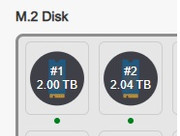
to the storage pool,
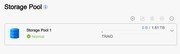
However, when I go to create a new volume from an "existing storage pool", it only shows the 1 drive's capacity, i.e., 2TBs instead of 4TBs?
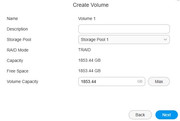
Is this correct because it is configured as a TRAID drive ? Therefore, even though there are 2 2TB drives (4TBs total), the volume only has 2TBs available because the 2nd 2TB is for redundancy ? Thank you for any help.
TNAS User
Re: Instructions for Adding HDDs to RAID
Posted: 01 May 2025, 01:18
by Gremlin
Yes, that's correct - You can think of Traid as raid 1 when using 2 drives.
Re: Instructions for Adding HDDs to RAID
Posted: 01 May 2025, 01:28
by tnasuser01
Thank you very much Gremlin for your prompt response. It is much appreciated.
Re: Instructions for Adding HDDs to RAID
Posted: 16 Jul 2025, 18:38
by jehuty
Hi,
I assume it's easier to increase a volume in TRAID if it's empty or half empty. Is this correct?
I have a 4x 8TB TRAID and I'm moving to 2x 16Tb and 2x 8Tb TRAID.
Thank you.
Re: Instructions for Adding HDDs to RAID
Posted: 16 Jul 2025, 21:21
by TMzethar
jehuty wrote: ↑16 Jul 2025, 18:38
Hi,
I assume it's easier to increase a volume in TRAID if it's empty or half empty. Is this correct?
I have a 4x 8TB TRAID and I'm moving to 2x 16Tb and 2x 8Tb TRAID.
Thank you.
After you move to 2x16TB and 2x8TB:
In case of normal RAID5, the capacity remains 24TB until you replace all 8TB with 16TB.
On TRAID, the 2 extra 8TB capacity of the two 16TBs can be formed into a new TRAID partition ahead of time to get the extra 8TB capacity.
Re: Instructions for Adding HDDs to RAID
Posted: 16 Jul 2025, 23:29
by jehuty
I don't want a new partition. I want to replace the drives one by one and rebuild the TRAID. I prefer not to lose any data or permission adjustments.
Re: Instructions for Adding HDDs to RAID
Posted: 17 Jul 2025, 07:57
by CursaYang
You can follow these steps to replace each hard drive individually.
1. Press the power button briefly to turn off the TNAS. Wait until the power indicator light goes out, remove the disk you want to replace, and insert a larger capacity disk.
2. Press the power button briefly to turn on the TNAS. You will hear continuous beeping sounds, and the message center will report that the array has been downgraded. Go to the right side of the TOS desktop to turn off the beeper.
3. Go to TOS Control Panel > Storage Management > Storage Pool (which will display as degraded array) > Edit > Select Expand Array > Choose the newly added disk > Confirm settings.
4. If you need to replace multiple disks, wait for the array synchronization to complete, then repeat steps 1, 2, and 3.
5. Go to TOS Control Panel > Storage Management > Volumes > Edit, and adjust the volume capacity according to your needs.
Re: Instructions for Adding HDDs to RAID
Posted: 20 Jul 2025, 00:11
by jehuty
Everything went great following your instructions. Thank you very much!
Re: Instructions for Adding HDDs to RAID
Posted: 31 Jul 2025, 03:52
by aaronsdropzone
Does this work differently for TRAID configuration? I'm trying to add a 6GB drive to my two 8GB drives that are currently in TRAID but none of the options are available to me and I'm stuck.