Page 7 of 7

Re: TOS 7.0.0791 Official Release (x86) is Released for Update

Posted: 26 Jul 2026, 17:56
by snapsh0t
TMzethar wrote: ↑24 Jul 2026, 15:27
joka388 wrote: ↑24 Jul 2026, 00:40 The hard drive sleep mode still isn't working, unless you use Jayjay's workaround.
Code: Select all
systemctl stop smartmontools.service
This should already be fixed in 7.0.0777. You've disabled it for now, but we're not sure if it will turn back on after a reboot. When you restart your NAS next time, keep an eye on whether the service stays off. If it comes back on even on the new version, we'll need further investigation.
The service definitely restarts after a power cycle or reboot. So the stop command is only temporary, as I would expect.

The current behaviour seems to be that the disks sleep as expected after a power on or reboot, with the service running, but don't sleep again once any access has woken them up. If the service is stopped then the disks continue to sleep as expected.

Re: TOS 7.0.0791 Official Release (x86) is Released for Update

Posted: 26 Jul 2026, 23:19
by petrose
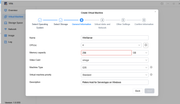
Any known issues in this newest version of the VMs component
I enabled it, after suggested upgrade, and now attempting to create a Window OS instance.
It am stuck with step 3 'General Information' where I can't get the Next button to work.
I have reserved 900+ GB fro storage, and I get problems here:

Image

Any ideas ?
(tried lowering the value to 32GB, but it stays the same)

Re: TOS 7.0.0791 Official Release (x86) is Released for Update

Posted: 27 Jul 2026, 14:47
by TMzethar
storageninja wrote: ↑23 Jul 2026, 14:36
TMzethar wrote: ↑23 Jul 2026, 09:10
storageninja wrote: ↑22 Jul 2026, 16:49 F4 SSD im unable to save my SMB custom setting, without this settings my MacBook TimeMachine backup wont run.
These settings are in place for months so the latest update(s) introduced this issue.
Image
Looks like the colon (":") isn't allowed in custom configs at the moment. We'll check it out and see if we can improve this. We will review this behavior and explore potential improvements. Any developments will be communicated to you.
As a short‑term workaround, you may edit /etc/samba/smb-customize.conf directly to achieve the desired Samba configuration.
Thanks for restoring this. I’ll test the TimeMachine apple backup without the custom settings first.
This has been fixed and will be included in a future TOS release — please stay tuned.

Re: TOS 7.0.0791 Official Release (x86) is Released for Update

Posted: 27 Jul 2026, 16:55
by storageninja
TMzethar wrote: ↑27 Jul 2026, 14:47
storageninja wrote: ↑23 Jul 2026, 14:36
TMzethar wrote: ↑23 Jul 2026, 09:10
Looks like the colon (":") isn't allowed in custom configs at the moment. We'll check it out and see if we can improve this. We will review this behavior and explore potential improvements. Any developments will be communicated to you.
As a short‑term workaround, you may edit /etc/samba/smb-customize.conf directly to achieve the desired Samba configuration.
Thanks for restoring this. I’ll test the TimeMachine apple backup without the custom settings first.
This has been fixed and will be included in a future TOS release — please stay tuned.
Great news, thanks for the fast fix.

Re: TOS 7.0.0791 Official Release (x86) is Released for Update

Posted: 27 Jul 2026, 18:30
by TMroy
petrose wrote: ↑26 Jul 2026, 23:19
How much total memory does your NAS have? Are you sure it's 256 GB or 32 GB? What model is it? And are you sure you want to allocate 4 CPU cores to the virtual machine?

Re: TOS 7.0.0791 Official Release (x86) is Released for Update

Posted: 22 Sep 2026, 07:10
by merlin9876
plexjellyfin wrote: ↑22 Jul 2026, 19:55 Model: TerraMaster F6-424 Max
TOS Version: 7.0.0791 (x86)

Immediately after upgrading to TOS 7.0.0791, my NAS became unstable. Before the update, it was operating normally.

The NAS boots successfully and works normally for several minutes, then becomes completely unreachable.

Symptoms:

* TOS web interface stops responding.
* SMB shares become unavailable.
* TNAS Desktop reports the NAS offline.
* The NAS eventually stops responding to network pings.
* Recovery requires a forced power cycle.

Immediately after the update I also received the notification that shared folder permission conversion had started and that shared folders might be inaccessible until the conversion completed. I’m not sure if that process ever finished successfully.

Troubleshooting already performed:

* Multiple reboots and power cycles.
* Switched Ethernet ports and cables.
* Verified DHCP network configuration.
* Tested using both hostname and IP address.
* Tested from multiple browsers.

To troubleshoot, I continuously monitored both network connectivity and the TOS web interface.

The failure sequence is always the same:

1. The NAS boots normally.
2. Network connectivity is normal.
3. The TOS web interface responds normally.
4. After several minutes, the web interface begins failing.
5. Shortly afterward, the web interface becomes unreachable.
6. Finally, the NAS stops responding to network pings and all services become unavailable.

This happens even when the NAS is left completely idle after boot with no user interaction.

Has anyone else experienced this on TOS 7.0.0791 with the F6-424 Max?

Is this a known issue, and are there any recommended diagnostic steps before attempting a TOS recovery or reinstall?
Oh my gosh!!! I have the exact same thing! I've reported this on the thread for the 7.0.1169 update at :
viewtopic.php?p=60225#p60225

Am I glad I'm not the only one in this predicament!!! As anything been found to fix this? I have the exact same pattern (lose web interface, lose USB I/O and lose ethernet connection so the server, a F4-423, stops responding completely after about 15 minutes from boot/reboot)