Page 6 of 24
Re: TOS 7 Beta Is Available for Testing
Posted: 17 Dec 2025, 13:26
by TMroy
Thank you for reporting several issues regarding Docker permissions and applications. We appreciate all the feedback.
Please be aware that TOS 7 is currently in a public beta phase focused on identifying and resolving bugs. We have noted the problems you've raised and will work on optimizing and fixing them in future version updates.
We encourage you to continue submitting your feedback, as it helps us prioritize and address issues more quickly. Thank you for your participation in the public beta!
Re: TOS 7 Beta Is Available for Testing
Posted: 17 Dec 2025, 15:30
by TMEmily
Hello, we have confirmed the issue you encountered: The VNC service is bound by default to the HTTP port you set (e.g., 8181). When this port is occupied by a Docker container, the VNC service will fail to start normally, and it will not recover automatically even after the container is stopped.
We have identified this as a bug, which will be fixed in the next version of VMs. For now, please use the following temporary solution to restore connectivity:
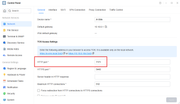
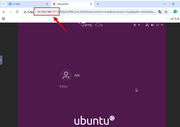
1. Go to Control Panel > Network and change the HTTP port from 8181 to 7171.
2. When connecting via VNC, also change the default port from 8181 to 7171 accordingly.
After completing the above steps, you will be able to connect to the virtual machine normally. Thank you for your patience and feedback, and for your support of TerraMaster!
Re: TOS 7 Beta Is Available for Testing
Posted: 17 Dec 2025, 18:09
by RyanYang
epicwomble wrote: ↑17 Dec 2025, 11:43
Many thanks.
tcp 0 0 127.0.0.1:8989 0.0.0.0:* LISTEN 1371/msgbus
what is msgbus? as before on TOS 6 this port was not in use and Sonarr worked fine on its default 8989
Thank you for your feedback. We have received your question via email and have already responded to it. The process you mentioned is related to functions such as desktop notifications, online user status, and system information, and it is a newly added process in the current version. We have planned to adjust its default port in future versions.
Re: TOS 7 Beta Is Available for Testing
Posted: 17 Dec 2025, 19:47
by rfbjr
Ok sort of Beta question can I just take the 4 8tb drives out of my F4-223 (running current 7 beta) and install them in my new F4-425 Plus and just power up the new machine for the first time without any additional prep work?
The fact that the F4-223 is TOS 7 beta doesn't change anything with this process?
Re: TOS 7 Beta Is Available for Testing
Posted: 17 Dec 2025, 21:06
by DCCentR
TMEmily wrote: ↑17 Dec 2025, 10:05
DCCentR wrote: ↑16 Dec 2025, 16:30
F4-424 Pro.
Can you, please, add the option to select the LAN port for which Open vSwitch should be enabled? Instead of enabling it for all ports.
I also can't get the internet to work for VMs. Has anyone figured it out?
Hello and thank you for your detailed feedback.
Regarding the request for port-specific selection in Open vSwitch: We have received your suggestion and have submitted it to the product team for evaluation. Thank you for helping us improve our product functionality.
Regarding the issue of VMs being unable to access the network: Based on the information you provided, we have confirmed that this is a known issue in the current version. We sincerely apologize for any inconvenience this may have caused.
Temporary solution: After enabling Open vSwitch, please try uninstalling and reinstalling the VMs. This should restore normal network connectivity for the host.
A fix for this issue will be provided in the next version. Please stay tuned for further updates.
Thanks! I think this wil be usefull then we use like macvlan with other port for example.
Also one more thing with enabling Open vSwitch. After turning it on, the port settings are reset from DHCP to Manual (without a specified IP address), which makes the NAS inaccessible over the network.
In my case, having a second LAN port on the NAS helped. I connected it to the router and it received an address via DHCP. The second port remained in DHCP mode, possibly because it was not connected to the router when I enabled Open vSwitch.
Re: TOS 7 Beta Is Available for Testing
Posted: 18 Dec 2025, 01:05
by KikoWTI360
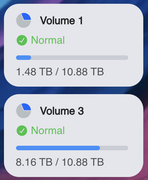
I have updated to TOS 7 on my F8-SSD Plus, and the "Public" folder in the main Pool (Volume 1) disappeared, even though the Pool used space is 1.5 Tb.
How can I recover that folder, but overall the content?
Re: TOS 7 Beta Is Available for Testing
Posted: 18 Dec 2025, 11:00
by RyanYang
rfbjr wrote: ↑17 Dec 2025, 19:47
Ok sort of Beta question can I just take the 4 8tb drives out of my F4-223 (running current 7 beta) and install them in my new F4-425 Plus and just power up the new machine for the first time without any additional prep work?
The fact that the F4-223 is TOS 7 beta doesn't change anything with this process?
Simply insert your disk into the F4-425 Plus and power it on. The system will be up and running without any additional setup.
Re: TOS 7 Beta Is Available for Testing
Posted: 18 Dec 2025, 11:05
by rfbjr
RyanYang wrote: ↑18 Dec 2025, 11:00
rfbjr wrote: ↑17 Dec 2025, 19:47
Ok sort of Beta question can I just take the 4 8tb drives out of my F4-223 (running current 7 beta) and install them in my new F4-425 Plus and just power up the new machine for the first time without any additional prep work?
The fact that the F4-223 is TOS 7 beta doesn't change anything with this process?
Simply insert your disk into the F4-425 Plus and power it on. The system will be up and running without any additional setup.
That's what I just did, and it worked fine. I do wish the back of the unit did indicate which is NIC1 and NIC2.
Re: TOS 7 Beta Is Available for Testing
Posted: 18 Dec 2025, 19:13
by RyanYang
rfbjr wrote: ↑18 Dec 2025, 11:05
Thank you for the suggestion. Your requirements have been communicated to the hardware project team, and they will evaluate them.
Re: TOS 7 Beta Is Available for Testing
Posted: 18 Dec 2025, 19:23
by RyanYang
KikoWTI360 wrote: ↑18 Dec 2025, 01:05
I have updated to TOS 7 on my F8-SSD Plus, and the "Public" folder in the main Pool (Volume 1) disappeared, even though the Pool used space is 1.5 Tb.
How can I recover that folder, but overall the content?
This issue typically occurs because you have shared folders named "public" on multiple volumes (Volumes), and the TOS control panel may currently only display the "public" folder under Volume 3.
First, please confirm whether the public folder shown in the control panel is the one from Volume 3. If so, follow the steps below:
1. Open Terminal on the TOS desktop and execute the following commands in order:
Code: Select all
mv /Volume3/public /Volume3/public1

The first command renames the `public` folder under Volume 3 to `public1`, and the second command remounts all shared folders, which should then mount the public folder from Volume 1.
2. After completing the above, go to the Shared Folders module in the TOS control panel, locate the `public1` folder, and rename it following the normal procedure (you can change it to your preferred name).
This will restore normal display and access to the public shared folder on Volume 1.