Page 6 of 7

Re: How to Flash a New USB Initboot for TOS on Windows PC?

Posted: 22 Jan 2026, 18:59
by TMzethar
Hemps wrote: 22 Jan 2026, 13:53 Is there a USB initBoot image for TOS7?
Unable to provide temporarily. If you need to use TOS7, please refer to:
viewtopic.php?t=9437

Re: How to Flash a New USB Initboot for TOS on Windows PC?

Posted: 25 Jan 2026, 20:52
by baf28
Help me

Code: Select all

root@TNAS-425-Plus:/volume1/Test# dd if=USB_Initboot_1.3.img of=/dev/usb1 bs=4M status=progress conv=fsync
37+1 records in
37+1 records out
157286400 bytes (157 MB, 150 MiB) copied, 37.54 s, 4.2 MB/s
root@TNAS-425-Plus:/volume1/Test# sync
root@TNAS-425-Plus:/volume1/Test# fdisk -l /dev/usb1
GPT PMBR size mismatch (7864319 != 515071) will be corrected by write.
The primary GPT table is corrupt, but the backup appears OK, so that will be used.
Disk /dev/usb1: 251.5 MiB, 263716864 bytes, 515072 sectors
Disk model: TerraMaster             
Units: sectors of 1 * 512 = 512 bytes
Sector size (logical/physical): 512 bytes / 512 bytes
I/O size (minimum/optimal): 512 bytes / 512 bytes
Disklabel type: gpt
Disk identifier: 8E3E491A-4BB9-429B-85A7-22509A007F64
root@TNAS-425-Plus:/volume1/Test# 
I can't burn the image to the TerraMaster F4-425 Plus flash drive. Maybe the image you posted is not correct?

I have a TNAS-425-Plus with a built-in 256MB flash drive (515072 sectors).

I downloaded the USB_Initboot_1.3.img image (150MB), but errors occur during recording:

1. The image contains a GPT table for a 3.75GB disk (7864319 sectors),

But the actual file size is only 150MB (307200 sectors)

2. Protective MBR in the image indicates the wrong disk size

3. When writing to a 256MB flash drive, I get an error:

"GPT PMBR size mismatch (7864319 ! = 515071)"

What I tried:

- Writing via dd with different parameters

- Manual MBR/GPT correction

- Creation of protective MBR with the correct dimensions

Problem: the image, apparently, is assembled for a 4GB flash drive,

And not for the built-in 256MB flash drive TNAS-425-Plus.

Questions:

1. Is there a special image for a built-in 256MB flash drive?

2. Is it possible to get an image with the correct GPT/MBR tables?

3. Or instructions for adapting the image for a 256MB flash drive?

Technical details:

- Model: TNAS-425-Plus

- Built-in flash drive: 256MB (515072 sectors)

- Image: USB_Initboot_1.3.img (157286400 bytes)

- Error: GPT PMBR size mismatch (7864319 ! = 515071)

Thank you!

Re: How to Flash a New USB Initboot for TOS on Windows PC?

Posted: 25 Jan 2026, 22:20
by TMeric
You can try using the tools in the following link to select the appropriate file and directly write it to the USB drive.

https://etcher.balena.io/#download-etcher

Re: How to Flash a New USB Initboot for TOS on Windows PC?

Posted: 26 Jan 2026, 01:42
by baf28
TMeric wrote: 25 Jan 2026, 22:20 You can try using the tools in the following link to select the appropriate file and directly write it to the USB drive.

https://etcher.balena.io/#download-etcher
Unfortunately, there is no USB flash drive loader on TerraMaster F4-425 Plus. The flash drive is soldered on the board and I can't insert it into my PC in order to write the loader as you recommend.

Maybe there is another way? I use the dd command, but the img file you posted is incorrect.

Re: How to Flash a New USB Initboot for TOS on Windows PC?

Posted: 26 Jan 2026, 06:58
by crisisacting
baf28 wrote: 26 Jan 2026, 01:42 Unfortunately, there is no USB flash drive loader on TerraMaster F4-425 Plus. The flash drive is soldered on the board and I can't insert it into my PC in order to write the loader as you recommend.
It is not soldered; it's using internal USB header pins like a desktop motherboard would have.
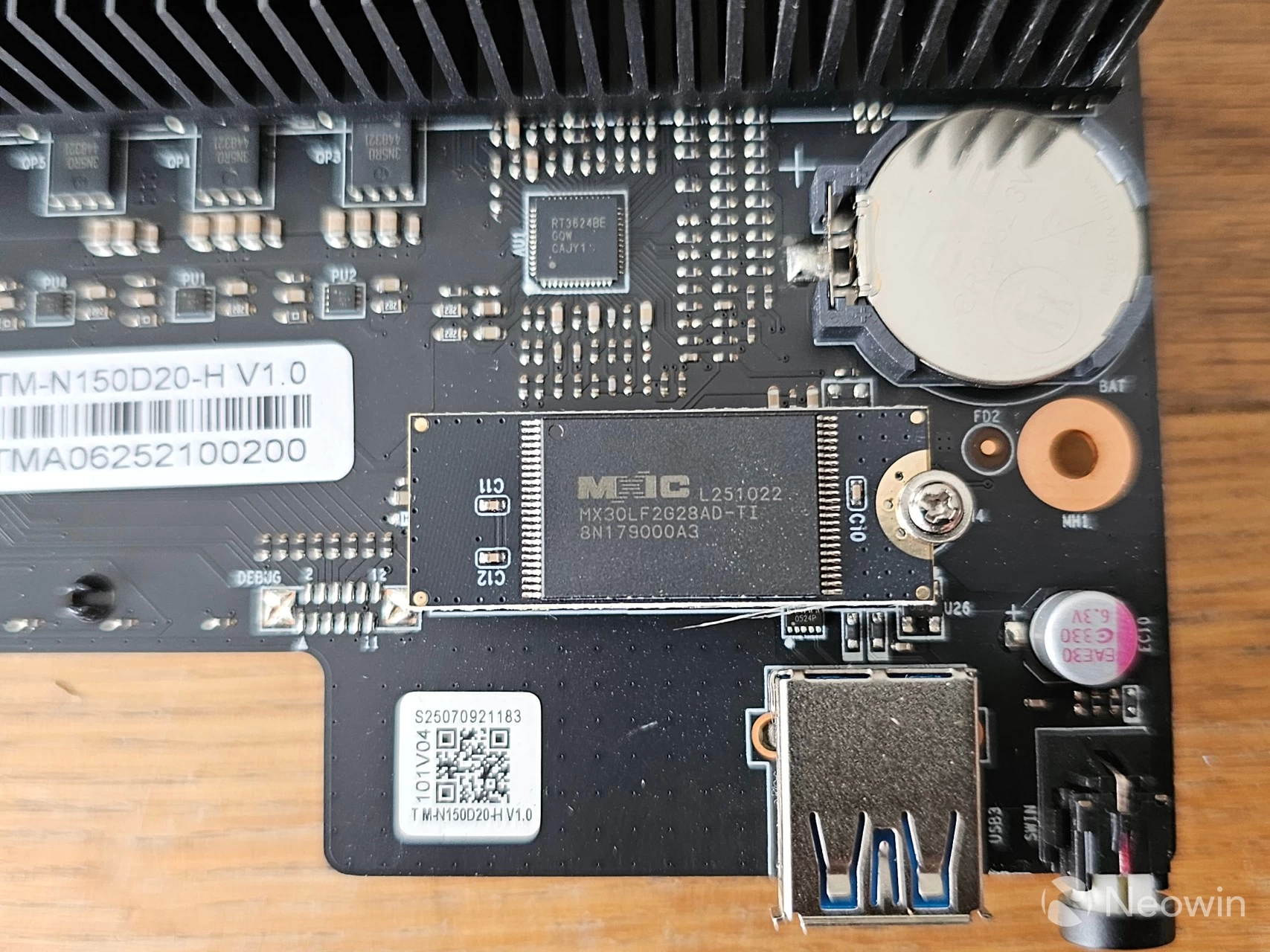
Image

It might have a 4 or 5 pin header, but could have a 9 or 10 pin one if it needs more power: Image

You'd need a desktop to connect it if removing it from the TNAS.

Or purchase an adapter like this if you only have a laptop available: Image

Re: How to Flash a New USB Initboot for TOS on Windows PC?

Posted: 19 Jun 2026, 21:02
by mmick
I need for TOS 7 for my F4-423 ...

Re: How to Flash a New USB Initboot for TOS on Windows PC?

Posted: 19 Jun 2026, 21:54
by Gremlin
mmick wrote: 19 Jun 2026, 21:02 I need for TOS 7 for my F4-423 ...
If you were following the proper upgrade path, there should be no need to re-write the flash drive as far as I can tell. (None of my devices required it.) Did you try doing something with the flash drive because of your other issues? Please try and keep the details in the one thread to make it easier for others to follow and assist. It would not be wise to try and directly instal TOS7 - rather revert to TOS6 or even TOS5 and proceed from there.

Re: How to Flash a New USB Initboot for TOS on Windows PC?

Posted: 20 Jun 2026, 00:41
by crisisacting
mmick wrote: 19 Jun 2026, 21:02 need for TOS 7 for F4-423 ...
Use the TOS 6 UEFI image & then follow the upgrade procedure from the latest TOS 6 build towards the current TOS 7 beta.

If you can wait until the 23rd of June, there should be a .ins image file for a manual/off-line installation of TOS 7 stable as that's the slated release date, according to their social media and website.

Re: How to Flash a New USB Initboot for TOS on Windows PC?

Posted: 24 Jun 2026, 13:54
by User009
Hi, will there be a new initboot version for TOS7? A newly unboxed F4-425 Pro showed a new initboot Loader featuring a new design

Re: How to Flash a New USB Initboot for TOS on Windows PC?

Posted: 24 Jun 2026, 14:31
by Gremlin
-425 models do not use the traditional plug-in usb flash drive. They use a daughter-board flash card mounted on the motherboard (USB-DOM).

Code: Select all

What it Does in Your F4-425The Hardware: 
It is a tiny, proprietary daughter board attached to an internal USB header via a standoff and secured with a single screw.
The Function: 
It contains a small amount of flash memory (historically 1GB–4GB, but updated to a compact ~250MB Flashdisc in the 425-series). Its sole purpose is to store the lightweight initboot / bootloader for TerraMaster's TOS operating system.