[Help] No Access F6-424Max After TOS 6.0.750 Update – Not Detected on Network

The discussion here is limited to topics related to the system update itself. Please post the functional issues after the system update to the corresponding other forums.
User avatar
spleenrun
Posts: 39
Joined: 09 Jan 2025, 22:03
France

Re: [Help] No Access F6-424Max After TOS 6.0.750 Update – Not Detected on Network

Post by spleenrun »

Hi everyone,

I’ve decided to go with the reset button method to reinstall TOS without erasing my files.

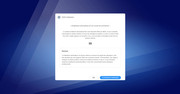
After booting, I now see a screen with a countdown timer, giving me two options:
▶️ Automatic Initialization
⚙️ Custom Initialization

I’m not sure which one to choose.

Before the issue, I had already created storage pools and enabled SSD cache (using the M.2 drives), but I no longer remember the exact configuration or cache size I had originally set up.

I’ve attached a screenshot of the screen I’m currently stuck at.

➡️ What’s the safest option to restore the system without wiping my existing data and configuration?

Thanks in advance for your help!
Image
User avatar
TMzethar
TM Support
Posts: 2819
Joined: 27 Oct 2020, 16:43

Re: [Help] No Access F6-424Max After TOS 6.0.750 Update – Not Detected on Network

Post by TMzethar »

Hi.
⚙️ Custom Initialization is recommended.
▶️ Automatic Initialization is suitable for new users who want a simple setup.
To contact our team, please send email to following addresses, remember to replace (at) with @:
Technical team: support(at)terra-master.com (for technical support)
Service team: service(at)terra-master.com (for purchasing, return, replacement, RMA service)
Post Reply

Return to “System Update”