Page 5 of 5
Re: How to repair a corrupted file system?
Posted: 17 Nov 2025, 11:49
by dleonmag
Hola a todos. Tengo un terramaster F5-221, con el sistema TOS 5.1.67 (tenía antes la 4.2.44, la cual eliminé para instalar la versión 5.1.67). El hecho fue que hubo un corte de energía, y al iniciar el NAS salió un mensaje en el navegador web indicando que hay un problema con los archivos. Inicié el proceso de reparación del sistema de archivos y me aparece este mensaje:
[8619.576287] hpet: Lost 7161 RTC interrupts
¿Ello qué significa? Va del número 6375 al 8619.
También comentar que los discos 1 y 2 (bloque 1), 3 y 4 (bloque 2), están en raid 1, y el disco 5 es single disk. He revisado algunos archivos de manera aleatoria y no he hallado problemas.
Una cosa adicional que noté, es que el reloj se desconfiguró, y lo volví a poner en la zona horaria correcta. No sé si a causa de la falla de energía pasó eso de que se desconfiguró el reloj.
Sería estupendo contar con una herramienta automatizada que permita analizar y reparar los sistemas de archivos de una forma más sencilla para los usuarios que no le sabemos mucho a usar comandos.
Saludos y gracias.
Re: How to repair a corrupted file system?
Posted: 17 Nov 2025, 16:15
by CursaYang
Hola, el número entre paréntesis indica el tiempo. Este mensaje es una advertencia en el registro del sistema que se refiere a que, dentro de una ventana de tiempo específica, el sistema no pudo procesar una interrupción del RTC (reloj en tiempo real). Si no hay problemas significativos de rendimiento o errores del sistema, este mensaje generalmente se puede ignorar.
Hello, the number in parentheses represents time. This is a warning in the system log referring to the fact that, within a specific time window, the system failed to process the RTC (real-time clock) interrupt. If there are no significant performance issues or system errors, this message can usually be ignored.
Re: How to repair a corrupted file system?
Posted: 18 Nov 2025, 06:41
by dleonmag
CursaYang wrote: ↑17 Nov 2025, 16:15
Hola, el número entre paréntesis indica el tiempo. Este mensaje es una advertencia en el registro del sistema que se refiere a que, dentro de una ventana de tiempo específica, el sistema no pudo procesar una interrupción del RTC (reloj en tiempo real). Si no hay problemas significativos de rendimiento o errores del sistema, este mensaje generalmente se puede ignorar.
Hello, the number in parentheses represents time. This is a warning in the system log referring to the fact that, within a specific time window, the system failed to process the RTC (real-time clock) interrupt. If there are no significant performance issues or system errors, this message can usually be ignored.
Muchas gracias por las atenciones y asesoría. Saludos cordiales.
Re: How to repair a corrupted file system?
Posted: 23 Nov 2025, 19:19
by rodrigocruz
Hi everyone.
My equipment is model F4-424, currently running version 6.0.783.
It was working normally until the folders started appearing empty. I restarted the system, and afterwards the Volume2 became corrupted. I tried to follow the steps in the tutorial, but there is an issue: in step 2, volume 2 does not appear.
The system is installed on the SSD in Volume 1, and the files are stored in Volume 2 with 2 HDDs in TRAID.
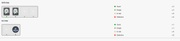


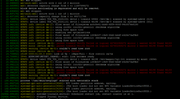
When I run the command "dmesg", this is the error that appears.
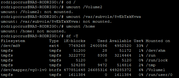
As indicated in step 2, I tried to change the volume, but the volume2 does not appear. What should I do?
Re: How to repair a corrupted file system?
Posted: 23 Nov 2025, 21:11
by CursaYang
It seems that Volume 2 is not mounted, so you do not need to unmount Volume 2. You can directly repair the file system. After the repair is complete, execute the following command to remount the volume:
/etc/tos/scripts/mntdata
Re: How to repair a corrupted file system?
Posted: 23 Nov 2025, 21:28
by rodrigocruz
CursaYang wrote: ↑23 Nov 2025, 21:11
It seems that Volume 2 is not mounted, so you do not need to unmount Volume 2. You can directly repair the file system. After the repair is complete, execute the following command to remount the volume:
/etc/tos/scripts/mntdata
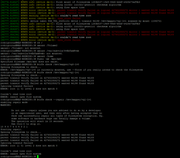
It's still not working.
Re: How to repair a corrupted file system?
Posted: 24 Nov 2025, 09:49
by CursaYang
It seems your file system is severely damaged and cannot be repaired. However, you mentioned that the current setup uses two hard drives in TRAID, which is equivalent to RAID 1.
We can try to help you recover the data. Please schedule a time for remote assistance via live chat on the official website.