Page 5 of 8
Re: TOS 7.0.0777 Official Release (X86) is Now Available
Posted: 09 Jul 2026, 10:52
by star
spoke to support and they said restart nas. nas restart raid damaged.

storage pool application update = not stable.
Re: TOS 7.0.0777 Official Release (X86) is Now Available
Posted: 09 Jul 2026, 11:22
by star
possible issue. solution update TOS first and storage manager application after. unknown fix.
Re: TOS 7.0.0777 Official Release (X86) is Now Available
Posted: 09 Jul 2026, 13:02
by TMroy
jayjay wrote: ↑09 Jul 2026, 00:37
CursaYang wrote: ↑08 Jul 2026, 08:21
jayjay wrote: ↑08 Jul 2026, 04:19
I'm still seeing problems with HDD drives not going into sleep mode, does anyone else have the same problem?
In this version, we fixed the system disk hibernation function. Is the hard drive you mentioned that cannot hibernate the system disk?
No, a hard drive that doesn't go into sleep mode isn't a system drive. The system runs on a completely separate NVMe drive. Hard drives are used solely for data storage and are not currently being used by anything.
Navigate to Control Panel > Resource Monitor, review the process list, and if you can, send us a screenshot so we can see what processes or services are running on your system.
Re: TOS 7.0.0777 Official Release (X86) is Now Available
Posted: 09 Jul 2026, 13:26
by joka388
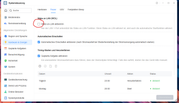
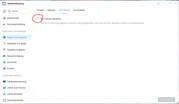
jayjay wrote: ↑08 Jul 2026, 04:19
I'm still seeing problems with HDD drives not going into sleep mode, does anyone else have the same problem?
Check whether you have turned off the following. See screenshots.
Re: TOS 7.0.0777 Official Release (X86) is Now Available
Posted: 09 Jul 2026, 14:43
by snapsh0t
TMroy wrote: ↑09 Jul 2026, 13:02
jayjay wrote: ↑09 Jul 2026, 00:37
CursaYang wrote: ↑08 Jul 2026, 08:21
In this version, we fixed the system disk hibernation function. Is the hard drive you mentioned that cannot hibernate the system disk?
No, a hard drive that doesn't go into sleep mode isn't a system drive. The system runs on a completely separate NVMe drive. Hard drives are used solely for data storage and are not currently being used by anything.
Navigate to Control Panel > Resource Monitor, review the process list, and if you can, send us a screenshot so we can see what processes or services are running on your system.
I have the same setup and problem as jayjay. Please can I send you a screenshot of the process list too?
Although the exported .csv file seems more sensible as it'll be multiple screenshots.
Re: TOS 7.0.0777 Official Release (X86) is Now Available
Posted: 09 Jul 2026, 22:57
by DCCentR
Andy2026 wrote: ↑08 Jul 2026, 14:55
DCCentR wrote: ↑07 Jul 2026, 21:26
However, it seems that after one of the updates, there are issues with launching Docker containers (via autorun at system startup).
It feels like they start earlier than they should, when the system or some of its components aren’t quite ready yet.
The problem occurs in the following containers, for example:
-
Homepage: The remaining space on mounted disks is displayed incorrectly (for example, a few gigabytes instead of 2 terabytes)
-
Jellyfin: A problem with file playback; most, if not all, files stop playing (the logs show the error “FFmpeg exited with code 254”).
- There may be other problematic containers as well...
All of this is resolved by restarting the containers shortly after TOS starts up.
I don’t have many details yet; I need to dig into it more in my free time.
Has anyone else encountered a similar problem?
Yes. There is a problem. Wordpress in docker. After turning on the NAS, you need to restart the container every time. Problems wordpress accessing the network. After rebooting the container it works
I'm glad I'm not the only one

***
Looks like UI bug.
The “View Details” button in task notifications leads nowhere:

Re: TOS 7.0.0777 Official Release (X86) is Now Available
Posted: 10 Jul 2026, 09:05
by CursaYang
It’s inconvenient to send a large number of screenshots and files on the forum; please send them to our support email address:support(at)terra-master.com
Re: TOS 7.0.0777 Official Release (X86) is Now Available
Posted: 10 Jul 2026, 14:22
by GevinKe
Thank you very much for your feedback. We have identified the issue and completed the fix. The improvement will be included in a future release.
Re: TOS 7.0.0777 Official Release (X86) is Now Available
Posted: 10 Jul 2026, 22:59
by Bartman
Installed OK, but Hypercache does not seem to stop deleting, been going on for over 24 hours, I even manually upgraded to this version but is still shows the same. Also theOpenclaw will not install, fails all the time, dread to see what else stops.
Re: TOS 7.0.0777 Official Release (X86) is Now Available
Posted: 11 Jul 2026, 02:35
by quella
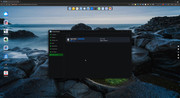
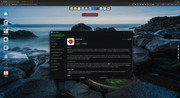
I upgraded from TOS v6 to TOS v7 (non beta) and now most of my apps in the App Center are missing. I can only see 10 total apps under the "All Apps" and most of these were ones I had installed before the upgrade. I did try to reboot and also left the App Center up for over an hour with no change in behavior. I also confirmed that all traffic is allowed from, the NAS to the Internet. But nothing seems to fix this. I was looking to install TerraSync, but it is not found. Any way to kick off or reset the store to get all the apps back?
Thanks
Quella