Page 5 of 7
Re: TOS 7.0.0601 Beta (X86) is Released for Update
Posted: 24 May 2026, 19:16
by storageninja
Hello TM it’s had been confirmed after a week of monitoring. F4 SSD won’t auto boot at scheduled time. Only shutdown works. Could we investigate, I also reported in another topic about this bug.
Re: TOS 7.0.0601 Beta (X86) is Released for Update
Posted: 24 May 2026, 22:06
by TMzethar
storageninja wrote: ↑24 May 2026, 19:16
Hello TM it’s had been confirmed after a week of monitoring. F4 SSD won’t auto boot at scheduled time. Only shutdown works. Could we investigate, I also reported in another topic about this bug.
We will continue to monitor the situation and attempt to reproduce the issue you mentioned.
Re: TOS 7.0.0601 Beta (X86) is Released for Update
Posted: 25 May 2026, 07:21
by mossholderm
Any word on whether the U4-111 will be supported?
Thanks!
Re: TOS 7.0.0601 Beta (X86) is Released for Update
Posted: 25 May 2026, 09:01
by TMzethar
storageninja wrote: ↑24 May 2026, 19:16
Hello TM it’s had been confirmed after a week of monitoring. F4 SSD won’t auto boot at scheduled time. Only shutdown works. Could we investigate, I also reported in another topic about this bug.
This may be due to a mismatch in the time or time zone settings.
If your NAS time is set to “Sync with web browser,” try changing it to “Sync with server.”
Re: TOS 7.0.0601 Beta (X86) is Released for Update
Posted: 25 May 2026, 18:17
by EgorA
Thanx!
Top bar now floating over windows to give more space on desktop!
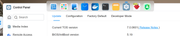
Next step is make bar really floating with the ability to drag it up/down/left/right side of desktop.
Thanx!!
Re: TOS 7.0.0601 Beta (X86) is Released for Update
Posted: 26 May 2026, 01:37
by storageninja
TMzethar wrote: ↑25 May 2026, 09:01
storageninja wrote: ↑24 May 2026, 19:16
Hello TM it’s had been confirmed after a week of monitoring. F4 SSD won’t auto boot at scheduled time. Only shutdown works. Could we investigate, I also reported in another topic about this bug.
This may be due to a mismatch in the time or time zone settings.
If your NAS time is set to “Sync with web browser,” try changing it to “Sync with server.”
It is synced with a server. Please note that shutdown as the scheduled time works fine, but startup just not.

Re: TOS 7.0.0601 Beta (X86) is Released for Update
Posted: 26 May 2026, 02:10
by Gremlin
Have you tried just running a startup schedule on its own without the shutdown. (Shutdown manually to test). This sounds like an old problem where the "power" scheduled tasks did not gracefully handle multiple (ie more than one!) events. You could of course use the main task scheduler (custom options) to script and sequence these events.
Re: TOS 7.0.0601 Beta (X86) is Released for Update
Posted: 26 May 2026, 02:45
by storageninja
Gremlin wrote: ↑26 May 2026, 02:10
Have you tried just running a startup schedule on its own without the shutdown. (Shutdown manually to test). This sounds like an old problem where the "power" scheduled tasks did not gracefully handle multiple (ie more than one!) events. You could of course use the main task scheduler (custom options) to script and sequence these events.
Just tested, only one startup line: does not work, It simply never startup/boot.
Re: TOS 7.0.0601 Beta (X86) is Released for Update
Posted: 26 May 2026, 12:50
by snapsh0t
storageninja wrote: ↑26 May 2026, 02:45
Just tested, only one startup line: does not work, It simply never startup/boot.
I had a similar problem and I found that deselecting 'Enable scheduled task', Apply, then selecting it again and Apply fixed it. I expect you've already tried this but if not......
Re: TOS 7.0.0601 Beta (X86) is Released for Update
Posted: 26 May 2026, 13:10
by storageninja
snapsh0t wrote: ↑26 May 2026, 12:50
storageninja wrote: ↑26 May 2026, 02:45
Just tested, only one startup line: does not work, It simply never startup/boot.
I had a similar problem and I found that deselecting 'Enable scheduled task', Apply, then selecting it again and Apply fixed it. I expect you've already tried this but if not......
Yeah tried that last night also, but no difference.