Page 31 of 32
Re: TOS 6.0.530 Official Version Released
Posted: 18 Mar 2026, 14:40
by Phil
Dennis_H wrote: ↑18 Mar 2026, 01:22
I asked a similar question in another thread, but now that I found this one, it seems to be a more natural place...
I have a
F2-221 with
10GB and running
4.2.44 with the
V17 BIOS.
I would like to update to TOS 6 and it seems possible with this config.
Do I follow the instructions like
1. If your TOS version is below TOS 4.2.44, you need to first update to TOS 4.2.44.
2. If your TOS version is TOS 4.2.44, you cannot upgrade to TOS 5.0 via the update method and must install TOS 5.0.
3. If your TOS version is between TOS 5.0.93 and TOS 5.0.176, you need to first update to TOS 5.0.176.
4. If your TOS version is TOS 5.0.176, you need to update to TOS 5.1.24.
5. If your TOS version is between TOS 5.1.24 and TOS 5.1.145, you need to first update to TOS 5.1.145.
6. If your TOS version is between TOS 5.1.145 and TOS 6.0.229, you need to first update to TOS 6.0.530.
Will I lose data since I should be on the 2GB system now? Does it update it to 8GB and still work, or will I lose data? If I'm going to lose data, do I just flash a new initdisk for TOS6 and start fresh and have to re-init my drives and copy info back from external USB?
Updating from a 2GB system partition to an 8GB system partition will format the existing system partition, resulting in the loss of all data on the system drive. Therefore, you must back up all important data before proceeding.
You can then create a USB bootable drive for TOS6, install TOS6 directly, and then import the data from an external device.
For instructions on creating a USB bootloader, please refer to this link:
viewtopic.php?t=6433
Re: TOS 6.0.530 Official Version Released
Posted: 24 Mar 2026, 21:43
by Dennis_H
I had the wrong physical size flash drive to fit in the slot. Wanted to keep that original just in case, but went ahead and did the update dance. I wiped the partitions of the existing drives so I could get the 8GB system partition. Running TOS 6 now on my F2-221. Data restored from backup. Got Jellyfin installed from TOS store. That was the main reason I wanted to update. Not sure how often that updates, but so far, it is running great.
Re: TOS 6.0.530 Official Version Released
Posted: 25 Mar 2026, 14:55
by Phil
Dennis_H wrote: ↑24 Mar 2026, 21:43
I had the wrong physical size flash drive to fit in the slot. Wanted to keep that original just in case, but went ahead and did the update dance. I wiped the partitions of the existing drives so I could get the 8GB system partition. Running TOS 6 now on my F2-221. Data restored from backup. Got Jellyfin installed from TOS store. That was the main reason I wanted to update. Not sure how often that updates, but so far, it is running great.
Thank you for your detailed sharing and feedback! I'm very glad to hear that you have successfully installed the TOS6 system on F2-221 and have it running smoothly with Jellyfin.
Once again, thank you for your trust in our product. If you encounter any questions or need assistance in optimizing its use in the future, please feel free to contact us. Have a pleasant use!
Re: TOS 6.0.530 Official Version Released
Posted: 25 Apr 2026, 17:15
by Xcentric
I've been trying to update my F2-221 ver. 5.1.67 | BIOS version MAPL0304V22 to TOS 6.0.530
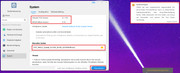
Just shows update failed if I update through Control Panel > System > Update > Manual Update.
How else can I update my NAS?
Re: TOS 6.0.530 Official Version Released
Posted: 25 Apr 2026, 19:45
by Gremlin
Xcentric wrote: ↑25 Apr 2026, 17:15
I've been trying to update my F2-221 ver. 5.1.67 | BIOS version MAPL0304V22 to TOS 6.0.530
Just shows update failed if I update through Control Panel > System > Update > Manual Update.
How else can I update my NAS?
Go back to page 1 of this thread:
This update only supports TOS versions from 5.1.145 and above to 6.0.229 and below. Please do not update from other TOS versions.
Re: TOS 6.0.530 Official Version Released
Posted: 25 Apr 2026, 20:10
by Felix
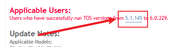
Return to the topic's homepage, find the section shown in the image, and you'll be redirected to the 5.1.145 update notification. Follow the instructions to update to 5.1.145.
Re: TOS 6.0.530 Official Version Released
Posted: 25 Apr 2026, 20:48
by Xcentric
Felix wrote: ↑25 Apr 2026, 20:10
Return to the topic's homepage, find the section shown in the image, and you'll be redirected to the 5.1.145 update notification. Follow the instructions to update to 5.1.145.
Absolutely right, in my head 67 was bigger than 145, I guess I was too tired.
Anyways update is successful, i'm now on 6.0.530
Re: TOS 6.0.530 Official Version Released
Posted: 03 May 2026, 13:25
by rockintaco
did you ever figure out if installing TOS 6 is possible for the u4-111?
Re: TOS 6.0.530 Official Version Released
Posted: 03 May 2026, 14:52
by crisisacting
rockintaco wrote: ↑03 May 2026, 13:25
…ever figure out if installing TOS 6 is possible for the u4-111?
The U4-111 uses the same J3455 based motherboard as the ×21/422 TNAS series; as long as the UEFI/BIOS is between
MAPL0303 V16 to
V22, it is capable of running TOS 6 and even current TOS 7 betas after the initboot USB drive is updated to the
TOS 6 Legacy image:
Code: Select all
https://toshelp.terra-master.com/faq/TNAS/begin/production-usb-initboot
Also, there's an HDMI connector covered by the backplate (should you need to connect a display for whatever reason such as troubleshooting, remove the i/o shield to make it accessible/usable); it's visible in this review on YouTube:
Code: Select all
https://youtu.be/Kt-eIdKhEvk?si=tzakLgl5YDpCY13j&t=278
Re: TOS 6.0.530 Official Version Released
Posted: 16 Jun 2026, 03:53
by RealGold
It is not possible to update my F4 423 from TOS 5.1.145 to TOS 6.0.530. After manual update in release Package 530, F4 423 restarts unregularly and get such info! Hast anyone any idea?