[Help] Scheduled Reboot for F4-424Pro

Re: [Help] Scheduled Reboot for F4-424Pro
Regarding the Wake-on-LAN (WOL) function settings of the TOS system, the system currently only supports wake-up via the MAC address of the LAN 1 interface. To ensure compatibility between network bonding (link aggregation) and WOL, it is recommended to set the MAC address of the bonding group to the actual MAC address of the LAN 1 interface (rather than the system default or the MAC address of other interfaces) when creating network bonding. Additionally, it is advised to directly display the MAC address information of the LAN 1 interface on the WOL configuration page, allowing users to quickly confirm and configure the settings, thereby avoiding wake-up failures caused by MAC address confusion.
To contact our team, please send email to following addresses, remember to replace (at) with @
Technical team: support(at)terra-master.com (for technical support)
Service team: service(at)terra-master.com (for purchasing, return, replacement, RMA service)
Technical team: support(at)terra-master.com (for technical support)
Service team: service(at)terra-master.com (for purchasing, return, replacement, RMA service)


Re: [Help] Scheduled Reboot for F4-424Pro
I have no idea what this message means. My point was that the LAN 1 MAC address should be displayed so WOL is correctly configured.

Re: [Help] Scheduled Reboot for F4-424Pro
Do you mean that we should display the corresponding MAC address of the LAN port on the WOL module's UI? This would help users better understand which LAN port and MAC address are involved in the WOL functionality. Is that correct?
To contact our team, please send email to following addresses, remember to replace (at) with @:
Technical team: support(at)terra-master.com(for technical support)
Service team: service(at)terra-master.com(for purchasing, return, replacement, RMA service)
Technical team: support(at)terra-master.com(for technical support)
Service team: service(at)terra-master.com(for purchasing, return, replacement, RMA service)
Re: [Help] Scheduled Reboot for F4-424Pro
Thanks - I’m with you now. And yes, displaying the MAC address for WOL would be beneficial as when you use a bonded interface (lan1+lan2), the MAC address shown will not work with WOL (it appears to be generated when the bond is created), The only way to find the WOL MAC address when lan1 and lan2 are bonded is to delete the bonded interface.
Re: [Help] Scheduled Reboot for F4-424Pro
Thank you for your suggestion. I have forwarded this request to the relevant product team for research and evaluation.Canuck wrote: ↑31 Aug 2025, 15:59 Thanks - I’m with you now. And yes, displaying the MAC address for WOL would be beneficial as when you use a bonded interface (lan1+lan2), the MAC address shown will not work with WOL (it appears to be generated when the bond is created), The only way to find the WOL MAC address when lan1 and lan2 are bonded is to delete the bonded interface.
To contact our team, please send email to following addresses, remember to replace (at) with @:
Technical team: support(at)terra-master.com(for technical support)
Service team: service(at)terra-master.com(for purchasing, return, replacement, RMA service)
Technical team: support(at)terra-master.com(for technical support)
Service team: service(at)terra-master.com(for purchasing, return, replacement, RMA service)


Re: [Help] Scheduled Reboot for F4-424Pro
The issue of miss-aligned IP/MAC addresses has been discussed previously. I think this was the last time:
viewtopic.php?p=44536#p44536
Is it Groundhog day .... again
 Issues get pointed out; someone looks at it; someone rolls out a new code fix; a subsequent update reverts to "old" code; issue reappears; and here we go again.
F5-221 TOS7.0.1278 - 4x4TB (Ironwolf) Traid
F2-424 TOS7.0.1278 - 2x500GB nvme (P3) Traid, 2x6TB HDD (HGST) Traid
F2-221 TOS7.0.1278 - 1x3TB Ext4, 1x4TB Btrfs
F2-425+ TOS7.0.1278 - 2x500GB nvme (P3) Traid, 2x6TB HDD (EXOS) Traid
F2-424 TOS7.0.1278 - 2x500GB nvme (P3) Traid, 2x6TB HDD (HGST) Traid
F2-221 TOS7.0.1278 - 1x3TB Ext4, 1x4TB Btrfs
F2-425+ TOS7.0.1278 - 2x500GB nvme (P3) Traid, 2x6TB HDD (EXOS) Traid
Re: [Help] Scheduled Reboot for F4-424Pro
Thanks. At least there is a workaround for the WOL MAC address. Now just need a resolution on the reboot with UPS…


Re: [Help] Scheduled Reboot for F4-424Pro
Hello,
Regarding the issues of abnormal shutdown caused by insufficient UPS power and the inability to automatically power on after power is restored, we have prepared a temporary solution. This will be sent to your email shortly, so please keep an eye on your inbox.
Thank you for your continued understanding and support!
To contact our team, please send email to following addresses, remember to replace (at) with @:
Technical team: support(at)terra-master.com(for technical support)
Service team: service(at)terra-master.com(for purchasing, return, replacement, RMA service)
Technical team: support(at)terra-master.com(for technical support)
Service team: service(at)terra-master.com(for purchasing, return, replacement, RMA service)
Re: [Help] Scheduled Reboot for F4-424Pro
Just a quick revisit: My F2-221 has been running Tos 6.1.770. While I understand that "an abnormal shutdown" may interfere auto power-on/shutdown, I have found, recently, that "normal shutdown" - whether by button or GUI - can also have an impact. It also happens that this device is also subject to "losing touch" with the real world (refusing to respond to GUI input or terminal input or network connections generally. (unplug/re-plug ethernet/hdmi has no impact.) For info only; no action required as I am taking this particular device off-line for a while.
F5-221 TOS7.0.1278 - 4x4TB (Ironwolf) Traid
F2-424 TOS7.0.1278 - 2x500GB nvme (P3) Traid, 2x6TB HDD (HGST) Traid
F2-221 TOS7.0.1278 - 1x3TB Ext4, 1x4TB Btrfs
F2-425+ TOS7.0.1278 - 2x500GB nvme (P3) Traid, 2x6TB HDD (EXOS) Traid
F2-424 TOS7.0.1278 - 2x500GB nvme (P3) Traid, 2x6TB HDD (HGST) Traid
F2-221 TOS7.0.1278 - 1x3TB Ext4, 1x4TB Btrfs
F2-425+ TOS7.0.1278 - 2x500GB nvme (P3) Traid, 2x6TB HDD (EXOS) Traid
Re: [Help] Scheduled Reboot for F4-424Pro
Hello,
We have sent the patch package and its usage instructions to you via email.
For the convenience of other users who may encounter the same issue, we are also providing the download link and usage guide below.
【Patch Download Link】
https://download2.terra-master.com/upsctl
【Usage Guide】
Applicable Model: TNAS on x86 architecture
TOS Version: TOS 6
Issue: After the UPS power is depleted and mains power is restored, the device fails to power on—either via power-on from AC or by pressing the power button—resulting in boot failure.
Root Cause: When the UPS is in low-battery state, the nut service may send a low-battery signal during startup, which triggers an unintended shutdown.
Solution: After receiving a low-battery signal, check whether mains power is present. If so, the shutdown command will not be executed.
Patch Procedure:
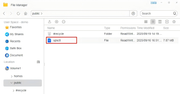
1.Upload the upsctl file to the public shared folder.
2.Open the terminal and run the following commands:
mv /usr/bin/upsctl /usr/bin/upsctl.bak
mv /Volume1/public/upsctl /usr/bin/upsctl
chmod 755 /usr/bin/upsctl
Setfacl -b /usr/bin/upsctl
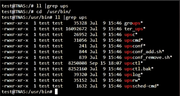
Patch update completed.
To contact our team, please send email to following addresses, remember to replace (at) with @:
Technical team: support(at)terra-master.com(for technical support)
Service team: service(at)terra-master.com(for purchasing, return, replacement, RMA service)
Technical team: support(at)terra-master.com(for technical support)
Service team: service(at)terra-master.com(for purchasing, return, replacement, RMA service)