

Are you running Hypercache by any chance?
TOS 6.0.530 Official Version Released
Re: TOS 6.0.530 Official Version Released
F5-221 TOS7.0.1278 - 4x4TB (Ironwolf) Traid
F2-424 TOS7.0.1278 - 2x500GB nvme (P3) Traid, 2x6TB HDD (HGST) Traid
F2-221 TOS7.0.1278 - 1x3TB Ext4, 1x4TB Btrfs
F2-425+ TOS7.0.1278 - 2x500GB nvme (P3) Traid, 2x6TB HDD (EXOS) Traid
F2-424 TOS7.0.1278 - 2x500GB nvme (P3) Traid, 2x6TB HDD (HGST) Traid
F2-221 TOS7.0.1278 - 1x3TB Ext4, 1x4TB Btrfs
F2-425+ TOS7.0.1278 - 2x500GB nvme (P3) Traid, 2x6TB HDD (EXOS) Traid


Re: TOS 6.0.530 Official Version Released
no i stated i updated to 5.1.145! succesfully and yes i got a working system but bootloader usb is corrupt.Gremlin wrote: ↑05 Nov 2024, 23:47You stated previously that you updated successfully to version 6.0.500.
THIS (6.0.530) is not appropriate for updating 6.0.500 but only for earlier 6Beta versions up to 6.0.229 or latest Tos5.1.145
(clearly stated on page 1 of this thread).
Not sure where you are now. If the update you tried just failed, do you still have a working system?
Re: TOS 6.0.530 Official Version Released
welcome to the club i failed as well but i got my system disks on normal disks.nperiannan wrote: ↑06 Nov 2024, 02:34 Update from 5.1.145 to 6.0.530 failed on my F2-423. I have 16GB RAM and 5.1.145 installed on my NVMe M.2.
Re: TOS 6.0.530 Official Version Released
Sorry, I saw this post: viewtopic.php?p=38137#p38137
Maybe get a new USB drive (I use 4GB versions). You should be able to run your system without one. Which bootloader did you try and install? You need the one appropriate for your Tos version/system. That would then be overwritten by the post 6.0.430 updates.
F5-221 TOS7.0.1278 - 4x4TB (Ironwolf) Traid
F2-424 TOS7.0.1278 - 2x500GB nvme (P3) Traid, 2x6TB HDD (HGST) Traid
F2-221 TOS7.0.1278 - 1x3TB Ext4, 1x4TB Btrfs
F2-425+ TOS7.0.1278 - 2x500GB nvme (P3) Traid, 2x6TB HDD (EXOS) Traid
F2-424 TOS7.0.1278 - 2x500GB nvme (P3) Traid, 2x6TB HDD (HGST) Traid
F2-221 TOS7.0.1278 - 1x3TB Ext4, 1x4TB Btrfs
F2-425+ TOS7.0.1278 - 2x500GB nvme (P3) Traid, 2x6TB HDD (EXOS) Traid


Re: TOS 6.0.530 Official Version Released
The update process from 5.1.45 to 6.0.530 went without any errors.
I had to reconfigure some things, such as users, as stated on the main page.
It seems that the docker config changed, as some bridged containers cant access some containers running in host mode, but that might be due to my docker nw setup.
But there seems to be one misconfiguration after the udpate.
I have two volumes, both from different storage pools.
Volume1 on a single m2 and Volume3 on a RAID5.
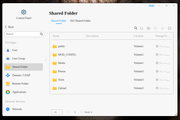
On Volume3 i always had a shared folder "Media" (/Volume3/Media).
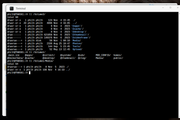
However, after the update to TOS6, webui suddenly reports the shared folder "Media" to be on Volume1.
There is now an empty folder in /Volume1/Media.
The original shared folder "Media" is still there in the filesystem, there is no data loss yet.
I dont know if its safe to change the setting of the shared folder to Volume3 in the TOS webui?
Will it overwrite the original shared folder in /Volume3/Media?
I had to reconfigure some things, such as users, as stated on the main page.
It seems that the docker config changed, as some bridged containers cant access some containers running in host mode, but that might be due to my docker nw setup.
But there seems to be one misconfiguration after the udpate.
I have two volumes, both from different storage pools.
Volume1 on a single m2 and Volume3 on a RAID5.
On Volume3 i always had a shared folder "Media" (/Volume3/Media).
However, after the update to TOS6, webui suddenly reports the shared folder "Media" to be on Volume1.
There is now an empty folder in /Volume1/Media.
The original shared folder "Media" is still there in the filesystem, there is no data loss yet.
I dont know if its safe to change the setting of the shared folder to Volume3 in the TOS webui?
Will it overwrite the original shared folder in /Volume3/Media?

Re: TOS 6.0.530 Official Version Released
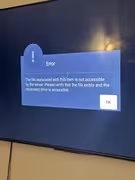
Plex is not working after the upgrade, can see the files but when I try to play it this the message:

Re: TOS 6.0.530 Official Version Released
Ongoing concerns about your failed update from TOS 5.1.145. Have you contacted tech support or customer service?
Your original USB Initboot was TOS5 specific. When upgrading TOS 6.0.530 it will automatically mount the USB and update it to the new TOS 6-specific Initboot, but for some reason you are experiencing failure.
We have not observed this phenomenon or received any other similar feedback at this time.
Will keep an eye on it.
To contact our team, please send email to following addresses, remember to replace (at) with @:
Technical team: support(at)terra-master.com (for technical support)
Service team: service(at)terra-master.com (for purchasing, return, replacement, RMA service)
Technical team: support(at)terra-master.com (for technical support)
Service team: service(at)terra-master.com (for purchasing, return, replacement, RMA service)
Re: TOS 6.0.530 Official Version Released
HelloTMzethar wrote: ↑06 Nov 2024, 11:08Ongoing concerns about your failed update from TOS 5.1.145. Have you contacted tech support or customer service?
Your original USB Initboot was TOS5 specific. When upgrading TOS 6.0.530 it will automatically mount the USB and update it to the new TOS 6-specific Initboot, but for some reason you are experiencing failure.
We have not observed this phenomenon or received any other similar feedback at this time.
Will keep an eye on it.
i now have 3 devices that failed from tos 5.1.145 to update to tos 6.0.530 and both usb boot loaders are corrupt.
t6-423 and a u24 f4-423 all three succeeded to update to 5.1.145 no issuee.
But when update to 6.0.530 Udate failed and boot usb gets corrupted!
all three experianced same issue.
i tried get in contact with support but they said they would try contact a engineer but never got any response after that.
Re: TOS 6.0.530 Official Version Released
Relax, this is easy to fix.
Most likely you had folders named Media on two different volumes before the upgrade, and Media on Volume 3 was set as a shared folder.
The upgrade resets the configuration so that the Media folder on Volume 1 is automatically used as a shared folder. You can rename it and reboot TNAS to make the Media on volume 3 visible.
To contact our team, please send email to following addresses, remember to replace (at) with @:
Technical team: support(at)terra-master.com (for technical support)
Service team: service(at)terra-master.com (for purchasing, return, replacement, RMA service)
Technical team: support(at)terra-master.com (for technical support)
Service team: service(at)terra-master.com (for purchasing, return, replacement, RMA service)
-
nperiannan

- Posts: 12
- Joined: 06 Nov 2024, 02:30

Re: TOS 6.0.530 Official Version Released
Is TOS 6.0 still in beta and unstable? Currently, I don’t have any data stored on my HDDs, so I’ve been able to experiment with the system since purchasing this NAS in October 2024. I’ve been awaiting the official release of TOS 6.0, hoping it would be ready soon so that I could set up the NAS reliably. However, I’m now concerned that I may have made a premature decision in purchasing this device.star wrote: ↑06 Nov 2024, 02:43welcome to the club i failed as well but i got my system disks on normal disks.nperiannan wrote: ↑06 Nov 2024, 02:34 Update from 5.1.145 to 6.0.530 failed on my F2-423. I have 16GB RAM and 5.1.145 installed on my NVMe M.2.
I currently have two 256GB NVMe M.2 drives and two 1TB SSDs installed, two 8TB IronWolf HDDs are on the way. If the HDDs arrive before TOS 6.0 is released, I plan to use TOS 5.1 for my setup by replacing the two SSD with ironwolf. We’ll see which arrives first.