Yes, TOS 5. The instructions worked, thanks.TMzethar wrote: ↑04 Apr 2026, 14:10Hi.
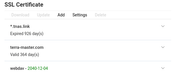
Based on the images you provided, it appears you are using TOS5. In TOS5, you can usually update your eu.tnas.link automatically by simply disabling and then re-enabling the TNAS.online service.
Detailed instructions for this method are available on the first page of this thread.
"(2)If your system version is TOS 4 (excluding models F2-210 and F4-210) or TOS 5, you can update the certificate by restarting the TNAS.online service, provided that the network connection is normal. If the TNAS.online restart is unsuccessful, restarting the entire TNAS device will also complete the certificate update process."
How to update an expired SSL certificate?
-
pennypacker

- Posts: 29
- Joined: 12 Nov 2024, 18:52

Re: How to update an expired SSL certificate?
Wealthy industrialist, philanthropist, and uhh, bicyclist.

Re: How to update an expired SSL certificate?
TOS 4.2.44 on F2-210 (ARM)
Did the TNAS.online start (and stop) and restarted NAS
Thanks for suggestion to fix x509 certificate for docker.
Code: Select all
$ sudo docker pull ghcr.io/tailscale/tailscale:stable
Password:
stable: Pulling from tailscale/tailscale
d741ee1608f3: Already exists
c2d5824efcb8: Retrying in 1 second
7f75f7be1c9d: Retrying in 1 second
c4122d13ac3f: Retrying in 1 second
f1878199be32: Waiting
error pulling image configuration: download failed after attempts=6: x509: certificate signed by unknown authorityThanks for suggestion to fix x509 certificate for docker.
TerraMaster F2-210 under TOS 4.2.44, RAID1, Btrfs, serving Mac, Linux & Windows clients


Re: How to update an expired SSL certificate?
Please refer to this guide to update your expired certificate first, and then try again.
To contact our team, please send email to following addresses, remember to replace (at) with @
Technical team: support(at)terra-master.com(for technical support)
Service team: service(at)terra-master.com(for purchasing, return, replacement, RMA service)
Technical team: support(at)terra-master.com(for technical support)
Service team: service(at)terra-master.com(for purchasing, return, replacement, RMA service)
Re: How to update an expired SSL certificate?
I think you mean first post: yes I did that too (BTW, it misses one step to chmod +x downloaded script):
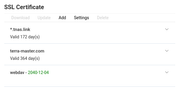
However, even after restart, it does not solve the docker pull error about x509 certificate signed by unknown authority...
(BTW, when logging-into NAS interface from recent Firefox with https, Firefox also complain and have to acknowledge security risks...)
Thanks for any tip to allow successful docker pull with no x509 cert error. (seem this older issue it popping-up again, even with so-called latest docker version)
TerraMaster F2-210 under TOS 4.2.44, RAID1, Btrfs, serving Mac, Linux & Windows clients

Re: How to update an expired SSL certificate?
Please follow the steps below. I have included instructions to backup your original file and a method to restore it later.
Backup the Original File
Before modifying system files, always create a backup:
Code: Select all
sudo cp /etc/docker/daemon.json /etc/docker/daemon.json.bakOpen the configuration file using your preferred editor:
Code: Select all
vi /etc/docker/daemon.jsonCode: Select all
{
  "registry-mirrors": [
    "https://docker.ketches.cn/"
  ],
  "insecure-registries": [
    "ghcr.io"
  ]
}
Restart the service to apply the new settings:
Code: Select all
/etc/init.d/docker restartSince adding entries to insecure-registries lowers security by allowing unverified connections, it is recommended to revert the changes after you have finished pulling images.
To restore your original settings:
Stop Docker
Code: Select all
/etc/init.d/docker stopCode: Select all
sudo mv /etc/docker/daemon.json.bak /etc/docker/daemon.jsonCode: Select all
/etc/init.d/docker startTo contact our team, please send email to following addresses, remember to replace (at) with @:
Support team: support(at)terra-master.com (for technical support only)
Support team: support(at)terra-master.com (for technical support only)
Re: How to update an expired SSL certificate?
Thanks a lot for the useful workaround: works fine.
Now, is there a possibility TM would ship an updated docker app for TOS 4.2.44 / F2-210, so that we avoid such (even transitional) unsecure setup?
Thanks for consideration.
PS:
Code: Select all
 $ sudo systemctl restart docker
sudo: systemctl: command not found
TerraMaster F2-210 under TOS 4.2.44, RAID1, Btrfs, serving Mac, Linux & Windows clients
Re: How to update an expired SSL certificate?
The 210 series are early ARM products. Due to incomplete Docker support for the ARM architecture and architectural limitations in the early days, they could not be upgraded to newer versions.macmpi wrote: ↑27 Apr 2026, 16:58Thanks a lot for the useful workaround: works fine.
Now, is there a possibility TM would ship an updated docker app for TOS 4.2.44 / F2-210, so that we avoid such (even transitional) unsecure setup?
Thanks for consideration.
PS:Code: Select all
 $ sudo systemctl restart docker
sudo: systemctl: command not found
Thank you for pointing this out; the relevant commands have been updated.
To contact our team, please send email to following addresses, remember to replace (at) with @:
Support team: support(at)terra-master.com (for technical support only)
Support team: support(at)terra-master.com (for technical support only)


Re: How to update an expired SSL certificate?
this is not working for me. the commands sudo -i doesnt work. I am in an admin cmd window
Re: How to update an expired SSL certificate?
Great to know our live support team got this sorted out for you!
You only need to update according to solution 1 for your situation.
Thank you for reaching out, and feel free to contact us know if you need any further assistance。
To contact our team, please send email to following addresses, remember to replace (at) with @
Technical team: support(at)terra-master.com(for technical support)
Service team: service(at)terra-master.com(for purchasing, return, replacement, RMA service)
Technical team: support(at)terra-master.com(for technical support)
Service team: service(at)terra-master.com(for purchasing, return, replacement, RMA service)