Page 4 of 8
Re: How to Flash a New USB Initboot for TOS on Windows PC?
Posted: 28 Jul 2025, 05:23
by Gremlin
If you are trying to upgrade to TOS 6 then following a designated upgrade path from 5.1.145 (eg to 6.0.530 or later
viewtopic.php?p=39506#p39506 ) you should not need to re-write the usb drive as the upgrade would do it for you.
In any case the usb in question is
INSIDE the nas and has to be
REPLACED with the new one should circumstances (such as reverting from TOS6 to TOS5,1) dictate. Dismantling required.
Suggest you remove the new USB from back of nas and check normal startup is possible.
Re: How to Flash a New USB Initboot for TOS on Windows PC?
Posted: 28 Jul 2025, 05:46
by BurnsyD17
Gremlin wrote: ↑28 Jul 2025, 05:23
If you are trying to upgrade to TOS 6 then following a designated upgrade path from 5.1.145 (eg to 6.0.530 or later
viewtopic.php?p=39506#p39506 ) you should not need to re-write the usb drive as the upgrade would do it for you.
In any case the usb in question is
INSIDE the nas and has to be
REPLACED with the new one should circumstances (such as reverting from TOS6 to TOS5,1) dictate. Dismantling required.
Suggest you remove the new USB from back of nas and check normal startup is possible.
Hi. Thanks for the reply, I updated my post with additional information.
So as you note, the "initboot" is a USB "
INSIDE the nas". Where? I have it disassembled and find no USB drive (or SD card or whatever) inside. With my 4 HDD and 2 M.2 unplugged, I can see the F4 booting up via HDMI monitor, but when it is up and I browse to the IP, it says "No Hard Drive Detected". I can't figure out from that thread (or others) how to I get my NAS to boot and be running TOS 6.0 without my HDDs or M.2s plugged in.
I tried to follow these instructions
viewtopic.php?p=48860#p48860 and as I noted in the edit of my original I had 6.0 running but when I plugged in my 4x HDDs the NAS comes up and says it is back to running 5.1.
Re: How to Flash a New USB Initboot for TOS on Windows PC?
Posted: 28 Jul 2025, 06:47
by crisisacting
BurnsyD17 wrote: ↑28 Jul 2025, 05:46
[… Where? I have it disassembled and find no USB drive (or SD card or whatever) inside.
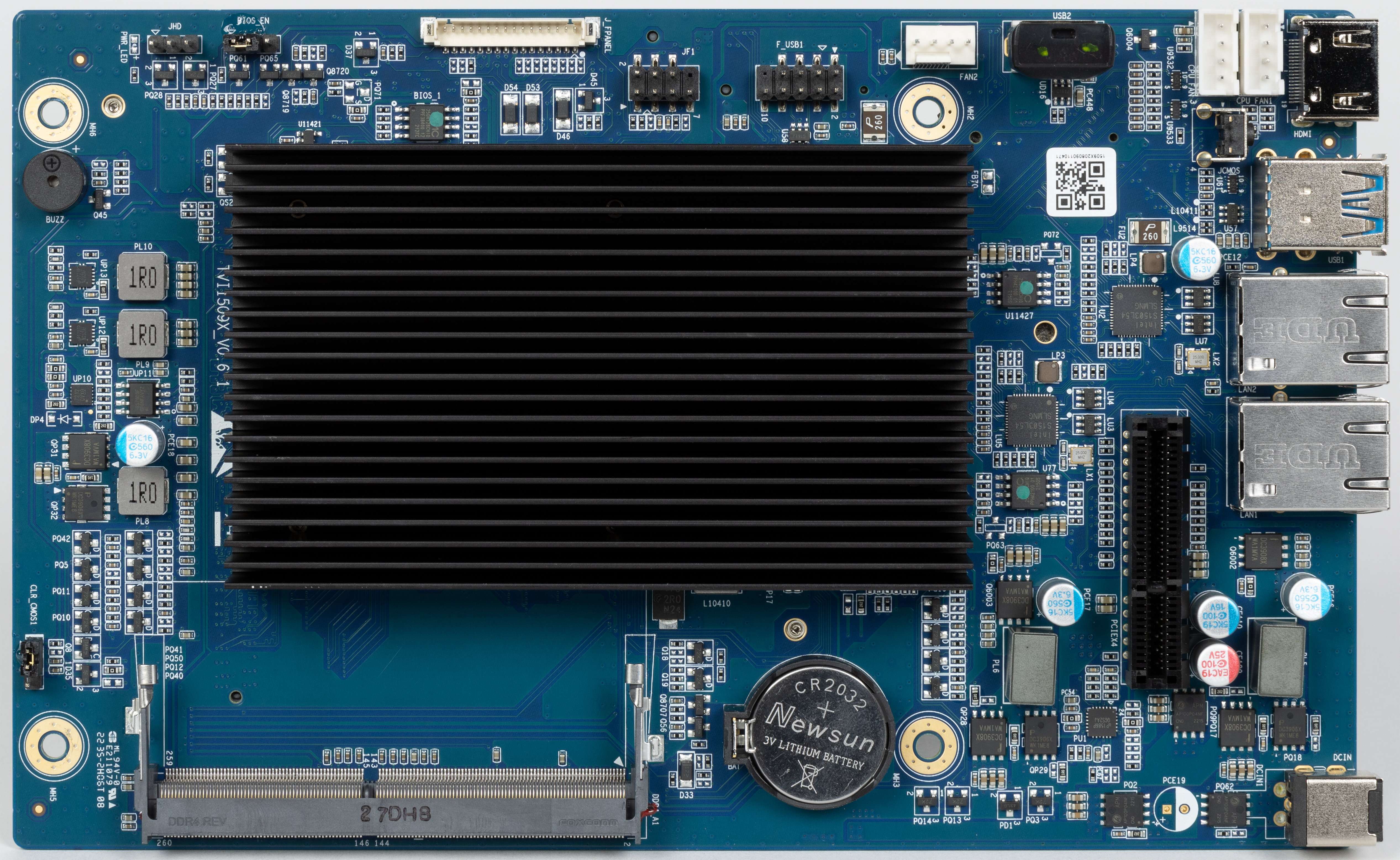
It's plugged into a port labeled USB2 on the motherboard, near the fan headers & HDMI port; it's visible in this high resolution image @
https://www.ixbt.com/img/r30/00/02/63/40/IMG1046.jpg
Re: How to Flash a New USB Initboot for TOS on Windows PC?
Posted: 28 Jul 2025, 18:02
by TMzethar
Based on your description, you have successfully changed the USB Initboot to TOS6-specific.
When you put the HDDs containing TOS5 back into the NAS along with the M.2 SSD and reboot the NAS, it starts TOS5 from the HDD due to the boot priority. Because of TOS5's automatic expansion and synchronization system partition feature, it synchronizes the TOS6 system partition on the M.2 SSD to TOS5.
Solution: Execute the factory reset in Control Panel - System. This operation will clear TOS5 from both the HDD and M.2 SSD. After the automatic reboot, you should be able to reach the TOS6 initial setup page again. Please select the M.2 SSD as the installation target for the TOS6 system once more.
Re: How to Flash a New USB Initboot for TOS on Windows PC?
Posted: 29 Jul 2025, 02:42
by BurnsyD17
Awesome, THANKS! It was hiding under a ribbon cable but I see it now!
Re: How to Flash a New USB Initboot for TOS on Windows PC?
Posted: 29 Jul 2025, 02:53
by BurnsyD17
TMzethar wrote: ↑28 Jul 2025, 18:02
Based on your description, you have successfully changed the USB Initboot to TOS6-specific.
When you put the HDDs containing TOS5 back into the NAS along with the M.2 SSD and reboot the NAS, it starts TOS5 from the HDD due to the boot priority. Because of TOS5's automatic expansion and synchronization system partition feature, it synchronizes the TOS6 system partition on the M.2 SSD to TOS5.
Solution: Execute the factory reset in Control Panel - System. This operation will clear TOS5 from both the HDD and M.2 SSD. After the automatic reboot, you should be able to reach the TOS6 initial setup page again. Please select the M.2 SSD as the installation target for the TOS6 system once more.
Is there a way to configure with TOS6 the same as my NAS offered in TOS5.1, a RAID5 array across my 4x 4TB HDDs with a RAID1 SSD Cache that uses the two M.2 NVMEs? Either by changing boot priority in BIOS or some other steps? For the brief time TOS6 was running, it was with TOS6 on one of the M.2, which then only allowed for one M.2 for SSD Cache. Now that thanks to chris above I have located the internal USB drive and I'm willing to jump through whatever steps that takes, there is no data on either the M.2s or the HDDs.
Re: How to Flash a New USB Initboot for TOS on Windows PC?
Posted: 29 Jul 2025, 15:00
by TMzethar
SSDs that have already been installed with the TOS system or used for storage pools/volumes cannot be simultaneously used for Hyper Cache. If you want to use both SSDs for Hyper Cache, you need to adjust the target disk of the system disk in the control panel under Disk-system disk. You can also reinstall the system and choose HDD as the installation target again.
Please note, if there is data on your HDD, stop the operation if you receive any prompts to 'delete/formatted'.
Re: How to Flash a New USB Initboot for TOS on Windows PC?
Posted: 29 Jul 2025, 21:32
by BurnsyD17
TMzethar wrote: ↑29 Jul 2025, 15:00
SSDs that have already been installed with the TOS system or used for storage pools/volumes cannot be simultaneously used for Hyper Cache. If you want to use both SSDs for Hyper Cache, you need to adjust the target disk of the system disk in the control panel under Disk-system disk. You can also reinstall the system and choose HDD as the installation target again.
Please note, if there is data on your HDD, stop the operation if you receive any prompts to 'delete/formatted'.
I think I understand now. TOS itself doesn't operate from the internal USB, all that internal USB contains is a boot loader and enough of a "web server" to manage downloading and installing TOS to either a M.2 NVME or plugged in SATA drives. Do I have that right?
That would realign my expectations of how I can setup my F4-423, which is okay. There is no data on either my 2 M.2's or the 4x 4TB HDDs I planned to setup in it.
Re: How to Flash a New USB Initboot for TOS on Windows PC?
Posted: 30 Jul 2025, 09:07
by TMzethar
BurnsyD17 wrote: ↑29 Jul 2025, 21:32
I think I understand now. TOS itself doesn't operate from the internal USB, all that internal USB contains is a boot loader and enough of a "web server" to manage downloading and installing TOS to either a M.2 NVME or plugged in SATA drives. Do I have that right?
Right.
Re: How to Flash a New USB Initboot for TOS on Windows PC?
Posted: 14 Nov 2025, 17:59
by ShinyNobody
Hello, i have a f4-424 pro where linux and some stuff was installed instead of the original Bios. I try to revert but the init sticks don't work.
(and it is a pain to "reset" the us sticks, my windows knows they are there but every windows stuff denies to format them back or even delete them so i change them with rufus to seomethign else and then windows is allowing me to do other stuff. )
I have no other usb stick in it. even the small one and i even did remove the battary for a time so that no other information should be on the board. and still it starts, try to use the stick but only beeps 3 times and fails. what else can i try?