Page 4 of 7
Re: TOS 7.0.0791 Official Release (x86) is Released for Update
Posted: 22 Jul 2026, 04:34
by zeratyx
Hi,
I upgraded to TOS7 on my F2-423 NAS, and it indicates that the boot order does not match the factory settings, even though I configured it correctly! What should I do ?
Re: TOS 7.0.0791 Official Release (x86) is Released for Update
Posted: 22 Jul 2026, 09:08
by HeliaWu
Could you tell us more details about the problem you’re facing with Media Indexing?
Re: TOS 7.0.0791 Official Release (x86) is Released for Update
Posted: 22 Jul 2026, 10:56
by TMzethar
zeratyx wrote: ↑22 Jul 2026, 04:34
Hi,
I upgraded to TOS7 on my F2-423 NAS, and it indicates that the boot order does not match the factory settings, even though I configured it correctly! What should I do ?
One or more of your drives might still have an old boot partition lying around.
Try rebooting a few times — you might get lucky and boot into the system. If you do, migrate the system to each drive in turn to overwrite those old boot partitions, then move it back to your preferred system drive.
You could also do a fresh TOS 7 reinstall and choose a different system drive — that should overwrite the old boot partitions on the other drives.
(If you see a prompt to “Delete/Format,” do not proceed; select a different drive instead. This may be because the target drive contains an older partition format or is being used as an SSD Hyper Cache.)
If you run into trouble, you can book a remote engineer session here:
https://salesiq.zohopublic.com/signatur ... 97d0be8892
Re: TOS 7.0.0791 Official Release (x86) is Released for Update
Posted: 22 Jul 2026, 14:17
by snapsh0t
HeliaWu wrote: ↑22 Jul 2026, 09:08
Could you tell us more details about the problem you’re facing with Media Indexing?
Simply that the Last Run time is one hour out when 'summer time' is in force. This fault has now been corrected in the system logs but remains in Media Indexing.
My personal belief is that the Last Run time should not show at all when Media Indexing is disabled but the development team does not agree with me.
Re: TOS 7.0.0791 Official Release (x86) is Released for Update
Posted: 22 Jul 2026, 15:27
by Grigorio
Konstantin wrote: ↑22 Jul 2026, 01:10
Grigorio wrote: ↑22 Jul 2026, 01:08
Storage Manager update stuck at 99% after reboot and is completely unusable
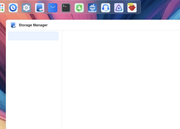
Does anyone have ideas?
I confirm, the same error, but also on the previous version...

This is a recipe from the support team. My problem is solved
- - - - - - -
Please open a terminal in your TOS web browser and execute the following commands:
systemctl stop StorageManager.service
dpkg --purge storagemanager
cd /
wget
https://download2.terra-master.com/stor ... _amd64.deb
dpkg -i storagemanager_1.0.054_amd64.deb
/etc/tos/scripts/mntdata
This should resolve the storage management issue.
- - - - - - - -
Re: TOS 7.0.0791 Official Release (x86) is Released for Update
Posted: 22 Jul 2026, 15:49
by TMnight
Please open the Terminal from the top navigation bar of the TOS desktop, then run the following commands one by one to reinstall Storage Manager:
Code: Select all
systemctl stop StorageManager.service
dpkg --purge storagemanager
cd /
wget https://download2.terra-master.com/storagemanager_1.0.054_amd64.deb
dpkg -i storagemanager_1.0.054_amd64.deb
rm -rf storagemanager_1.0.054_amd64.deb
/etc/tos/scripts/mntdata
After the commands have finished executing, please refresh the web page and check whether Storage Manager has returned to normal.
If any command returns an error during the process, please take a screenshot of the complete terminal output or copy and send it to us. We will further analyze the issue and assist you with the next steps.
Re: TOS 7.0.0791 Official Release (x86) is Released for Update
Posted: 22 Jul 2026, 15:49
by TMnight
Please open the Terminal from the top navigation bar of the TOS desktop, then run the following commands one by one to reinstall Storage Manager:
Code: Select all
systemctl stop StorageManager.service
dpkg --purge storagemanager
cd /
wget https://download2.terra-master.com/storagemanager_1.0.054_amd64.deb
dpkg -i storagemanager_1.0.054_amd64.deb
rm -rf storagemanager_1.0.054_amd64.deb
/etc/tos/scripts/mntdata
After the commands have finished executing, please refresh the web page and check whether Storage Manager has returned to normal.
If any command returns an error during the process, please take a screenshot of the complete terminal output or copy and send it to us. We will further analyze the issue and assist you with the next steps.
Re: TOS 7.0.0791 Official Release (x86) is Released for Update
Posted: 22 Jul 2026, 15:50
by TMnight
Please open the Terminal from the top navigation bar of the TOS desktop, then run the following commands one by one to reinstall Storage Manager:
Code: Select all
systemctl stop StorageManager.service
dpkg --purge storagemanager
cd /
wget https://download2.terra-master.com/storagemanager_1.0.054_amd64.deb
dpkg -i storagemanager_1.0.054_amd64.deb
rm -rf storagemanager_1.0.054_amd64.deb
/etc/tos/scripts/mntdata
After the commands have finished executing, please refresh the web page and check whether Storage Manager has returned to normal.
If any command returns an error during the process, please take a screenshot of the complete terminal output or copy and send it to us. We will further analyze the issue and assist you with the next steps.
Re: TOS 7.0.0791 Official Release (x86) is Released for Update
Posted: 22 Jul 2026, 15:52
by TMvalen
Hello, thank you very much for your suggestion!
After an internal assessment, we believe that the "last run time" record is for historical execution nodes and is not related to the current enabled status. If it is hidden when disabled and re-enabled, the last scan time cannot be traced, which may cause data gaps and is not conducive to problem troubleshooting. Therefore, we will not adjust this logic for now.
Thank you again for your attention and feedback!
Re: TOS 7.0.0791 Official Release (x86) is Released for Update
Posted: 22 Jul 2026, 16:49
by storageninja
F4 SSD im unable to save my SMB custom setting, without this settings my MacBook TimeMachine backup wont run.
These settings are in place for months so the latest update(s) introduced this issue.
