Page 4 of 6
Re: How to Properly Install and Use TOS 7 on the 425 Series TNAS
Posted: 29 Jun 2026, 13:57
by HeliaWu
This issue may have occurred due to anomalies during the update process, which caused the LAN1 interface to drop out of the Bond group. You may resolve it by deleting the existing Bond configuration and recreating it.
Re: How to Properly Install and Use TOS 7 on the 425 Series TNAS
Posted: 29 Jun 2026, 19:29
by eric2
Hello,
I just purchased the F4-425 after my F4-220 had failed, i've inserted all the hard disks and everything seems to be working fine. Now i'm looking to upgrade the TOS.
The old TOS ver 4.2.40 is still being used, from what i read i can get TOS 7 on this new hardware? Looks like i can't directly manual update to this latest version which gives me an error about size being too large, this is possibly because the older TOS is too old? What is the recommended approach?
I tried upgrading to TOS 5 first which seemed to be working at first but it stopped at 50%, the webpage reloads and nothing seemed to have changed.
Not a IT person by any means, appreciate your advise.
Thanks,
Re: How to Properly Install and Use TOS 7 on the 425 Series TNAS
Posted: 30 Jun 2026, 12:31
by DCCentR
EriChan wrote: ↑27 Jun 2026, 16:06
nikk wrote: ↑27 Jun 2026, 14:09
Based on TerraMaster's official support documentation regarding TOS 7 compatibility for the 425 series, here is the clarity you are looking for:
1. Do you need to update?
No, you don't. The official documentation explicitly states that both MTWL0101.V07 (your current version) and BJFX-TWLX-108 are fully compatible with TOS 7 out of the box and require no additional adjustments.
2. What is the difference / What changed?
The BJFX-TWLX-108 BIOS was specifically released to fix a boot priority defect found in older BIOS versions (MTWL0101.V03 through MTWL0101.V06). On those older builds, if a user installed TOS 7 on an NVMe M.2 SSD located in the 3rd slot, the NAS would fail to boot properly and loop back to the initialization page.
Since your current V07 version already resolves this issue (or does not suffer from it), updating to 108 will not bring any new features (like memory compatibility or CPU microcode updates) or extra security patches.
Recommendation:
Your current V07 is already fully optimized for TOS 7, you can safely stay on your current version and proceed with your TOS 7 upgrade without touching the BIOS.
Hope this helps!
By the way, why didn't you update the microcode when you updated the BIOS?
Re: How to Properly Install and Use TOS 7 on the 425 Series TNAS
Posted: 30 Jun 2026, 16:31
by marinipa
What about installing TOS 7 on the F2-425 model (non plus)?
Re: How to Properly Install and Use TOS 7 on the 425 Series TNAS
Posted: 01 Jul 2026, 11:35
by EriChan
F2-425 supports TOS7 perfectly, you just need to upgrade according to the BIOS version of NAS and current system version.
Re: How to Properly Install and Use TOS 7 on the 425 Series TNAS
Posted: 01 Jul 2026, 11:39
by EriChan
From a technical standpoint, it usually comes down to two reasons:
- Targeted Hotfix: This BIOS release was specifically released to fix a boot priority defect found in older BIOS versions. Bundling a CPU microcode update introduces unnecessary variables and risks breaking stability for a system that is otherwise working fine.
- OS-Level Updates: Since TOS is Linux-based, critical CPU microcode patches (like security fixes) are usually handled dynamically by the OS kernel during boot anyway. There's rarely a need to force it into a motherboard BIOS update.
In short: to avoid introducing new bugs, We kept the patch as isolated as possible.
Re: How to Properly Install and Use TOS 7 on the 425 Series TNAS
Posted: 02 Jul 2026, 21:02
by eric2
eric2 wrote: ↑29 Jun 2026, 19:29
Hello,
I just purchased the F4-425 after my F4-220 had failed, i've inserted all the hard disks and everything seems to be working fine. Now i'm looking to upgrade the TOS.
The old TOS ver 4.2.40 is still being used, from what i read i can get TOS 7 on this new hardware? Looks like i can't directly manual update to this latest version which gives me an error about size being too large, this is possibly because the older TOS is too old? What is the recommended approach?
I tried upgrading to TOS 5 first which seemed to be working at first but it stopped at 50%, the webpage reloads and nothing seemed to have changed.
Not a IT person by any means, appreciate your advise.
Thanks,
So while i was waiting for assistant i went ahead and did a factory restore on my TOS ver 4 after reading that to ugrade to ver 5 i needed to factory restore. To my shock and surprise the drive booted up with no TOS installed at all and it asked me if i want to write the TOS to my disk and gave me a warning that it will erase my disks!!
I did not go ahead and instead installed the new TOS (now ver 6) to a spare HDD that i had. Now i'm trying to recover data from my old disks before i do anything else.. but i'm stuck.
Anyway i'll bring up a new post in the TOS help section

Re: How to Properly Install and Use TOS 7 on the 425 Plus Series TNAS
Posted: 10 Jul 2026, 19:59
by Din0
Hi,
I have a F4-425 Plus with BIOS version MTWL0101.V05. I would like to install the latest version of TOS 7.
My current setup:
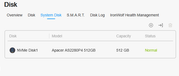
System disk: NVMe Disk1 (Slot 1) — Apacer AS2280P4 512GB
Slot 2: NVMe SSD (in TRAID)
Slot 3: Empty
Since I understand the BIOS defect on V03–V06 only affects the NVMe M.2 SSD in Slot 3, and I'm not using that slot, can the TOS 7 installation be performed without risk in my case?
Thanks!
Re: How to Properly Install and Use TOS 7 on the 425 Plus Series TNAS
Posted: 10 Jul 2026, 20:22
by samw5
I'm on MTWL0101.V05 on an F2-425plus with System Drive on SSD1 and SSD2 (SSD3 used for caching).
My biggest concern here is data and functionality loss in the upgrade. I'm game in moving forward, though I'm trying to first understand what will need or may need to be reconfigured after update.
Main things that I have:
- plex server
- docker engine and 14 dockers
- 3 storage pools, TRAID, one for the system OS on the 2 SSDs and 2 for the HDDs
- nic bonding
- obviously any data on the HDDs.
Any thoughts?
Re: How to Properly Install and Use TOS 7 on the 425 Plus Series TNAS
Posted: 11 Jul 2026, 08:02
by CursaYang
Din0 wrote: ↑10 Jul 2026, 19:59
If you are not using Slot 3, there is no impact, and you can upgrade directly to TOS 7.