Page 4 of 7

Re: TOS 7.0 Beta: Boot hang, internal array drop (mdadm DeviceDisappeared), and Web UI failure on F8 NVMe

Posted: 22 May 2026, 16:41
by MikeZhang
AES wrote: 20 May 2026, 01:48
This error message is unrelated to the boot failure. We need more information to help with the analysis, such as the location where the computer is stuck on the monitor during boot.

Re: TOS 7.0.0601 Beta (X86) is Released for Update

Posted: 22 May 2026, 17:53
by exqo
I install TOS 7.0.0601 without any issue (for the moment).

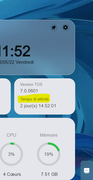
But i found a translation issue in french version (not a big issue obviously)

Image

Re: TOS 7.0.0601 Beta (X86) is Released for Update

Posted: 22 May 2026, 22:18
by MikeZhang
exqo wrote: 22 May 2026, 17:53
Thanks for the help, please help us with correct information to be displayed there

Re: TOS 7.0.0601 Beta (X86) is Released for Update

Posted: 23 May 2026, 14:48
by snapsh0t
Some odd entries in the debug syslog file which occurred as I turned debug mode off. Whole log available if required.

May 23 07:28:09 Therver2 TOSDaemon[2795]: Successfully wrote file path=/etc/tos/debug/debug_cron.conf
May 23 07:28:09 Therver2 systemd[1]: debugmodel.timer: Deactivated successfully.
May 23 07:28:09 Therver2 systemd[1]: Stopped debugModel Timer.
May 23 07:28:09 Therver2 systemd[1]: Reloading.
May 23 07:28:10 Therver2 systemd[1]: /lib/systemd/system/rsync.service:9: Unknown key name 'IOSchedulingPolicy' in section 'Service', ignoring.
May 23 07:28:10 Therver2 systemd[1]: /lib/systemd/system/rsync.service:10: CPU scheduling priority is out of range, ignoring: 19
May 23 07:28:10 Therver2 systemd[1]: /lib/systemd/system/rsync.service:12: Unknown key name 'NICE' in section 'Service', ignoring.
May 23 07:28:10 Therver2 systemd[1]: Configuration file /lib/systemd/system/application.service is marked executable. Please remove executable permission bits. Proceeding anyway.
May 23 07:28:10 Therver2 TOSDaemon[2795]: running stop /etc/tos/debug/script/klogdebug.sh...
May 23 07:28:10 Therver2 TOSDaemon[2795]: shell /etc/tos/debug/script/klogdebug.sh running success
May 23 07:28:10 Therver2 systemd[1]: Condition check resulted in Kernel Security Modules - SMACK being skipped.

Re: TOS 7.0.0601 Beta (X86) is Released for Update

Posted: 23 May 2026, 16:21
by kai
Good afternoon. It's not possible to activate any user other than the administrator.

F2-223
TOS 7.0.0601

Re: TOS 7.0.0601 Beta (X86) is Released for Update

Posted: 23 May 2026, 17:21
by EriChan
snapsh0t wrote: 23 May 2026, 14:48
To better assist you in confirming whether there are any abnormalities in the TOS system, please send the complete log to our technical support email at [email protected] via email, and attach the forum link and your forum ID as well.
Re: TOS 7.0.0601 Beta (X86) is Released for Update

Posted: 23 May 2026, 19:02
by AES
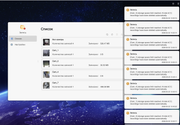
The video surveillance system has stopped recording. It creates a single file within each half-day folder—and may even attempt to write to it—but to no avail.

(F8) A dedicated 1 TB SSD used for video surveillance is currently full; however, everything was working normally prior to this.
Despite this, messages indicating that old files are supposedly being deleted due to storage limits being reached appear regularly.

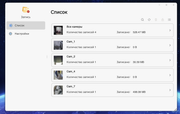
The designated recording directory is configured correctly, and new folders are indeed being created within the proper location. However, in reality, the drive is cluttered with old, empty folders dating back to last year, while the new folders are either empty themselves or contain a single file that cannot be played back.
The file sizes displayed in the screenshot are incorrect; in reality, the drive is filled with video clips—not just 528 MB of data.

Image

What exactly does it delete? Files from the folder it writes to? There is such an unwieldy number of folders—hundreds of them—that I can't be bothered to sort through them all; they really should have been organized by year instead of dumping every single subscription into a single folder.
Image
It seems to be working now—video files have started appearing.
It might be because I enabled a shared limit of 930 GB; previously, the limits were set individually for each camera.
I also manually deleted the old recordings.

Re: TOS 7.0.0601 Beta (X86) is Released for Update

Posted: 23 May 2026, 22:04
by Riccobono67
Riccobono67 wrote: 21 May 2026, 18:18
CursaYang wrote: 21 May 2026, 09:16
Riccobono67 wrote: 21 May 2026, 01:00
Our internal tests show no lag issues when transferring files via SMB. Does the 2GB file you're transferring have a specific format?

Additionally, you can try temporarily disabling SMB multichannel and VFS MAC, then clearing the Windows SMB connection, and then testing the transfer again.
Hello,

regarding an issue that appeared after updating the firmware to release 7.0.0601 on my TerraMaster F6-424 MAX (IP 192.168.20.109). Before the update (rel. 7.0.0567) I did not experience any anomalies.

Environment description:

NAS 1: QNAP TS-1685, IP 192.168.20.100. Shares three folders; one of these receives the backup from the TerraMaster.

NAS 2: TerraMaster F6-424 MAX, IP 192.168.20.109. Shares three folders with three PCs, Qnap and various devices.

Three PCs on the network have an active VPN that bypasses the local network for the NAS devices.

Jellyfin has been installed on the TerraMaster since purchase.

Symptoms observed after the update:

Any activity on the TerraMaster shared folders experiences micro-interruptions and freezes.

Video playback with VLC from SMB paths on the TerraMaster shows frequent interruptions and is not smooth.

File transfers to/from the TerraMaster show variable speeds up to zero throughput.

Disabling the VPN on one of the PCs reduces the issue but a slowdown is still noticeable.

The backup from the QNAP of the TerraMaster folder shows delays after the update.

FTP operations between the TerraMaster and the PCs do not present problems.

Streaming via Jellyfin (direct server streaming to TV, browser, smartphone, iPad, or laptops with the Jellyfin app) works correctly without interruptions. The issue appears only when accessing the same folder via SMB (e.g., VLC on PC).

The same file and operations on the QNAP (with or without VPN) do not show the issue.

Preliminary actions I intend to perform / plan to try:

Temporarily disable SMB Multichannel and VFS MAC on the TerraMaster.

Remove and recreate the SMB connection on Windows, then retest transfers.

Support request:

Could you tell me which logs or diagnostics to collect to assist your analysis (e.g., SMB logs, system logs, packet captures)?

Are there known settings introduced in 7.0.0601 that could cause these symptoms, particularly when VPNs are active on clients?

Any recommendations for further tests to perform (e.g., test SMBv2 vs SMBv3, temporarily disable SMB signing, check VPN MTU/keepalive)?

Is a patch or recommended rollback planned if this release is confirmed as the cause?

I am available to send logs, configuration files, or run tests by appointment. Thank you for your help.

Best regards,
Cesare Riccobono
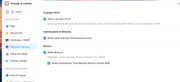
For those who have experienced issues with SMB sharing while VPN is active on the PC, after several attempts I managed to solve the problem by enabling the **Discovery Service**, in particular the following options:
UPnP, WSDD, and Bonjour.

Image

Re: TOS 7.0.0601 Beta (X86) is Released for Update

Posted: 24 May 2026, 03:45
by exqo
MikeZhang wrote: 22 May 2026, 22:18
exqo wrote: 22 May 2026, 17:53
Thanks for the help, please help us with correct information to be displayed there
it should be : "Temps d'activité" !

Re: TOS 7.0.0601 Beta (X86) is Released for Update

Posted: 24 May 2026, 12:05
by TMzethar
exqo wrote: 24 May 2026, 03:45
MikeZhang wrote: 22 May 2026, 22:18
exqo wrote: 22 May 2026, 17:53
Thanks for the help, please help us with correct information to be displayed there
it should be : "Temps d'activité" !
This has been added to the bug tracker. We will review and fix it as soon as possible. Thank you again for reporting the issue. :)