Page 28 of 31
Re: TOS 6.0.420 Beta Is Available for Testing
Posted: 19 Sep 2024, 09:22
by TMzethar
koalakoala wrote: ↑18 Sep 2024, 10:19
6. Minor Typo here - TM team.

Okay, please wait for subsequent TOS updates.
Re: TOS 6.0.420 Beta Is Available for Testing
Posted: 20 Sep 2024, 04:25
by GoodwinBY
Where can I find a link in this forum to download TOS 6.0.420?
Re: TOS 6.0.420 Beta Is Available for Testing
Posted: 20 Sep 2024, 09:49
by TMroy
The beta test has ended, and the 6.0.420 update package has been removed.
Re: TOS 6.0.420 Beta Is Available for Testing
Posted: 27 Sep 2024, 14:48
by Lau6311
Quote:
""The TOS 6.0.420 version adopts a new root file system, fully compatible with the Ubuntu 22.04 root file system. However, please note that all your previous system configurations will be cleared after the update...""
Appreciating TerraMaster and others can help to clarify the following simple queries, for purpose of avoiding unproductive mistakes in using F2-223 product just received:
1. Wanting to re-start from fresh "re-initialization" of HDD (1x8T Toshiba, as Vol 1) and 1x256G NVME SSD (as hyper cache), Is it correct to remove the NVME SSD before updating from TOS 5.1.145 to TOS 6 (which version is most appropriate).
2. first top 2.5G ethernet port is connected to 1G 8xethernet ports switch. Can I connect my PC 2.5G ethernet port to F2-223 second lower 2.5G ethernet port at the same time. When possible, any settings are required? Reason: Hoping can transfer files faster by this way between NAS and PC. So far, can observe max files transfer rate of about 100MB/s+ connected at 1G switch port. Satisfied. Currently using very old WD ex2 NAS (50MB/s max).
3. Or can FE-223 ONLY connected to PC for faster files transfer, on a temporally basis ?
4. Did Install 2 NVME sticks to all SSD slots before the very first initialization, resulted not able to setup hyper cache (main purpose) on SSD, selected RAID is JBOD. Planning to remove all Volumes + all ssd so to begin from fresh when upgrading to TOS 6 Beta.)
Thank you for helping...
Re: TOS 6.0.420 Beta Is Available for Testing
Posted: 03 Oct 2024, 23:56
by YAYEST
Hello! I became the proud owner of the NAS Terramaster F4-423. Now I wish to upgrade my operating system to TOS6, but I can't do it. Please help me
Re: TOS 6.0.420 Beta Is Available for Testing
Posted: 04 Oct 2024, 00:06
by Gremlin
The updates for non-beta installations are not yet available. Some devices can download a new installation file if it is available for that model. (See support pages for possible downloads.)
Re: TOS 6.0.420 Beta Is Available for Testing
Posted: 05 Oct 2024, 00:31
by spamdz12o
golgoth wrote: ↑18 Aug 2024, 22:47
Really, just take your terramaster NAS (wonderful piece of hardware) and put another OS in it.
I had some (big) issues with TOS 6, no solutions found at all and not even identified the cause. Now i'm doing a backup of my data at the speed of 5-10 MB/sec because of high CPU load: it will take weeks, but at the end i will be able to put a working OS inside my F4-424 PRO.
Can you help me? Installed an SSD, installed OMV on it and it does not boot!
Any idea?
Re: TOS 6.0.420 Beta Is Available for Testing
Posted: 05 Oct 2024, 20:37
by TMzethar
YAYEST wrote: ↑03 Oct 2024, 23:56
Hello! I became the proud owner of the NAS Terramaster F4-423. Now I wish to upgrade my operating system to TOS6, but I can't do it. Please help me
Upgrade packages from TOS5 to TOS6 are not available at this time, please wait for further announcements.
Re: TOS 6.0.420 Beta Is Available for Testing
Posted: 05 Oct 2024, 21:15
by owen94
Where can I download version 6? I UPDATED TO 6.0.507 from 6.0.500 and it keeps asking for the .in file from version 6 and I AM UNABLE TO USE THE NAS.
Re: TOS 6.0.420 Beta Is Available for Testing
Posted: 06 Oct 2024, 10:47
by TMeric
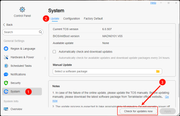
owen94 wrote: ↑05 Oct 2024, 21:15
Where can I download version 6? I UPDATED TO 6.0.507 from 6.0.500 and it keeps asking for the .in file from version 6 and I AM UNABLE TO USE THE NAS.
Please follow the instructions in the image below to upgrade TOS 6.0.500 to TOS 6.0.507