TOS 6.0.530 Official Version Released

Official news about TOS, mobile app, PC app updates or beta releases.
User avatar
Lexbox
Posts: 2
Joined: 06 Mar 2023, 00:49
Great Britain

Re: TOS 6.0.530 Official Version Released

Post by Lexbox »

T2Consulting wrote: 02 Feb 2025, 01:06
Lexbox wrote: 01 Feb 2025, 06:52 F2-421, F5-421, F2-422, F4-422, F5-422 USERS ON THE OLDER BIOS YOU ARE GOING TO WANT TO READ THIS: Terra Master do have the bios update you need to be able to install TOS 6. Follow the instructions by the letter and you SHOULD be able to update your bios to MAPL0304V22 and go on and install TOS 6 thereafter. Caveat: If you are not confident in flashing a BIOS, just stay where you are on TOS 5.1, there is always a risk when flashing anything. For those of you that are comfortable with the risk, read on.

Firstly, make sure you are on the correct TOS versions supported for this upgrade listed in the 1st post. Plus your system HAS to have an HDMI out.

Next, download the MAPL0304V22 bios zip file at https://download2.terra-master.com/MAPL0304V22.zip Have a USB stick formatted to FAT32 to hand. Follow the instructions on the word doc in the zip file. After you have finished following all instructions, go back into the bios and go to Southbridge settings in the chipset tab and change the OS selection to Intel Linux. Save and exit. All being well the new bios image will boot up into your current TOS.

All you need to do now is download the TOS 6 image in post 1 and follow the instructions. Once rebooted you have TOS 6 installed!

OTA updated will now also be available to download!

Image

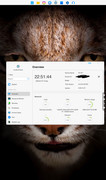
First F2-421 in the world running latest TOS 6.0.610 :geek:
My F4-422 runs TOS 5.1.145 with BIOS MAPL0301V14 and does not have hdmi port. How can i follow instructions without a monitor? Thanks!
Interestingly it looks like TM took away the HDMI port for the Fx-422. The CPU has a built in GPU, so it is perfectly capable. Referring to the previous post, you could always try a USB to vga/hdmi adapter; my worry would be that it won’t show the bios splash screen before attempting to load into the OS. I wonder if it was just a cost saving exercise on TM’s part and that the mobo just doesn’t have an HDMI soldered in? 🤷🏻
F2-421 TOS 6.0.610: 8GB RAM 2xWD RED 3TB HDD + D5-300c 5xWD RED 8 TB HDD
T9-423 TOS 5.1.67: 16GB RAM 1xnvme 1TB hyper cache & 7xIronwolf 10TB HDD
User avatar
crisisacting
Silver Member
Posts: 500
Joined: 20 Jan 2022, 16:42

Re: TOS 6.0.530 Official Version Released

Post by crisisacting »

Lexbox wrote: 02 Feb 2025, 18:03 Interestingly it looks like TM took away the HDMI port for the Fx-422. The CPU has a built in GPU, so it is perfectly capable. … wonder if it was just a cost saving exercise on TM’s part and that the mobo just doesn’t have an HDMI soldered in? 🤷🏻
They didn't take it away; some units were shipped with the plastic not removed from the rear.

This site got one of those units, however upon removing the backplate of the TNAS, they discovered that the HDMI output is there, but the plastic cover wasn't removed at the factory. They made the port accessible by cutting it out themselves.
Lexbox wrote: 02 Feb 2025, 18:03… Referring to the previous post, you could always try a USB to vga/hdmi adapter; my worry would be that it won’t show the bios splash screen before attempting to load into the OS. …
A DisplayLink adapter requires drivers to output over USB, which as you stated, wouldn't display anything at startup; until a driver is loaded to allow for output, it's not a solution to use for any kind of diagnostic purposes.
User avatar
Lexbox
Posts: 2
Joined: 06 Mar 2023, 00:49
Great Britain

Re: TOS 6.0.530 Official Version Released

Post by Lexbox »

crisisacting wrote: 02 Feb 2025, 18:43
Lexbox wrote: 02 Feb 2025, 18:03 Interestingly it looks like TM took away the HDMI port for the Fx-422. The CPU has a built in GPU, so it is perfectly capable. … wonder if it was just a cost saving exercise on TM’s part and that the mobo just doesn’t have an HDMI soldered in? 🤷🏻
They didn't take it away; some units were shipped with the plastic not removed from the rear.

This site got one of those units, however upon removing the backplate of the TNAS, they discovered that the HDMI output is there, but the plastic cover wasn't removed at the factory. They made the port accessible by cutting it out themselves.
Lexbox wrote: 02 Feb 2025, 18:03… Referring to the previous post, you could always try a USB to vga/hdmi adapter; my worry would be that it won’t show the bios splash screen before attempting to load into the OS. …
A DisplayLink adapter requires drivers to output over USB, which as you stated, wouldn't display anything at startup; until a driver is loaded to allow for output, it's not a solution to use for any kind of diagnostic purposes.
I’m confused at the fact that they just didn’t bother removing the blanking plate, though more so at the fact that the 4 bays have 5 sata ports built in!?! 🤣
F2-421 TOS 6.0.610: 8GB RAM 2xWD RED 3TB HDD + D5-300c 5xWD RED 8 TB HDD
T9-423 TOS 5.1.67: 16GB RAM 1xnvme 1TB hyper cache & 7xIronwolf 10TB HDD
rvillac
Posts: 2
Joined: 12 Jan 2020, 17:30
Spain

Re: TOS 6.0.530 Official Version Released

Post by rvillac »

Lexbox wrote: 01 Feb 2025, 06:52
Hi all,

Just in case someone could find this helpful.

This morning, I've followed the instructions provided by Lexbox (thanks a lot for your post!!!) and I've been able to update to TOS6 in a (initially) not compatible F2-221.

As far as I had tried to update to TOS 6.0.610 from TOS 5.1.145 or just doing a fresh install (with an empty HD), process stopped with a message "Failed to update" or similar. My initial configuration:
· Aptio Setup Utility 2018 2.18.1263
· BIOS Vendor American Megatrends
· Core Version 5.12
· Compliancy UEFI 2.5; PI 1.4
· Build Date and Time 17/12/2018

So, I decided to give a try to the BIOS update. I strictly followed the instructions stated, mainly those in the Word file inside the zip downloaded ("Instructions for updating BIOS(2GB RAM).docx"). In order to avoid any problems, I removed not only the USB boot stick but also the additional SODIMM (to only let the stock 2GB RAM, since I normally have 10GB installed). Everything worked fine but I had a "tiny" problem in the last step. When executing the command "AMIDEEFIx64.efi /SP 000-F2221-NT140-0001", I got an error like "file not found" and also "system not compatible".

Anyway, the solution was easy; the USB disk with the files for the update hadn't been correctly mapped after removing the "f.nsh" file, and so I had "Shell>" in the command line instead "fs0:\>". In other words, the files to execute wasn't in the path. As easy as writing "fs0:" and press "Enter". After that, command line showed "fs0:\>" (as expected) and the command to setup efi worked fine.
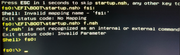
Image

After rebooting, I've checked that system works fine (on TOS 5.1.145), without any appreciable difference from before BIOS update. However, now in the System screen I don't see BIOS version 5.12 anymore.
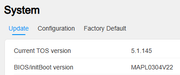
Image

After that, I`ve tried to update directly to TOS 6.0.610, but the process aborted ("failed to update" message). So I've tried with TOS 6.0.530 before and everything went fine. As others have stated, users are gone, so it's necessary to create the admin after reboot and then to access to dashboard and create rest of previous users. Anyway, volumes (I have 4), shared folders, and apps (I only have Emby installed) were there. So, I assume that it's only a matter of revising/creating users and config, since it's not possible to upload parameters exported from TOS5.

Finally, I upgraded the system to TOS 6.0.610 directly checking for updates on General Settings / System, and it worked flawlessly.

I have to say that I'm really happy to know that my F2-221 little toy will have longer life that I initially thought ;-)
User avatar
crisisacting
Silver Member
Posts: 500
Joined: 20 Jan 2022, 16:42

Re: TOS 6.0.530 Official Version Released

Post by crisisacting »

Lexbox wrote: 03 Feb 2025, 00:27I’m confused at the fact that they just didn’t bother removing the blanking plate, though more so at the fact that the 4 bays have 5 sata ports built in!?! 🤣
Yeah, there's a few lots of 2××/4×× TNAS units that shipped with F5 daughterboards on F4 TNAS units; personally have a 220 & 421 with them & the 5th caddy-less bay works just fine (have a half-slim SSD as cache in both units).
User avatar
Tricky
Posts: 233
Joined: 07 Feb 2020, 02:12
Great Britain

Re: TOS 6.0.530 Official Version Released

Post by Tricky »

rvillac wrote: 03 Feb 2025, 01:58
Lexbox wrote: 01 Feb 2025, 06:52
Hi all,

Just in case someone could find this helpful.

This morning, I've followed the instructions provided by Lexbox (thanks a lot for your post!!!) and I've been able to update to TOS6 in a (initially) not compatible F2-221.

As far as I had tried to update to TOS 6.0.610 from TOS 5.1.145 or just doing a fresh install (with an empty HD), process stopped with a message "Failed to update" or similar. My initial configuration:
· Aptio Setup Utility 2018 2.18.1263
· BIOS Vendor American Megatrends
· Core Version 5.12
· Compliancy UEFI 2.5; PI 1.4
· Build Date and Time 17/12/2018

So, I decided to give a try to the BIOS update. I strictly followed the instructions stated, mainly those in the Word file inside the zip downloaded ("Instructions for updating BIOS(2GB RAM).docx"). In order to avoid any problems, I removed not only the USB boot stick but also the additional SODIMM (to only let the stock 2GB RAM, since I normally have 10GB installed). Everything worked fine but I had a "tiny" problem in the last step. When executing the command "AMIDEEFIx64.efi /SP 000-F2221-NT140-0001", I got an error like "file not found" and also "system not compatible".

Anyway, the solution was easy; the USB disk with the files for the update hadn't been correctly mapped after removing the "f.nsh" file, and so I had "Shell>" in the command line instead "fs0:\>". In other words, the files to execute wasn't in the path. As easy as writing "fs0:" and press "Enter". After that, command line showed "fs0:\>" (as expected) and the command to setup efi worked fine.

Image

After rebooting, I've checked that system works fine (on TOS 5.1.145), without any appreciable difference from before BIOS update. However, now in the System screen I don't see BIOS version 5.12 anymore.

Image

After that, I`ve tried to update directly to TOS 6.0.610, but the process aborted ("failed to update" message). So I've tried with TOS 6.0.530 before and everything went fine. As others have stated, users are gone, so it's necessary to create the admin after reboot and then to access to dashboard and create rest of previous users. Anyway, volumes (I have 4), shared folders, and apps (I only have Emby installed) were there. So, I assume that it's only a matter of revising/creating users and config, since it's not possible to upload parameters exported from TOS5.

Finally, I upgraded the system to TOS 6.0.610 directly checking for updates on General Settings / System, and it worked flawlessly.

I have to say that I'm really happy to know that my F2-221 little toy will have longer life that I initially thought ;-)
Glad to hear this works with the 221 series now I can update my two F5-221s. :D
rvillac
Posts: 2
Joined: 12 Jan 2020, 17:30
Spain

Re: TOS 6.0.530 Official Version Released

Post by rvillac »

rvillac wrote: 03 Feb 2025, 01:58
Just for your info, two pitfalls I've found after the BIOS update on my F2-221.

Before, I had the RAM running at 1600 MHz (stock and the extra 8GB module I had installed to get 10GB in total). Now, it is working at 1333.

Even worse, the second LAN port doesn't seem to work anymore. I only see one interface in the network section of the dashboard. Perhaps, it will be a misconfiguration after upgrading to TOS6 since I had a bond setup in TOS5, but there is no light on the rear connector, neither, what is very bad sign... I'll continue investigating but there is a possibility that the BIOS version 0304V22 is not totally compatible with F2-221... What a pity.
User avatar
Lexbox
Posts: 2
Joined: 06 Mar 2023, 00:49
Great Britain

Re: TOS 6.0.530 Official Version Released

Post by Lexbox »

I have found MAPL0303V21, maybe this is compatible with the f2-221? But I wouldn’t know 🤷🏻
https://download2.terra-master.com/MAPL0303V21.zip
F2-421 TOS 6.0.610: 8GB RAM 2xWD RED 3TB HDD + D5-300c 5xWD RED 8 TB HDD
T9-423 TOS 5.1.67: 16GB RAM 1xnvme 1TB hyper cache & 7xIronwolf 10TB HDD
rvillac
Posts: 2
Joined: 12 Jan 2020, 17:30
Spain

Re: TOS 6.0.530 Official Version Released

Post by rvillac »

Lexbox wrote: 05 Feb 2025, 23:57
One possible way to success... I'll take a look, many thanks!!!
User avatar
Lexbox
Posts: 2
Joined: 06 Mar 2023, 00:49
Great Britain

Re: TOS 6.0.530 Official Version Released

Post by Lexbox »

rvillac wrote: 06 Feb 2025, 04:22
Lexbox wrote: 05 Feb 2025, 23:57
One possible way to success... I'll take a look, many thanks!!!
Let us know how you get on 👍
F2-421 TOS 6.0.610: 8GB RAM 2xWD RED 3TB HDD + D5-300c 5xWD RED 8 TB HDD
T9-423 TOS 5.1.67: 16GB RAM 1xnvme 1TB hyper cache & 7xIronwolf 10TB HDD
Post Reply

Return to “Update Notice”