RyanYang wrote: ↑24 Mar 2026, 10:23
Target Users:
Users currently running TOS 7.0.0299 beta or later versions.
Note:
If your TOS version is TOS 6, please refer to the
TOS 7 beta update instructions first
Here, we sincerely thank user @snapsh0t, @Phil, @Gremlin, @samius, @rfbjr, @DanB, @Lex, @bartmans99, @Nitrokalel, @mmalchuk, @usersky, @EgorA, @BFG and others, for their sharing and feedback. It is your support that has enabled us to quickly identify and resolve some issues.
Update Notes
Bugs fixes:
1. Fixed the issue where file system snapshots could not be successfully taken under specific conditions.
2. Fixed the issue where the real-time display of application status might be abnormal when operating multiple applications simultaneously.
3. Fixed the issue where an extraction failure might be prompted when updating the system.
4. Fixed the issue where the USB Copy auto-mount function did not take effect.
5. Fixed the issue where the status display might be abnormal during VPN connection.
6. Fixed the issue where the text editor did not display the correct prompt when editing a read-only file.
7. Fixed the issue where some application shortcuts redirected to incorrect pages.
8. Optimized the page display of custom DDNS.
9. Fixed some other known issues.
Warning:
1. If the first update prompts a decompression failure, please click update again.
2. To reduce interruptions caused by system notifications, we have readjusted the triggering rules for notifications at various levels and simultaneously modified the default system notification settings. After the update, you will need to reconfigure your personal notification preferences.
3. Due to the kernel architecture upgrade in TOS 7, the VirtualBox application will no longer be compatible with subsequent versions and will be removed from the App Center.
We recommend that users who still rely on this feature migrate their existing virtual machines to the officially supported VMs (Virtual Machines) application to ensure continued functionality.
For migration instructions, please refer to the technical documentation: https://toshelp.terra-master.com/faq/category/vms
Important Information:
1.Updating the system theoretically will not affect the data on your hard drives, but for safety, please make sure to back up your data in advance.
2.Before updating, ensure that your primary volume (usually volume1) has at least 3GB of available space. Insufficient storage space may cause the update to fail.
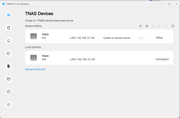
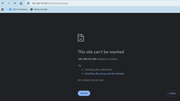
3.After the update, the IP address of your TNAS may change. Please use the TNAS PC desktop client to search for and reconnect to the device.
Update Procedure:
1.Go to TOS > Control Panel > General Settings > System > Update, and click "Check for updates."
2.Follow the prompts to update the system.
3.After the system update is complete, you may need to refresh your browser.
4.The TNAS IP address may change after the update. If you cannot connect to your TNAS using the previous IP address, use the TNAS PC client to search for the new IP address.
Client Downloads:
1. Download
TNAS PC 5.2.520 for Windows OS.
2. Download
TNAS PC 5.2.520 for macOS (x86 and ARM architectures).
3. Download
TNAS PC 5.2.520 for macOS (ARM architecture).
4. Download
TNAS PC for Linux.
5. Download
TNAS Mobile 3.X for Android.
6. For iOS, experience TNAS Mobile 3.X via:
https://testflight.apple.com/join/wFWYABJS.
considero importante señalar que la actualización del kernel no es un argumento suficiente para eliminar VirtualBox. Esta herramienta ha demostrado ser compatible tanto con sistemas antiguos como con arquitecturas modernas, por lo que técnicamente es posible mantener su soporte.
Obligar a los usuarios a migrar a una única herramienta no es una buena práctica, y va en contra de la flexibilidad que ha caracterizado a TerraMaster. Los usuarios deben tener la posibilidad de elegir la solución que mejor funcione para sus necesidades.
Por lo tanto, solicito nuevamente que se habilite VirtualBox, o al menos se ofrezca como una opción alternativa.
Adicionalmente, es fundamental que la aplicación VMs funcione de manera estable antes de sustituir completamente a VirtualBox. Actualmente, presenta fallas críticas, especialmente en la importación y exportación de máquinas virtuales en formato OVF.
Es indispensable que:
La importación y exportación en OVF funcione correctamente
No existan bloqueos o congelamientos durante los procesos
Se garantice la estabilidad general de la aplicación
Quiero dejar claro que no me opongo a la migración hacia una nueva plataforma. Sin embargo, esta transición debe ser progresiva, controlada y basada en una herramienta completamente funcional, no en una aplicación en estado beta con fallas críticas como la actual.
Quedo atento a sus comentarios y a una pronta solución.
However, I would like to point out that the kernel upgrade is not a sufficient justification for removing VirtualBox. This software has proven to be compatible with both legacy and modern systems, so maintaining its availability should be technically feasible.
Forcing users to adopt a single tool is not a good practice and goes against the flexibility that has characterized TerraMaster. Users should be allowed to choose the solution that best fits their needs.
Therefore, I respectfully request that VirtualBox be reinstated, or at least offered as an alternative option.
Additionally, it is critical that the VMs application reaches a stable and reliable state before replacing VirtualBox entirely. At present, it has serious issues, particularly with importing and exporting virtual machines in OVF format.
It is essential that:
OVF import and export work reliably
The application does not freeze or become unresponsive
Overall system stability is ensured
I want to be clear that I am not opposed to migration toward a new platform. However, this transition must be gradual, controlled, and based on a fully functional solution—not on a beta application with critical flaws as it currently stands.
I look forward to your response and a prompt resolution.
然而,我认为仅以内核架构升级作为移除 VirtualBox 的理由是不充分的。VirtualBox 已被证明能够在新旧系统环境中稳定运行,从技术角度来看,继续支持该应用是可行的。
强制用户使用单一工具并不是良好的做法,这也违背了 TerraMaster 一直以来所强调的灵活性。用户应当有权选择最适合自身需求的解决方案。
因此,我再次请求恢复 VirtualBox,或至少将其作为可选方案提供给用户。
此外,在完全替代 VirtualBox 之前,必须确保 VMs 应用具备足够的稳定性。目前该应用存在严重问题,尤其是在 OVF 格式虚拟机的导入与导出方面。
必须确保以下几点:
OVF 的导入与导出功能稳定可靠
操作过程中不会出现卡顿或无响应
应用整体运行稳定
我想明确说明,我并不反对向新平台迁移。但这一过程必须是渐进的、可控的,并基于一个完全成熟、稳定的解决方案,而不是当前这样一个存在严重缺陷的测试版应用。
期待您的回复以及问题的尽快解决。






 ing
ing


