After upgrading to TOS 7, it returns to the installation page, or prompts for a failed kernel version load when logging!

About TNAS hardware
User avatar
tc0566
Posts: 17
Joined: 20 Apr 2025, 09:03
United States of America

Re: After upgrading to TOS 7, it returns to the installation page, or prompts for a failed kernel version load when logg

Post by tc0566 »

EriChan wrote: ↑21 Oct 2026, 18:14
tc0566 wrote: ↑21 Oct 2026, 08:35
This situation may involve multiple factors. Please contact our online support team via the link below so we can assist you with direct troubleshooting: https://salesiq.zohopublic.com/signatur ... 97d0be8892
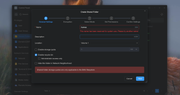
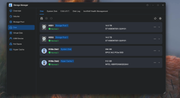
I spent an hour on Teamviewer yesterday with them, and none of the options they tried worked. The files are are in a folder under homes directory and have been since TOS 5. TOS 7 will not allow a shared folder under homes directory and says the folder is reserved for system. Moving the folder that has been shared for over a year in this location to the root of the drive allows access from Plex to the folder. And support also confirmed that the app center removed the ability to manually update apps. I figured out a work around for that last night TOS 7 can not be booted without the hard drives installed and system is installed to an SSD and shows that in TOS 7. There are so many issues with this update. Here is a screenshot of what happens if you try to share the folder on the hard drives as well as a screenshot showing where system is installed but yet can't boot without the storage drives installed now. System has been the SSD since TOS 5. The ability to boot without hard drives installed has worked since TOS 5 until update to TOS 7 yesterday. Manual installation of apps must be done to storage drives now where the option was not even offered before.


Image

Image
Image
User avatar
CursaYang
TM Support
Posts: 985
Joined: 06 Jan 2025, 16:34
China

Re: After upgrading to TOS 7, it returns to the installation page, or prompts for a failed kernel version load when logg

Post by CursaYang »

tc0566 wrote: ↑21 Oct 2026, 20:50
The homes directory stores users' personal directories. As it is a reserved system name, you cannot create a shared folder with the same name.

Please check whether the boot order in the BIOS has been changed.

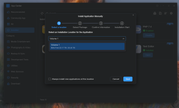
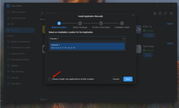
Starting from TOS 6, you can choose which volume an app is installed on. If you do not want to select the location every time, you can check the option in the lower-left corner.

Image
To contact our team, please send email to following addresses, remember to replace (at) with @

Technical team: support(at)terra-master.com(for technical support)
Service team: service(at)terra-master.com(for purchasing, return, replacement, RMA service)
User avatar
tc0566
Posts: 17
Joined: 20 Apr 2025, 09:03
United States of America

Re: After upgrading to TOS 7, it returns to the installation page, or prompts for a failed kernel version load when logg

Post by tc0566 »

You can't now, and even support apparently didn't know since he tried to share from there yesterday. But that server was setup like that 2 years ago on TOS 5 with Plex library in my home folder. And it worked fine, Plex was able to see it from there without issue. But now with TOS 7 that no longer works and support couldn't even suggest what to do on teamviewer for over an hour. I moved my library to root last night to fix Plex.
User avatar
CursaYang
TM Support
Posts: 985
Joined: 06 Jan 2025, 16:34
China

Re: After upgrading to TOS 7, it returns to the installation page, or prompts for a failed kernel version load when logg

Post by CursaYang »

tc0566 wrote: ↑Yesterday, 07:35
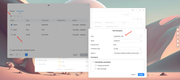
TOS 6 and TOS 7 introduced app user permissions.

As I mentioned earlier, when accessing files on the NAS through the media server, please make sure that the corresponding app user has permission to access the target directory.

You can refer to the illustration to add application user permissions under permission management.

Image
To contact our team, please send email to following addresses, remember to replace (at) with @

Technical team: support(at)terra-master.com(for technical support)
Service team: service(at)terra-master.com(for purchasing, return, replacement, RMA service)
User avatar
tc0566
Posts: 17
Joined: 20 Apr 2025, 09:03
United States of America

Re: After upgrading to TOS 7, it returns to the installation page, or prompts for a failed kernel version load when logg

Post by tc0566 »

CursaYang wrote: ↑Yesterday, 08:59
tc0566 wrote: ↑Yesterday, 07:35
TOS 6 and TOS 7 introduced app user permissions.

As I mentioned earlier, when accessing files on the NAS through the media server, please make sure that the corresponding app user has permission to access the target directory.

You can refer to the illustration to add application user permissions under permission management.

Image
Yes that was checked by support yesterday over teamviewer. He never figured out what was wrong and I moved the files to the root of the storage drives to solve the problem that for 2 years was fine on TOS 5 and TOS 6.
User avatar
TMzethar
TM Support
Posts: 3071
Joined: 27 Oct 2020, 16:43

Re: After upgrading to TOS 7, it returns to the installation page, or prompts for a failed kernel version load when logg

Post by TMzethar »

tc0566 wrote: ↑Yesterday, 09:06
It seems you've solved the problem in a way that works best for you.
If you have any further questions, please start a new thread to discuss them.
To contact our team, please send email to following addresses, remember to replace (at) with @:
Technical team: support(at)terra-master.com (for technical support)
Service team: service(at)terra-master.com (for purchasing, return, replacement, RMA service)
Post Reply

Return to “Hardware”