Page 3 of 5
Re: [Help] Scheduled Reboot for F4-424Pro
Posted: 21 Aug 2025, 15:43
by CursaYang
Canuck wrote: ↑20 Aug 2025, 22:22
OK. I've been able to replicate the following test case with the failure to restart.
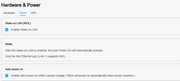
1. Turn on "Enable auto power on" per screenshot below.
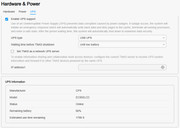
2. Turn on UPS support per screenshot below.
3. Cut power.
4. With some capacity left in the UPS, TM F4-424Pro (the "Unit") shuts down per policy.
5. Restore power to UPS (with some capacity remaining).
6. The Unit does not start automatically, even waiting till UPS is >50% charged.
Debug log available at:
https://www.dropbox.com/scl/fi/cw79kbkw ... rtime&dl=1
Obviously, not being able to restart after a power failure using a UPS is highly problematic.
The debug log includes three files: atop, kern, and syslog. The link you sent only has the atop file. Please check if the browser blocked the download when you downloaded it.
Please re-download and send them to our email
[email protected] with links to these posts, and we will analyze them as soon as possible.
Re: [Help] Scheduled Reboot for F4-424Pro
Posted: 21 Aug 2025, 19:27
by Canuck
Thank you. The "Download" log function in the UI only downloads the one file - there is no attempt to download all three debug log files. So looks like there is another bug there...
If have repeated the test case above, with the following two notes:
1. The Unit (F4-424Pro) shut down policy was to shut down at UPS low battery. That occured at 10% and then I immediately plugged the UPS back in - it had more than enough remaining capacity to power the Unit. Per the previous test, the Unit did not power on. The shut down and power reapplication occurred in the logs at ~6:40 local time.
2. For this test, I did set up a "Power On" scheduled event that fired 15 minutes after power was restored. The good news is that the Unit did respond to that event and started up. In the logs this appears at ~7:00 local time. To reiterate, this was not the Unit auto-restarting after power outage - this is the Unit responding to a schedule start.
I've emailed all three log files to
[email protected] per your instructions above.
Thanks.
Re: [Help] Scheduled Reboot for F4-424Pro
Posted: 28 Aug 2025, 17:59
by Canuck
Any update?
Re: [Help] Scheduled Reboot for F4-424Pro
Posted: 29 Aug 2025, 09:30
by GevinKe
Sorry for the late reply. Our initial plan was to get back to you once we could reproduce the issue.
Thank you for providing the log files. Our engineers have successfully reproduced the problem in the lab, and it has already been escalated to the product and technical teams for further evaluation.
This issue is more complex than expected and cannot be fixed directly at the TOS system level. Due to technical constraints, we’re unable to share more details for now.
We appreciate your patience, and we’ll keep you updated as soon as we have a feasible solution.
Re: [Help] Scheduled Reboot for F4-424Pro
Posted: 29 Aug 2025, 23:46
by Canuck
Thanks for this update. What would be your recommendation in the interim for operation with a UPS:
- Should we disable the "Enable UPS Support" at let it shutdown non-gracefully when the UPS is depleted?
- Is there any other workaround for a power outage during unattended operation apart from setting an regular "Power On" scheduled task?
Thanks.
Re: [Help] Scheduled Reboot for F4-424Pro
Posted: 30 Aug 2025, 06:01
by TMzethar
If you can sense the 'shutdown state' of the NAS through other devices within the local network and notify you at any time, you might consider setting up WOL to start the NAS when needed. For more information, visit:
https://toshelp.terra-master.com/web/#/ ... ware_power
Re: [Help] Scheduled Reboot for F4-424Pro
Posted: 30 Aug 2025, 08:25
by Gremlin
That does not address the unreliable scheduled task operations. I frequently experience failed shutdowns and/or failed restarts using the functions under Hardware & Power. This with UPS functions disabled. No recorded power interruptions. Nor that WOL does not always function as expected. I just got fed up reporting and waiting for non-existent fixes.
Re: [Help] Scheduled Reboot for F4-424Pro
Posted: 30 Aug 2025, 09:46
by Canuck
I have to admit I’m pretty surprised that such a fundamental capability for a NAS just doesn’t work… I’ll try WOL although my first test showed there were issues there. And there is some irony of suggesting WOL to deal with the case of unattended power outage (ie you’re not connected to the LAN).
Re: [Help] Scheduled Reboot for F4-424Pro
Posted: 30 Aug 2025, 12:54
by TMnick
Canuck wrote: ↑30 Aug 2025, 09:46
I have to admit I’m pretty surprised that such a fundamental capability for a NAS just doesn’t work… I’ll try WOL although my first test showed there were issues there. And there is some irony of suggesting WOL to deal with the case of unattended power outage (ie you’re not connected to the LAN).
Hello, could you please describe in detail the specific issues you're encountering? This way, we can reproduce them in our lab and thereby provide you with reliable solutions.
Re: [Help] Scheduled Reboot for F4-424Pro
Posted: 30 Aug 2025, 18:59
by Canuck
OK- I have determined the issue with WOL. If you have bonded LAN1 and LAN2, the MAC address appears to be generated and doesn't respond to WOL. I un-bonded the interfaces and noted the MAC addresses. Rebonded and used the LAN1 MAC - that worked with the WOL packet.
I would suggest that the UI show the MAC address to be used for WOL as well as the bonded interface MAC.