Page 3 of 3
Re: [Help] TOS7 Apps Data Location Behaviour - Possible Bug
Posted: 13 Jul 2026, 18:24
by TMzethar
Here's another approach that may help.
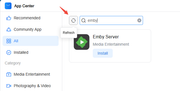
Before installing Emby from the App Center, make sure to click the Refresh button (see screenshot below).
Re: [Help] TOS7 Apps Data Location Behaviour - Possible Bug
Posted: 13 Jul 2026, 20:22
by digi999
Thankyou again for taking the time to investigate. I'll give Terramaster credit they really do take on board and try to investigate these issues! For me (after a lot of testing), I finally managed to get Emby working correctly on my F6-424 with TOS 7.
In the end, the solution was:
Completely uninstall Emby.
Delete all old Emby data (/Volume1/Emby, any old -ffdetect data, cache files, etc.) so there was no previous configuration left.
Install the latest TerraMaster-compatible Emby package (v4.9.5.0) downloaded directly from the Emby website rather than the older App Center version.
Initially, Emby still had problems after reboot because the launcher wasn't passing a valid ProgramData directory, causing Emby to create its database in the wrong location.
I modified the launcher script to explicitly set:
APP_DATA_DIR="/Volume2/Emby"
instead of dynamically calling:
APP_DATA_DIR=$(ter_share_add -name "Emby")
After that, Emby started correctly with:
-programdata /Volume2/Emby
and now stores all of its:
database
metadata
artwork
cache
plugins
logs
under:
/Volume2/Emby
which is exactly what I wanted, as my applications are installed on an NVMe storage pool.
I've now rebooted the NAS several times and Emby continues to start normally every time.
Important note for TM Firmware Team:
Although this workaround has completely solved the problem for me, I believe there is still an underlying issue with the package or launcher. It would be useful if the launcher handled a failure of ter_share_add more gracefully rather than starting Emby without a valid ProgramData path.
Re: [Help] TOS7 Apps Data Location Behaviour - Possible Bug
Posted: 14 Jul 2026, 15:36
by TMzethar
We will be publishing an updated Emby application in the App Center in the near future. This new version will support the directory modification method described above.
TMzethar wrote: ↑12 Jul 2026, 09:28
Uninstall Emby app, delete the shared folder named “Emby,” and reinstall Emby app on Volume 2.
When you re-enable Emby, it should automatically create the Emby-specific shared folder on Volume 2.
Re: [Help] TOS7 Apps Data Location Behaviour - Possible Bug
Posted: 20 Jul 2026, 13:30
by Argonautica
I am also looking forward to the updated Emby application version. I'm glad I trawled the forums before installing Emby from the App Centre, as it sounds like there are a number of issues. This particular one (installing to a separate SSD Volume for speed) would have affected me in exactly the same way as described by digi999. Thanks for getting to the bottom of it!