TOS 7.0.0612 Beta (X86) is Released for Update

Official news about TOS, mobile app, PC app updates or beta releases.
User avatar
Nitrokalel
Posts: 37
Joined: 24 Apr 2024, 05:51
Mexico

Re: TOS 7.0.0612 Beta (X86) is Released for Update

Post by Nitrokalel »

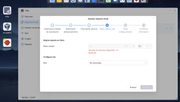
al importar una maquina virtual en la aplicacion VMs debe de permitir importar una maquina sobredimencionada para el destino
Image
ejemplo: tengo una maquina virtual donde su configuracion es un SSD de 25 TB (evidentemente no existe) pero la configuracion de origen lo permitio, al tratar de importarla en la aplicacion VMs aparece el error de la imagen, esto esta mal y es un error porque las maquinas pueden ser sobredimencionadas en el almacenamiento por encima del hardware real, el archivo .ova pesa 400GB el espacio disponible es de 3TB pero internamente la maquina tiene conocimiento de un disco de 25 TB, pueden corregir esto por favor.

When importing a virtual machine into the VMs application, it should allow importing a machine that is oversized for the destination.
Image
For example: I have a virtual machine whose configuration is a 25 TB SSD (which obviously doesn't exist), but the source configuration allowed it. When trying to import it into the VMs application, the error shown in the image appears. This is incorrect and is an error because virtual machines can be oversized in storage beyond the actual hardware. The .ova file is 400 GB, the available space is 3 TB, but internally the machine is aware of a 25 TB disk. Can you please correct this?
F8 SSD Plus (8x4TB NVMe, TRaid, 48GB, prod)
F8 SSD Plus (6x1TB+2x2TB, TRaid, 48GB, beta)
F4-424 Pro (2x22TB+2x10TB HDD +1TB+500GB NVMe, TRaid, 32GB, beta)
F2-423 (2x18TB, TRaid, 32GB, beta)
F2-221 (6TB+10TB, TRaid, 10GB, beta)
D1 SSD (2TB, prod)
User avatar
crisisacting
Silver Member
Posts: 500
Joined: 20 Jan 2022, 16:42

Re: TOS 7.0.0612 Beta (X86) is Released for Update

Post by crisisacting »

Test bed updated fine; will evaluate over next few days for issues
User avatar
MikeZhang
TM Support
Posts: 381
Joined: 05 Sep 2023, 22:21

Re: TOS 7.0.0612 Beta (X86) is Released for Update

Post by MikeZhang »

weerasak wrote: 26 May 2026, 23:18
We'd like to know why you need it to be deleted?
If you don't need it, you may remove it manually by right clicking the icon
To contact our team, please send email to following addresses, remember to replace (at) with @

Technical team: support(at)terra-master.com(for technical support)
Service team: service(at)terra-master.com(for purchasing, return, replacement, RMA service)
User avatar
MikeZhang
TM Support
Posts: 381
Joined: 05 Sep 2023, 22:21

Re: TOS 7.0.0612 Beta (X86) is Released for Update

Post by MikeZhang »

rfbjr wrote: 26 May 2026, 22:52
Thanks for pointing out, we will modify it in the next release.
To contact our team, please send email to following addresses, remember to replace (at) with @

Technical team: support(at)terra-master.com(for technical support)
Service team: service(at)terra-master.com(for purchasing, return, replacement, RMA service)
User avatar
MikeZhang
TM Support
Posts: 381
Joined: 05 Sep 2023, 22:21

Re: TOS 7.0.0612 Beta (X86) is Released for Update

Post by MikeZhang »

Nitrokalel wrote: 27 May 2026, 03:05
While thin-provisioned virtual disks may initially consume much less physical storage space than their configured logical capacity, the VM application currently validates disk allocation against the configured virtual disk size to help avoid potential storage overcommit situations.

If a VM with a 25 TB virtual disk is imported into a storage pool with only 3 TB of available capacity, future guest writes could eventually exhaust the physical storage space. In such cases, this may lead to VM instability, write failures, or possible data integrity risks.

The recommended approach is:
1. Modify the virtual disk size to a reasonable value during import (e.g., reconfigure it to 2 TB).
2. Alternatively, expand the physical storage first before importing, instead of forcibly importing a 25 TB configuration into a 3 TB environment.
To contact our team, please send email to following addresses, remember to replace (at) with @

Technical team: support(at)terra-master.com(for technical support)
Service team: service(at)terra-master.com(for purchasing, return, replacement, RMA service)
User avatar
weerasak
Posts: 6
Joined: 20 Jan 2026, 12:55
Thailand

Re: TOS 7.0.0612 Beta (X86) is Released for Update

Post by weerasak »

Subject: Bug Report: Openclaw 0.0.188 Installation Fails on TOS 7.0.0612 (F4-424)

Dear TerraMaster Support Team,

I am writing to report a bug where the Openclaw application fails to complete installation on my TerraMaster NAS.

---

Device Information:
- Model: TerraMaster F4-424
- CPU: Intel N95 (4 Cores / 4 Threads)
- TOS Version: TOS_X642.0_7.0.0612
- Openclaw Version: 0.0.188

---

Issue Description:

When installing Openclaw via the App Center, the installation process gets stuck at the "half-configured" stage and never completes. The installation then rolls back automatically.

This issue has been reproduced multiple times:
- First attempt: 2026-05-26 13:15 — installed but stuck at half-configured, removed at 21:30
- Second attempt: 2026-05-26 22:14 — same result, removed at 22:16

From dpkg.log:
install openclaw:amd64 0.0.188
status half-installed → unpacked → half-configured (STUCK)
remove openclaw:amd64 0.0.188

---

Steps to Reproduce:
1. Open TOS App Center
2. Search for Openclaw
3. Click Install
4. Installation proceeds to "half-configured" and stops

---

Additional Notes:
- Other applications install successfully on this device
- The system report file is attached for your reference
- This issue occurs both before and after the TOS 7.0.0612 update

Please investigate this issue. I would appreciate guidance on whether there is a fix available or if this will be addressed in a future update.

Thank you for your support.

Best regards,
Weerasak
NASbCloud
User avatar
MikeZhang
TM Support
Posts: 381
Joined: 05 Sep 2023, 22:21

Re: TOS 7.0.0612 Beta (X86) is Released for Update

Post by MikeZhang »

weerasak wrote: 27 May 2026, 16:27
Sorry for the inconvenience.

You may uninstall together with configuration file then try to install again.

If still no luck, please generate system log in TOS desktop dock bar "Support and Help" then send to support email for analysis.
To contact our team, please send email to following addresses, remember to replace (at) with @

Technical team: support(at)terra-master.com(for technical support)
Service team: service(at)terra-master.com(for purchasing, return, replacement, RMA service)
User avatar
snapsh0t
Posts: 64
Joined: 19 Oct 2025, 03:23
Great Britain

Re: TOS 7.0.0612 Beta (X86) is Released for Update

Post by snapsh0t »

Successful update here with no obvious problems. Will know about scheduled power on/off on Saturday.
F2-425 Plus, 16GB RAM, 2 x 500GB WD SN700 EXT4 RAID1, 2 x 18TB WD Red Pro EXT4 RAID1, TOS 7.0.<latest>
User avatar
Nitrokalel
Posts: 37
Joined: 24 Apr 2024, 05:51
Mexico

Re: TOS 7.0.0612 Beta (X86) is Released for Update

Post by Nitrokalel »

MikeZhang wrote: 27 May 2026, 15:08
Nitrokalel wrote: 27 May 2026, 03:05
While thin-provisioned virtual disks may initially consume much less physical storage space than their configured logical capacity, the VM application currently validates disk allocation against the configured virtual disk size to help avoid potential storage overcommit situations.

If a VM with a 25 TB virtual disk is imported into a storage pool with only 3 TB of available capacity, future guest writes could eventually exhaust the physical storage space. In such cases, this may lead to VM instability, write failures, or possible data integrity risks.

The recommended approach is:
1. Modify the virtual disk size to a reasonable value during import (e.g., reconfigure it to 2 TB).
2. Alternatively, expand the physical storage first before importing, instead of forcibly importing a 25 TB configuration into a 3 TB environment.
You're correct, but you're also wrong. This function is essential for migrating multiple machines. Indeed, it is oversized, but this should trigger an alert, not stop the process. There should be an alert about the oversizing, not a validation. Or, this validation should be used to indicate that the machine is oversized but should still be allowed to be installed for operational reasons. This is a test, but in reality, it's a very useful function that should be included.
F8 SSD Plus (8x4TB NVMe, TRaid, 48GB, prod)
F8 SSD Plus (6x1TB+2x2TB, TRaid, 48GB, beta)
F4-424 Pro (2x22TB+2x10TB HDD +1TB+500GB NVMe, TRaid, 32GB, beta)
F2-423 (2x18TB, TRaid, 32GB, beta)
F2-221 (6TB+10TB, TRaid, 10GB, beta)
D1 SSD (2TB, prod)
User avatar
TMEmily
Posts: 9
Joined: 12 Jun 2025, 10:33
China

Re: TOS 7.0.0612 Beta (X86) is Released for Update

Post by TMEmily »

Nitrokalel wrote: 28 May 2026, 02:17
MikeZhang wrote: 27 May 2026, 15:08
Nitrokalel wrote: 27 May 2026, 03:05
While thin-provisioned virtual disks may initially consume much less physical storage space than their configured logical capacity, the VM application currently validates disk allocation against the configured virtual disk size to help avoid potential storage overcommit situations.

If a VM with a 25 TB virtual disk is imported into a storage pool with only 3 TB of available capacity, future guest writes could eventually exhaust the physical storage space. In such cases, this may lead to VM instability, write failures, or possible data integrity risks.

The recommended approach is:
1. Modify the virtual disk size to a reasonable value during import (e.g., reconfigure it to 2 TB).
2. Alternatively, expand the physical storage first before importing, instead of forcibly importing a 25 TB configuration into a 3 TB environment.
You're correct, but you're also wrong. This function is essential for migrating multiple machines. Indeed, it is oversized, but this should trigger an alert, not stop the process. There should be an alert about the oversizing, not a validation. Or, this validation should be used to indicate that the machine is oversized but should still be allowed to be installed for operational reasons. This is a test, but in reality, it's a very useful function that should be included.
Hello,The design logic of the VMs application is as follows: the virtual disk size declared in the virtual machine configuration file is treated by the system as the space that needs to be pre-allocated on the target storage (i.e., pre-allocated space). Therefore, when the available space on the target device (3TB) is less than the virtual disk size specified in the VM configuration (25TB), the system determines that there is insufficient space and blocks the import. This is the normal design behavior of the current version of VMs, not a system error.
To contact our team, please send email to following addresses, remember to replace (at) with @:

Technical team: support(at)terra-master.com(for technical support)
Service team: service(at)terra-master.com(for purchasing, return, replacement, RMA service)
Post Reply

Return to “Update Notice”