Page 3 of 9
Re: [Help] F4-424 unreachable every 48-72h (or less)
Posted: 30 May 2026, 00:27
by xtimt
Apparently, some edits are needed in startup.nsh, but I won't risk making them myself.
Re: [Help] F4-424 unreachable every 48-72h (or less)
Posted: 01 Jun 2026, 11:39
by TMnight
xtimt wrote: ↑30 May 2026, 00:27
The BIOS file has been updated. Please download the latest BIOS package again and retry the BIOS upgrade for your F4-424 Max using the link below:
https://download2.terra-master.com/F4-424_Max_BIOS.zip
Please make sure to use the newly downloaded file and do not use any previously downloaded BIOS package.
Re: [Help] F4-424 unreachable every 48-72h (or less)
Posted: 04 Jun 2026, 21:58
by exqo
rgrg1 wrote: ↑29 May 2026, 01:01
Thank you for your help and guideline. I also successfully made the modifications.
BIOS updated to BJFX-ADLN-109 and kernel parameter intel_idle.max_cstate=1 applied to both boot disks. After reboot, C-state output shows only POLL — C1E, C6, C8, C10 completely gone. Monitoring for stability. Will report back.
gabor@TNAS:~# for c in /sys/devices/system/cpu/cpu[0-9]*; do echo "==================== $(basename $c) ===================="; for s in $c/cpuidle/state*; do echo "$(cat $s/name): usage=$(cat $s/usage), time=$(cat $s/time)"; done; echo; done
Code: Select all
==================== cpu0 ====================
POLL: usage=429217, time=96739979
==================== cpu1 ====================
POLL: usage=420671, time=94242920
==================== cpu2 ====================
POLL: usage=440831, time=98504574
==================== cpu3 ====================
POLL: usage=445463, time=98816693
Code: Select all
        Version: BJFX-ADLN-109
        Release Date: 11/15/2024
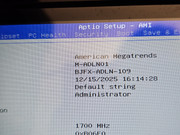
Debug mode has been successfully enabled.
One question: is it safe to update TOS now, or will a TOS update overwrite the grub.cfg and remove the intel_idle.max_cstate=1 parameter? Should we reapply it manually after every TOS update?

Just to respond to you, you can update but you will have to redo manually the grub.cfg file modification !
I updated to 7.0.0612 right after the update of the BIOS and I had to do it again...!
But it's stable now !
Re: [Help] F4-424 unreachable every 48-72h (or less)
Posted: 04 Jun 2026, 22:17
by rgrg1
exqo wrote: ↑04 Jun 2026, 21:58
rgrg1 wrote: ↑29 May 2026, 01:01
Thank you for your help and guideline. I also successfully made the modifications.
BIOS updated to BJFX-ADLN-109 and kernel parameter intel_idle.max_cstate=1 applied to both boot disks. After reboot, C-state output shows only POLL — C1E, C6, C8, C10 completely gone. Monitoring for stability. Will report back.
gabor@TNAS:~# for c in /sys/devices/system/cpu/cpu[0-9]*; do echo "==================== $(basename $c) ===================="; for s in $c/cpuidle/state*; do echo "$(cat $s/name): usage=$(cat $s/usage), time=$(cat $s/time)"; done; echo; done
Code: Select all
==================== cpu0 ====================
POLL: usage=429217, time=96739979
==================== cpu1 ====================
POLL: usage=420671, time=94242920
==================== cpu2 ====================
POLL: usage=440831, time=98504574
==================== cpu3 ====================
POLL: usage=445463, time=98816693
Code: Select all
        Version: BJFX-ADLN-109
        Release Date: 11/15/2024
Debug mode has been successfully enabled.
One question: is it safe to update TOS now, or will a TOS update overwrite the grub.cfg and remove the intel_idle.max_cstate=1 parameter? Should we reapply it manually after every TOS update?
Just to respond to you, you can update but you will have to redo manually the grub.cfg file modification !
I updated to 7.0.0612 right after the update of the BIOS and I had to donot again...!
But it's stable now !
Thank you for the hint exqo, I will try to update the system.
Re: [Help] F4-424 unreachable every 48-72h (or less)
Posted: 05 Jun 2026, 09:30
by TMnight
Based on the feedback we have received so far, system stability has improved significantly after updating the BIOS and applying the recommended kernel parameter changes. However, the current sample size is still relatively limited, and we look forward to receiving more long-term feedback from users to further validate the effectiveness of this solution.
Important: The kernel parameter modification will be reset after each TOS system upgrade. Therefore, after updating TOS, please reapply the kernel parameter settings.
If you continue to experience issues such as system freezes, unresponsiveness, unexpected reboots, or other abnormal behavior, please feel free to share your feedback in this thread. We will continue to investigate these cases and provide updates and solutions as they become available.
Thank you all for your testing, feedback, and continued support.
Re: [Help] F4-424 unreachable every 48-72h (or less)
Posted: 09 Jun 2026, 00:35
by exqo
After 8 days of non-stop operation, I can say that the problem has been successfully resolved. I’d never gone more than 4 or 5 days in a row without a freeze before...!
Thank you for finding the solution!
Re: [Help] F4-424 unreachable every 48-72h (or less)
Posted: 09 Jun 2026, 06:23
by MikeZhang
exqo wrote: ↑09 Jun 2026, 00:35
Thanks for your patience and the update.
Sorry again for the inconvenience caused before
Re: [Help] F4-424 unreachable every 48-72h (or less)
Posted: 09 Jun 2026, 13:06
by newtyp3
TMnight wrote: ↑01 Jun 2026, 11:39
xtimt wrote: ↑30 May 2026, 00:27
The BIOS file has been updated. Please download the latest BIOS package again and retry the BIOS upgrade for your F4-424 Max using the link below:
https://download2.terra-master.com/F4-424_Max_BIOS.zip
Please make sure to use the newly downloaded file and do not use any previously downloaded BIOS package.
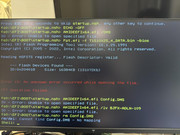
Hi, I've been having similar issues on my F4-424 Max as some of the other users in this thread. The NAS is currently on TOS 7.0.0616 and the issue started happening to me about 10 days ago. I tried updating the BIOS with the newest link but am running into the same issue @xtimt had initially.
edit:
I was able to update the BIOS after editing startup.nsh to refer to the correct BIOS version and Fpt.efi instead of Fpta.efi. I also successfully modified the grub.cfg file and will post my feedback after a few days of monitoring.
Re: [Help] F4-424 unreachable every 48-72h (or less)
Posted: 09 Jun 2026, 18:52
by TMnight
Okay, thank you for your cooperation and we look forward to your follow-up feedback. In the previously provided operation document, we recommended setting the kernel startup parameter to:
This setting will strictly limit the CPU from entering deeper energy-saving states. Based on feedback from some users, it can indeed effectively improve the problem of random crashes or no response. To further validate the issue, we would like you to try adjusting the parameter to:
The modification method is exactly the same as the operation in the previous document, just replace the original: inteltidle.max_cstate=1 with: intel_tidle.max_cstate=2, and then restart NAS.
Compared to parameter value 1, parameter value 2 allows the CPU to use a slightly higher level of idle energy-saving state, while maintaining good stability and also having the opportunity to achieve a better balance between power consumption and performance.
As we are still collecting relevant data and conducting validation, we hope to confirm the impact of different parameter settings on system stability through more actual operational results.
After completing the modifications, please continue to use the NAS normally and observe if there are still any issues such as crashes, unresponsive, or abnormal lagging. If the problem occurs again, please try to keep the relevant time points and log information as much as possible for us to further analyze.
Thank you very much for your assistance and cooperation.
Re: [Help] F4-424 unreachable every 48-72h (or less)
Posted: 09 Jun 2026, 18:54
by TMnight
exqo wrote: ↑09 Jun 2026, 00:35
Thank you for your cooperation, and we look forward to your follow-up feedback.
In the previously provided operation document, we recommended setting the kernel startup parameter to:
This setting will strictly limit the CPU from entering deeper energy-saving states. Based on feedback from some users, it can indeed effectively improve the problem of random crashes or no response. To further validate the issue, we would like you to try adjusting the parameter to:
The modification method is exactly the same as the operation in the previous document, just replace the original: intel_tidle.max_cstate=1 with: intel_tidle.max_cstate=2, and then restart NAS.
Compared to parameter value 1, parameter value 2 allows the CPU to use a slightly higher level of idle energy-saving state, while maintaining good stability and also having the opportunity to achieve a better balance between power consumption and performance.
As we are still collecting relevant data and conducting validation, we hope to confirm the impact of different parameter settings on system stability through more actual operational results.
After completing the modifications, please continue to use the NAS normally and observe if there are still any issues such as crashes, unresponsive, or abnormal lagging. If the problem occurs again, please try to keep the relevant time points and log information as much as possible for us to further analyze.
Thank you very much for your assistance and cooperation.