Page 17 of 31
Re: TOS 6.0.420 Beta Is Available for Testing
Posted: 10 Aug 2024, 18:44
by golgoth
Personally i didn't copy files larger than 4-5 GBs. It took me 20 hours to copy 300 Gbs...
Look at the difference as soon as i started transferring files.
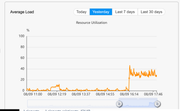
Frankly right now my NAS is pretty useless: qbittorrent and file transfers make it unstable, syncthing is not working. I understand it's a beta, but come on, at least basic functions should work correctly.
Re: TOS 6.0.420 Beta Is Available for Testing
Posted: 10 Aug 2024, 18:56
by Gremlin
TMroy wrote: ↑10 Aug 2024, 17:41
You can determine the manufacturing date by checking the S/N code sticker on the body of the device.
Actually, my F2-221 has the S/N sticker on the Motherboard (ie inside the unit

). There is no s/n on the outside of the case.
Re: TOS 6.0.420 Beta Is Available for Testing
Posted: 10 Aug 2024, 19:02
by Gremlin
TMroy wrote: ↑10 Aug 2024, 17:39
carlosdesedas wrote: ↑09 Aug 2024, 22:17
may I suggest in the GUI that the "Power Off" button and the "Logout" button not be next to one another... on can very easily miss-click and power off the NAS instead of logging out...
I personally don't agree with this statement. First of all, the icons for shutdown and logout have distinct appearances. Secondly, each icon has a tooltip for clarification. Lastly, even if the wrong icon is clicked, there is a secondary confirmation popup. Therefore, I believe the possibility of misoperation due to arrangement is very, very low.
I guess it's a personal thing. On my system(s) I find the icons in that area all appear a dull, faint, grey colour and can be indistinguishable. Plus the tooltips can be slow to appear until to actually 'jiggle' the mouse pointer a bit. Yes, I'm old, I'm diabetic and I probably need new glasses. Just saying

Re: TOS 6.0.420 Beta Is Available for Testing
Posted: 10 Aug 2024, 19:29
by Herbertson
Hi,
please help - after updating my F4-423 NAS to version TOS 6.0.420 from previous beta system the system isn't reachable anymore and the TNAS.app tells me that two uninitalized TNAS devices are found (that's because ive bundled the LAN-Ports)
What should I do?
Should I start reinitalizing?
Thanks for further support an help.
Regards
Herbertson
Re: TOS 6.0.420 Beta Is Available for Testing
Posted: 10 Aug 2024, 21:53
by Herbertson
Hi again, it has cleared more or less for now ... first I was confused because it seemed that the system had been completely gone ... but after initalizing process the system is running again - with the version of TOS 6.0.420.
Only the users, groups and access configuration were lost…
regards and thanks for your attention…
Re: TOS 6.0.420 Beta Is Available for Testing
Posted: 11 Aug 2024, 13:30
by jpeckinp
Unable to create Hyper Cache. I've tried all different variations Raid 0, 1 Balanced and Read/Write. There is no synchronization of the Volumes going on either. I hit confirm and Operation failed is displayed.
Running 6.0.436
Re: TOS 6.0.420 Beta Is Available for Testing
Posted: 11 Aug 2024, 16:25
by IrisLi
TOS version 6.0.420 features a new root filesystem that is fully compatible with the Ubuntu 22.04 root filesystem. So all your previous system configurations will be erased after the update. This is explained in the update notes in the forum.
Re: TOS 6.0.420 Beta Is Available for Testing
Posted: 11 Aug 2024, 16:32
by IrisLi
Is there some active process or service that is accessing the target volume?
You can refer to the following link for troubleshooting:
viewtopic.php?t=5955
Re: TOS 6.0.420 Beta Is Available for Testing
Posted: 11 Aug 2024, 23:15
by Gremlin
TMroy wrote: ↑10 Aug 2024, 17:39
there is a secondary confirmation popup. Therefore, I believe the possibility of misoperation due to arrangement is very, very low.
Forgot to mention the "do not prompt for confirmation" option in user settings shortens the odds.
Re: TOS 6.0.420 Beta Is Available for Testing
Posted: 12 Aug 2024, 13:25
by Ohlssons
I have the same problem... Copying VirtualDisk files (200GB / 50 GB) is also almost impossible within the NAS system... 100% CPU utilization, copying process then aborts. Accessing or copying to an external USB3 SSD (4TB) is also simply not possible; the USB disk is sometimes recognized and sometimes not...
Access after the boot process via HTTP is also a game of chance (BOND network) - ping works, access via HTTP is not possible. SSH sometimes still possible for another rebot. Furthermore, mounting NFS shares on my ProxMox server is not possible, despite the corresponding authorizations I get the message "Access dienied (500)" when trying to mount...
6.0.436 is very unreliable and unstable. It is beta - as you said - but the basic functionality should be given...