Page 13 of 24
Re: TOS 7 Beta Is Available for Testing
Posted: 28 Dec 2025, 22:28
by k.wechselberger
ColaChen wrote: ↑28 Dec 2025, 21:04
Does each of your two hard drives have an independent operating system installed? If so, please try removing one of the drives and then restarting the system.
I used both hard drives alternately. After switching on, TOS 6.0.794 booted up each time. An update to TOS 7xx did not work on either of them. Now I have inserted a new disk. The system has recognized it and is starting to install it. I will let you know the result.
Can I then mount the old disks individually without losing any data?
Update 16:30 UTC +1
An installation is running. It is now at 40%, but as already mentioned, it is very slow (approx. 1 hour has passed).
Update 17:00 UTC +1
Restart announced. TOS 6.0.794 is booted. Then try again to install the file TOS_X642.0_Update_7.0.0299_00446_2512081654.bz2.
Update 17:08 UTC+1
Installation complete. System will reboot after a 5-minute timer.
After booting, the following screenshot appears. After running Start, it takes a moment and the screenshot appears again.
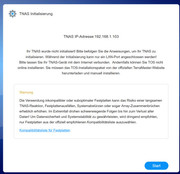 After many hours of trying, I have decided to stick with version TOS-6.0.794, if I can get it to work. I want to keep my data.
Since installation on a new, empty hard drive did not work either, I assume there is a bug.
Thanks for your help.
My F2-422 is running again under TOS-6.0.794. All the data seems to be there.
I have an update.log file that shows some errors in the update process. Send to [email protected] and [email protected]
Re: TOS 7 Beta Is Available for Testing
Posted: 29 Dec 2025, 03:19
by eulero
ColaChen wrote: ↑28 Dec 2025, 11:21
Did you click on automatic permission conversion after the update? Please go to Control Panel - Applications to check the application permissions.
Yes I did
Re: TOS 7 Beta Is Available for Testing
Posted: 29 Dec 2025, 13:23
by TMroy
Obviously, your tnas failed to update. I can't tell why this happened now, we will try to figure out and let you know. Do you mind having a remote session?
Re: TOS 7 Beta Is Available for Testing
Posted: 29 Dec 2025, 16:39
by k.wechselberger
TMroy wrote: ↑29 Dec 2025, 13:23
I will give you all the information you need as far as I can.
I would prefer not to have a remote session, as the data belongs to various people on the system. I would first have to export all the data and empty the system, which I would not be comfortable with due to the effort involved.
apt update resulted in a large number of update files. Should I (can I) do this?
Code: Select all
apt update
Hit:1 http://archive.ubuntu.com/ubuntu jammy InRelease
Hit:2 http://archive.ubuntu.com/ubuntu jammy-updates InRelease
Hit:3 http://archive.ubuntu.com/ubuntu jammy-backports InRelease
Hit:4 http://security.ubuntu.com/ubuntu jammy-security InRelease
Reading package lists... Done
Building dependency tree... Done
Reading state information... Done
261 packages can be upgraded. Run 'apt list --upgradable' to see them.

 apt list --upgradable
Listing... Done
alsa-ucm-conf/jammy-updates 1.2.6.3-1ubuntu1.12 all [upgradable from: 1.2.6.3-1ubuntu1.9]
apache2-utils/jammy-updates,jammy-security 2.4.52-1ubuntu4.16 amd64 [upgradable from: 2.4.52-1ubuntu4.7]
apt-transport-https/jammy-updates 2.4.14 all [upgradable from: 2.4.11]
apt-utils/jammy-updates 2.4.14 amd64 [upgradable from: 2.4.11]
apt/jammy-updates 2.4.14 amd64 [upgradable from: 2.4.11]
avahi-daemon/jammy-updates 0.8-5ubuntu5.3 amd64 [upgradable from: 0.8-5ubuntu5.2]
avahi-utils/jammy-updates 0.8-5ubuntu5.3 amd64 [upgradable from: 0.8-5ubuntu5.2]
bash/jammy-updates,jammy-security 5.1-6ubuntu1.1 amd64 [upgradable from: 5.1-6ubuntu1]
bind9-dnsutils/jammy-updates,jammy-security 1:9.18.39-0ubuntu0.22.04.2 amd64 [upgradable from: 1:9.18.18-0ubuntu0.22.04.1]
bind9-host/jammy-updates,jammy-security 1:9.18.39-0ubuntu0.22.04.2 amd64 [upgradable from: 1:9.18.18-0ubuntu0.22.04.1]
bind9-libs/jammy-updates,jammy-security 1:9.18.39-0ubuntu0.22.04.2 amd64 [upgradable from: 1:9.18.18-0ubuntu0.22.04.1]
bind9-utils/jammy-updates,jammy-security 1:9.18.39-0ubuntu0.22.04.2 amd64 [upgradable from: 1:9.18.18-0ubuntu0.22.04.1]
bind9/jammy-updates,jammy-security 1:9.18.39-0ubuntu0.22.04.2 amd64 [upgradable from: 1:9.18.18-0ubuntu0.22.04.1]
binutils-common/jammy-updates,jammy-security 2.38-4ubuntu2.12 amd64 [upgradable from: 2.38-4ubuntu2.4]
binutils-x86-64-linux-gnu/jammy-updates,jammy-security 2.38-4ubuntu2.12 amd64 [upgradable from: 2.38-4ubuntu2.4]
binutils/jammy-updates,jammy-security 2.38-4ubuntu2.12 amd64 [upgradable from: 2.38-4ubuntu2.4]
...
Re: TOS 7 Beta Is Available for Testing
Posted: 29 Dec 2025, 18:27
by CursaYang
You can perform these updates, but this is usually not related to system installation failures.
Re: TOS 7 Beta Is Available for Testing
Posted: 29 Dec 2025, 22:29
by David83
Hello,
I am having issues with TOS 7 in VMS.
I am not able to set any boot medium for a virtual machine. It is not possible to select a DVD ISO or any other bootable media.
Additionally, importing OVA files does not work. During the import process, no storage is shown under the storage selection, so the import cannot be completed.
Because of these issues, I am currently unable to install or deploy virtual machines.
Please let me know how this can be resolved or if this is a known issue with TOS 7 and VMS.
Thank you for your support.
Best regards
David
Re: TOS 7 Beta Is Available for Testing
Posted: 29 Dec 2025, 22:48
by CursaYang
David83 wrote: ↑29 Dec 2025, 22:29
Hello,
I am having issues with TOS 7 in VMS.
I am not able to set any boot medium for a virtual machine. It is not possible to select a DVD ISO or any other bootable media.
Additionally, importing OVA files does not work. During the import process, no storage is shown under the storage selection, so the import cannot be completed.
Because of these issues, I am currently unable to install or deploy virtual machines.
Please let me know how this can be resolved or if this is a known issue with TOS 7 and VMS.
Thank you for your support.
Best regards
David
It is a known issue that you cannot select storage space when importing a virtual machine. We have fixed it, please wait for the new version to be released.
Re: TOS 7 Beta Is Available for Testing
Posted: 29 Dec 2025, 22:51
by David83
CursaYang wrote: ↑29 Dec 2025, 22:48
David83 wrote: ↑29 Dec 2025, 22:29
Hello,
I am having issues with TOS 7 in VMS.
I am not able to set any boot medium for a virtual machine. It is not possible to select a DVD ISO or any other bootable media.
Additionally, importing OVA files does not work. During the import process, no storage is shown under the storage selection, so the import cannot be completed.
Because of these issues, I am currently unable to install or deploy virtual machines.
Please let me know how this can be resolved or if this is a known issue with TOS 7 and VMS.
Thank you for your support.
Best regards
David
It is a known issue that you cannot select storage space when importing a virtual machine. We have fixed it, please wait for the new version to be released.
Is there currently any way to use a boot medium (for example a DVD ISO) to manually create and install a virtual machine in VMS?
Since importing OVA files is not working at the moment, I would like to know if there is an alternative method to create a VM manually using a bootable medium.
Thank you in advance for your help.
Best regards
David
Re: TOS 7 Beta Is Available for Testing
Posted: 29 Dec 2025, 23:00
by k.wechselberger
I looked at the updatexx.log file. I noticed the error message
Code: Select all
VerifyUpdatePackage failed: cannot open INFO (...) no such file or directory
I then extracted the file “TOS_X642.0_Update_7.0.0299_00446_2512081654.bz2” with the command
Code: Select all
mkdir -p ./TOS7
gunzip -c TOS_X642.0_Update_7.0.0299_00446_2512081654.bz2 | tar -x -C /TOS7"
A file named “INFO” was not present. I cannot say whether this prevented the update.
Re: TOS 7 Beta Is Available for Testing
Posted: 30 Dec 2025, 05:15
by jdubya
jdubya wrote: ↑27 Dec 2025, 11:27
I just upgraded to 7.0.0299 that just had some shared (SMB) folders. I then upgraded to latest 7.0.0309.
I then installed Plex and configured it to point to Movie and Photo folders.
However I can't see any content.
I checked shared folder permissions - I see a "plex" user but when I try to assign read/write or read only permissions, the screen flashes quickly after pressing the apply button, but nothing happens. When I click the X to close the window, I get a warning that changes weren't applied. When I click the Save button, the window closes - but - it does not save the changes.
Also tried rebooting and trying again but got the same results.
Please advise.
Well, I gots no response but figured it out and am posting here in case anyone runs into the same problem. I had to go into Plex, click on the ellipsis (actions) for each library, manage library, edit, and simply choose 'Save Changes' - even though I didn't make any changes. Boom, libraries started populating. May not be a TOS7 bug per se, but a bug nonetheless.