Page 2 of 2
Re: [Help] Active-Directory domain join doesn't work
Posted: 10 Oct 2025, 17:37
by TMzethar
Currently monitoring and attempting to reproduce the issue.
You may schedule a remote troubleshooting session via the official website's Live Chat when you have time.
Re: [Help] Active-Directory domain join doesn't work
Posted: 16 Oct 2025, 17:36
by cmicallef
In continuation to my previous comment, to get it working, I retried for several times to join the domain and randlomly it joins the domain and keeps the setting, after that all is working as regards Domain Users\Groups permissions, although I had to reset the permissions per share etc. so looks like a bug, when it comes to check for SMB workgroup\domain!
Re: [Help] Active-Directory domain join doesn't work
Posted: 26 Oct 2025, 15:00
by bitronic
I am having this exact same problem, SMB Work Geoup set incorrectly!". I have tried everything and I can't fix it. I tried
On DC,:
server min protocol = NT1
server schannel = No
ntlm auth = ntlmv1-permitted
Doesn't work.
Re: [Help] Active-Directory domain join doesn't work
Posted: 26 Oct 2025, 17:34
by TMtina
What version of TOS are you currently using?
You can schedule a remote assistance appointment through the Live Chat on the official website. Our engineers will provide you with technical support.
Re: [Help] Active-Directory domain join doesn't work
Posted: 08 Nov 2025, 07:56
by SomeGuyInCalifornia
Update
I finally got it working. Here's what I did:
- Download a copy of Windows Server 2022 Evaluation (https://www.microsoft.com/en-us/evalcen ... erver-2022)
- Installed that in a VM and set the hostname to DC1 (my Samba domain controller is named DC0)
- Set a static IP address adjacent to my DC0 and joined the Samba domain
- Installed DNS and AD Directory Services roles and features and promoted to Domain Controller
Did some testing and verification that things were working.
- On the TerraMaster NAS, I went to Control Panel > Domain/LDAP
- Went to the Domain tab (LDAP still just wouldn't work) and added:
Domain: domain.tld
DNS Server: IP of my Server 2022 DC
Username: Account with domain-join privileges
Password: Account Password
Did it work? Yes
Am I happy with it? No
I got frequent lookup failures and the schema for Samba AD is funky. I know I could work around it, but it just didn't feel comfortable with it.
Issue #1: Windows Server 2022 is a 6-month evaluation. There's a command I'd need to run (slmgr.exe /rearm) before the eval license expires, which extends it another 6 months, up to 6 times.
Issue #2: The schema in Samba AD sets user object CNs to their display names, including spaces. On at least one critical app, this created problems with user account names not matching. This behaviour means I need to configure apps to look up samAccountName and be super careful to set the displayname in Active Directory to the account name. That also means no First Last display names, they'll just be their usernames. :-/
I was really hoping for Samba AD to bail me out of M$' clutches, but it won't for what I'm doing.
I hope this helps somebody out there.
SomeGuyInCalifornia wrote: ↑25 Sep 2025, 11:57
I'm having the same issue on a similar model. I have a domain controller running Samba-AD-DC on a Debian server. Other Windows and Linux hosts can join the domain, but my F4-424Pro cannot join the domain. The system is running version 6.0.783, has a static IP on the same subnet as the DC, and has the DNS server set as the IP of the DC.
In the File Services control panel, I switched the minimum version to SMB2, but the error message continues to display "SMB workgroup set incorrectly". I provided screenshots, but blurred out the domain and workgroup names, which are the same. I've also verified that the username and password combination are good, and used them on other systems. I also tried the domain-administrator account, but it failed with the same error, too.
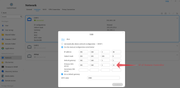
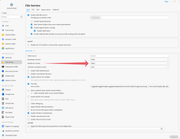
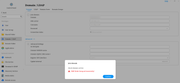
When I SSH into the NAS and run the smbclient command to list:
Code: Select all
# smbclient -L dc0.domain.local -N
Anonymous login successful

	Sharename       Type      Comment
	---------       ----      -------
	sysvol          Disk
	netlogon        Disk
	IPC$            IPC       IPC Service (Samba 4.22.4-Debian-4.22.4+dfsg-1~deb13u1)
Reconnecting with SMB1 for workgroup listing.
smbXcli_negprot_smb1_done: No compatible protocol selected by server.
protocol negotiation failed: NT_STATUS_INVALID_NETWORK_RESPONSE
Unable to connect with SMB1 -- no workgroup available
Re: [Help] Active-Directory domain join doesn't work
Posted: 19 Jan 2026, 21:16
by RyanYang
Hi, as we cannot see your complete email address when receiving your message, our reply failed.
Could you try sending an email to our support inbox instead?
You may schedule a remote troubleshooting session via the official website's Live Chat when you have time.