Page 2 of 5
Re: [Help] Scheduled Reboot for F4-424Pro
Posted: 30 Jul 2025, 19:55
by Canuck
Thank you for the additional verification. However, this does not explain the original issue I posted about which has nothing to do with UPS depletion:
When connected to a UPS (including USB status connection) with "Enable UPS Support" selected, a scheduled "Power On" does not function. For example, after a scheduled "Power Off" event, the unit shuts down. However, a "Power On" scheduled for 15 minutes later does not execute. During this time, power continues to be delivered through normal AC power.
When "Enable UPS Support" is deselected (and the unit is still connected to the UPS with AC power), the above scenario functions as expected, with the unit powering on per the scheduled "Power On" event.
Re: [Help] Scheduled Reboot for F4-424Pro
Posted: 30 Jul 2025, 21:36
by Canuck
Further to my post above, I tested switching to UPS battery with TOS option "Enable UPS Support" disabled. When the UPS battery was depleted, the Terra-Master unit powered down. When AC power was reapplied at the UPS, the Terra-Master unit automatically started as expected.
So, TOS functions "Power on schedule" and "Auto power on", work as expected when connected to a UPS as long as the TOS option "Enable UPS support" is not selected. If "Enable UPS support" is selected, it breaks these functions.
Re: [Help] Scheduled Reboot for F4-424Pro
Posted: 31 Jul 2025, 17:54
by TMzethar
Under normal UPS power supply conditions, we were unable to reproduce the issue of the equipment failing to start as planned in our laboratory. We will continue to monitor and verify the situation.
Re: [Help] Scheduled Reboot for F4-424Pro
Posted: 31 Jul 2025, 18:44
by Gremlin
Canuck wrote: ↑30 Jul 2025, 21:36
So, TOS functions "Power on schedule" and "Auto power on", work as expected when connected to a UPS as long as the TOS option "Enable UPS support" is not selected. If "Enable UPS support" is selected, it breaks these functions.
My limited testing would confirm these observations, regardless of what is found "in the lab". Note that in my case there is no USB connection between the UPS and NAS. I don't know if that is significant.
Re: [Help] Scheduled Reboot for F4-424Pro
Posted: 31 Jul 2025, 20:13
by Canuck
Thanks @Gremlin for your ongoing support on this issue.
@Terra-Master - so you have two users seeing the same thing along with @Gremlin's other UPS problems. Hopefully you can do more than "monitor"...
Re: [Help] Scheduled Reboot for F4-424Pro
Posted: 01 Aug 2025, 09:21
by TMjack
Regarding the issue you mentioned, we have already assigned a dedicated person to further investigate it. Please rest assured that we will neither overlook nor neglect this matter. Additionally, we kindly ask for your assistance: Could you enable debug mode in the TOS system and send the logs after the issue occurs to our support email?
Re: [Help] Scheduled Reboot for F4-424Pro
Posted: 04 Aug 2025, 05:17
by Canuck
Hi there. I’m sorry for the delay. I’m trying to collect the debug log but (of course) after a couple of weeks reproducing the issue I can’t. That is, the scheduled “start up” seems now to be working.
I have to head out of town for a week so don’t want to test remotely in case I can’t restart. I’ll continue testing in a week and will advise. Thanks for your assistance.
Re: [Help] Scheduled Reboot for F4-424Pro
Posted: 04 Aug 2025, 16:16
by magnus4ever
As a workaround,
I just used created a scheduled task and under "custom command" entered this line:
works like a charm, my TNAS consistently reboots once a week.
Re: [Help] Scheduled Reboot for F4-424Pro
Posted: 06 Aug 2025, 00:45
by Canuck
Yep and thanks. Definitely that would work. However, doesn’t help with the restart after power failure use case which was also failing and may be related.
Re: [Help] Scheduled Reboot for F4-424Pro
Posted: 20 Aug 2025, 22:22
by Canuck
OK. I've been able to replicate the following test case with the failure to restart.
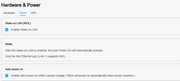
1. Turn on "Enable auto power on" per screenshot below.
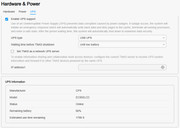
2. Turn on UPS support per screenshot below.
3. Cut power.
4. With some capacity left in the UPS, TM F4-424Pro (the "Unit") shuts down per policy.
5. Restore power to UPS (with some capacity remaining).
6. The Unit does not start automatically, even waiting till UPS is >50% charged.
Debug log available at:
https://www.dropbox.com/scl/fi/cw79kbkw ... rtime&dl=1
Obviously, not being able to restart after a power failure using a UPS is highly problematic.